


THRIVE SAFETY
Accident Investigations

Accidents Are Hard Enough—Tracking Them Shouldn’t Be
When something goes wrong, the last thing your team needs is a messy follow-up process. But here’s what usually happens:
Reports get stuck in inboxes
Root cause gets rushed—or skipped
No one’s sure if corrective actions were actually done
OSHA logs are a scramble at the end of the year
Thrive gives you one place to manage every incident—clearly, quickly, and completely.
Proven Results
Real manufacturers. Real numbers.


Thrive Accident Investigations
Instant Documentation – Log injuries or incidents on the spot
Automatic Notifications – Key stakeholders are alerted right away
Root Cause Analysis – Built-in tools to investigate what actually happened
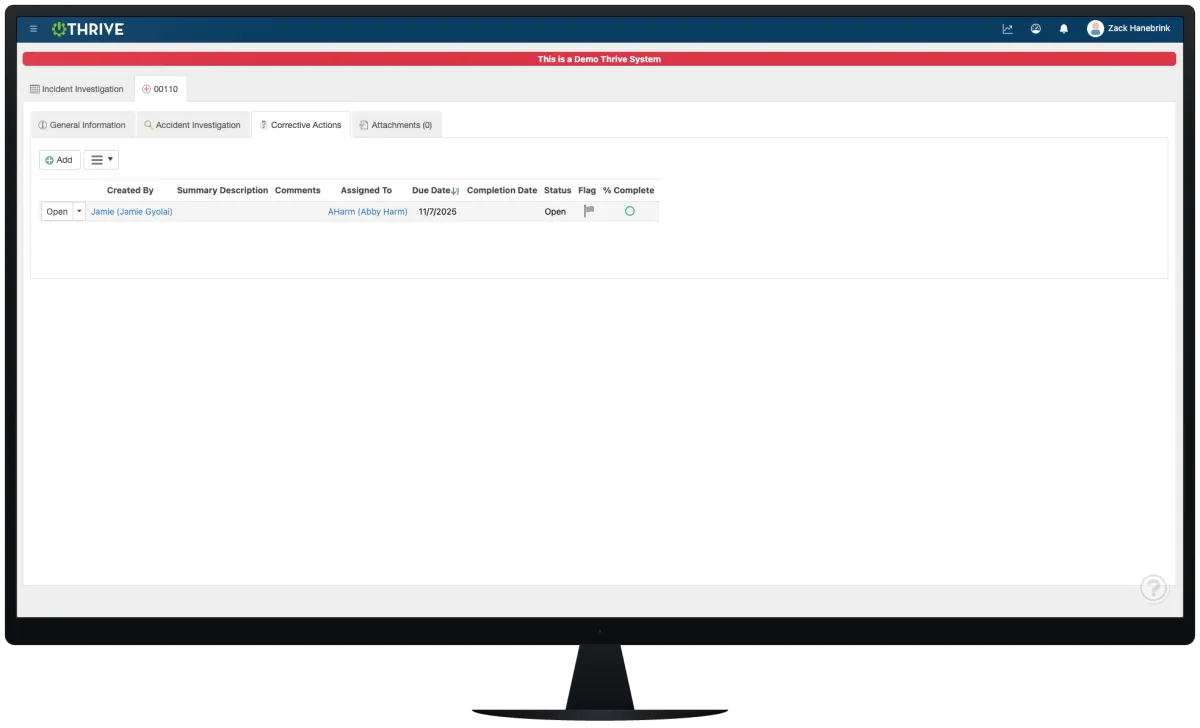
Corrective Action Tracking – Assign follow-ups and track to closure
Attach Photos + Evidence – Show what happened, not just tell
Dashboards + OSHA Logs – Automatically populate reports and OSHA 300 logs
No spreadsheets. No chasing people down. Just one clean, mobile-friendly system that keeps you covered.
Not Sure If the ROI Is There? Read This First.
If you're still weighing whether a PM overhaul is worth the effort, this is the most useful thing you can read.
ASSA ABLOY came in with the same challenges most maintenance teams face — reactive fire-fighting, manual tracking, and no real visibility into what was overdue. Within two weeks of going live with Thrive, past-due work orders dropped 66% and admin time went from 6 hours to 5 minutes.
Real plant. Real numbers. No fluff.
Built for Safety and Speed

Paper trails don’t prevent accidents—action does. Thrive helps you:
Get the full picture faster
Prevent repeat incidents
Show compliance without digging through files
Document every step, automatically
Thrive Pricing
We think pricing should be simple, straightforward and right out in the open. If you have questions, just ask us.
Thrive Module Hosted
$600
monthly
Cloud Hosted
ONE Module
Unlimited Users
All updates/version upgrades
All Thrive features/tools included
On-site/virtual training – OPTIONAL (quote)
Data transfer/conversion – OPTIONAL (quote)
ERP integration – OPTIONAL (quote)
Annual Support Contract included in Thrive Hosted price
Thrive Connected Hosted
$950
monthly, billed annually
Cloud Hosted
ALL Modules Included
Unlimited Users
All updates/version upgrades
All Thrive features/tools included
On-site/virtual training – OPTIONAL (quote)
Data transfer/conversion – OPTIONAL (quote)
ERP integration – OPTIONAL (quote)
Annual Support Contract included in Thrive Hosted price
Thrive
On-Premise
$40,000
one-time
ALL Modules Included
On-Premise Install
Unlimited Users
All updates/version upgrades
All Thrive features/tools included
On-site/virtual training – OPTIONAL (quote)
Data transfer/conversion – OPTIONAL (quote)
ERP integration – OPTIONAL (quote)
Annual Support Contract – 15% of current Thrive price
Thrive vs Manual or Email-Based Incident Tracking
| Feature | Thrive | Manual / Email Systems |
|---|---|---|
| Incident documentation | ✅ Instant + digital | ❌ Delayed or missing details |
| Stakeholder alerts | ✅ Auto-notified | ❌ Someone has to forward it |
| Root cause analysis | ✅ Structured tools built-in | ❌ Usually skipped or shallow |
| Corrective action tracking | ✅ Assigned, tracked, logged | ❌ No visibility or follow-up |
| OSHA logs & reporting | ✅ Auto-generated | ❌ End-of-year scramble |
Frequently Asked Questions
What happens when someone reports an injury?
Thrive notifies the right people instantly and starts the incident record.
Can I track corrective actions tied to the incident?
Yes. You can assign tasks, set due dates, and verify completion—all in the same system.
Can I add photos or diagrams to an investigation?
Absolutely. Upload files, images, or notes from the field.
Does this help with OSHA 300 logs?
Big time. Thrive logs your data in real-time and compiles your OSHA logs for you.
Companies BIG and Small We Partner With:





















Get Demo of Thrive
"Our IT loved working with Thrive!"
"- Beth Wilkerson, Compliance Manager, Specialty Manufacturing

"We have the real-time data for effective daily problem-solving"
- Pete Barboni, Intek Plastics
From Manual Chaos to Connected Excellence — How ASSA ABLOY Scaled Lean Manufacturing with Thrive
"We went from sticky notes and walking back and forth… to seeing everything on one screen." — Serge, Engineering & CI Lead
Norton Modernization
"Easy integration with our systems" - Antonio Ancrum




LEAN TECHNOLOGIES
427 Main Street
Pella, IA 50219
866-LEAN-TEC (866 532-6832)
For Technical Support: [email protected]
ABOUT US | CONTACT US | VIDEOS | THRIVE RESOURCES | FAQ | CAREERS | BLOG | PRIVACY POLICY | TERMS OF USE
© Copyright 2026. Thrive by Lean Technologies. All rights reserved.

