


THRIVE MAINTENANCE
Equipment Asset Tracking
Stop Wasting Time Searching for Info
Can’t find the last time that machine failed? No idea where the manual is? Team wasting 20 minutes flipping through binders for a part number? You’re not alone.
Most plants still treat asset data like an afterthought—scattered across emails, paper logs, and tribal knowledge.
Thrive centralizes it. So your team can make faster decisions, train better, and finally use your data like a weapon.
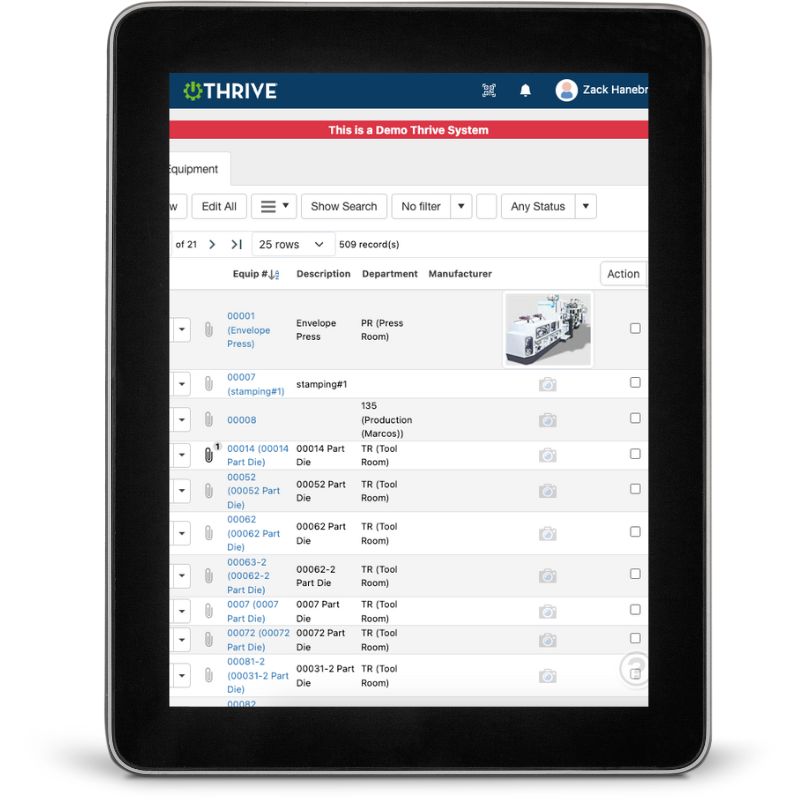
Thrive Equipment Tracking
Equipment Profiles - Everything in one place: manuals, photos, links, location, vendor info, and more.
Work Order History - Instant access to past maintenance, repairs, and downtime—organized by asset.
Real-Time Data - Know what’s running, what’s broken, and what’s bleeding dollars.
Risk-Based Summaries - See top offenders by downtime hours, failure frequency, or total cost.
Get Demo of Thrive
What’s Included in Asset Tracking
Asset History
Complete log of work orders, downtime, and PMs tied to each machine
Manuals & Attachments
Upload and access documents, images, and troubleshooting info
Quick Access
Search by asset tag, name, or scan a QR to instantly view records
Risk Level Summaries
See top problem assets based on cost, hours, and frequency
Mobile Access
All asset info is available on the floor—no binders needed
Built for Busy Teams

Your team isn’t going to stop and “document everything” unless it’s quick, visible, and useful. That’s why Thrive makes it dead simple:
Add photos, upload manuals, or record downtime—all in seconds
Punch in/out of work orders linked to specific equipment
Scan a code to pull up everything tied to that asset
Use built-in filters to sort by risk, cost, or downtime hours
Thrive vs Traditional Tracking
| Feature | Thrive | Traditional Asset Tracking |
|---|---|---|
| Centralized info | ✅ All-in-one asset profile | ❌ Scattered across files, inboxes, and cabinets |
| Maintenance history | ✅ Filterable, searchable, structured | ❌ Buried in paper or unlinked systems |
| Downtime summaries | ✅ See top offenders fast | ❌ Hard to calculate, often missed |
| AI-readiness | ✅ Structured, connected data | ❌ Unusable for predictive tools |
| Ease of use | ✅ Scan-and-go mobile access | ❌ “Ask Carl where the binder is” |
Frequently Asked Questions
Can I link photos and manuals to each asset?
Yes. Upload any attachments (PDFs, images, videos, etc.) and view them directly from the asset profile.
How is risk level determined?
Thrive summarizes each asset by downtime hours, number of work orders, cost and frequency - so you can set thresholds and sort accordingly.
Is this part of the Maintenance module?
Yes. Thrive Maintenance includes full asset tracking out of the box. It connects your work orders, PMs, downtime, and inventory all back to your equipment.
How does this help with AI or predictive tools?
You can’t predict failure without clean historical data. Thrive structures your records so they’re usable by AI or machine learning tools when you're ready to plug them in.
Companies big and small we partner with





Get Demo of Thrive
"Our IT loved working with Thrive!"
"- Beth Wilkerson, Compliance Manager, Specialty Manufacturing

"We have the real-time data for effective daily problem-solving"
- Pete Barboni, Intek Plastics
From Manual Chaos to Connected Excellence — How ASSA ABLOY Scaled Lean Manufacturing with Thrive
"We went from sticky notes and walking back and forth… to seeing everything on one screen." — Sergio, Engineering & CI Lead
Norton Modernization
"Easy integration with our systems" - Antonio Ancrum




LEAN TECHNOLOGIES
427 Main Street
Pella, IA 50219
866-LEAN-TEC (866 532-6832)
For Technical Support: [email protected]
ABOUT US | CONTACT US | VIDEOS | THRIVE RESOURCES | FAQ | CAREERS | BLOG | PRIVACY POLICY | TERMS OF USE
© Copyright 2026. Thrive by Lean Technologies. All rights reserved.

