


Thrive Continuous Improvement
Production Tracking Goal Boards
Your Line Can’t Improve If It’s in the Dark
Let’s be honest—most shop floors are flying blind.
Nobody knows if the line is hitting target or falling behind
Hourly production gets tracked on a whiteboard—or not at all
No clarity on why downtime happened
Quality issues get caught too late
Everyone’s reacting instead of improving
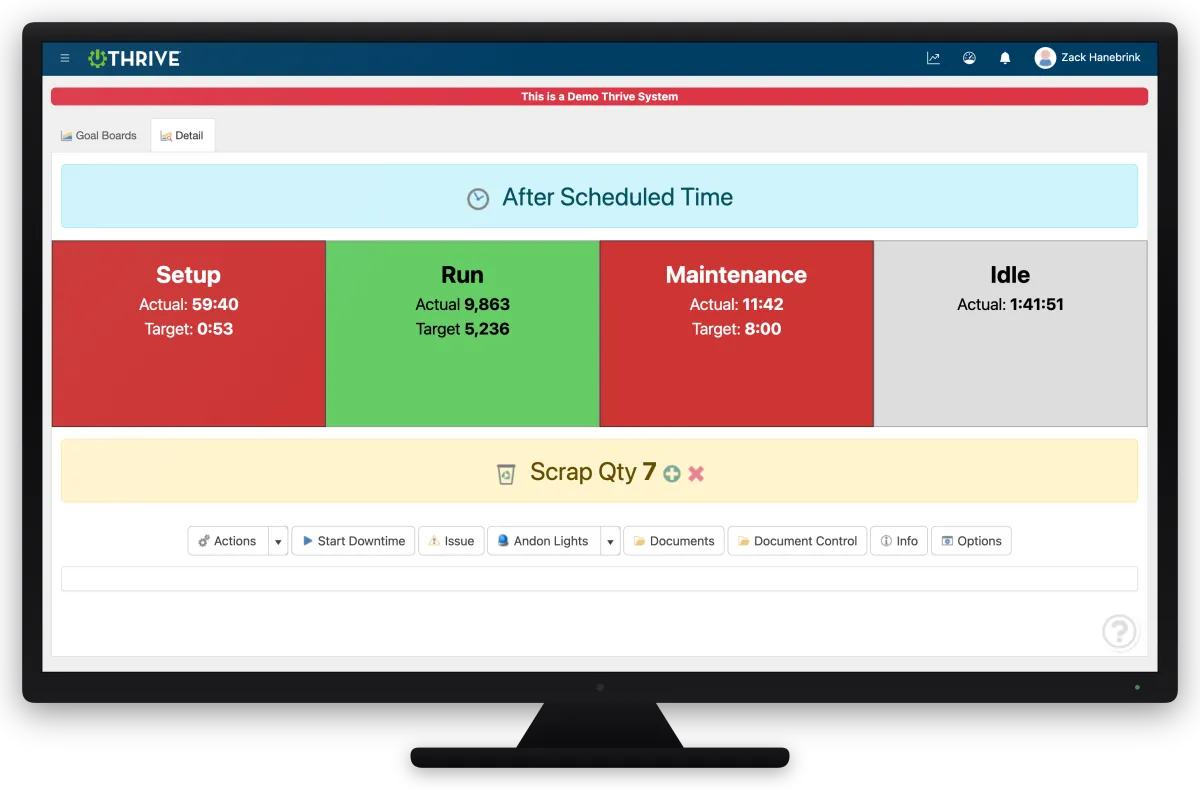
Thrive gives your team live, visual feedback on performance, downtime, and goals—right at the point of use.
Proven Results
Real manufacturers. Real numbers.


Thrive Performance / Goal Boards
Track to Takt Time – Know in real time if you’re ahead, behind, or on pace
Visualize OEE – See availability, performance, and quality as it happens
Downtime Reasons – Capture root causes—not just totals
Defect Tracking – Log and categorize quality issues by type
Virtual Andon – Instantly flag issues to maintenance or leads
Accessible Anywhere – View from the floor or your phone at home
Point-of-Use Docs – SOPs and guides right where the team needs them
When your team sees the numbers, they start owning the numbers.
Not Sure If the ROI Is There? Read This First.
If you're still weighing whether a PM overhaul is worth the effort, this is the most useful thing you can read.
ASSA ABLOY came in with the same challenges most maintenance teams face — reactive fire-fighting, manual tracking, and no real visibility into what was overdue. Within two weeks of going live with Thrive, past-due work orders dropped 66% and admin time went from 6 hours to 5 minutes.
Real plant. Real numbers. No fluff.
Go From Reactive to Ready

This isn’t just data. It’s clarity.
Clarity for operators
Clarity for supervisors
Clarity for leadership
When the whole team sees the same numbers—improvement becomes the standard.
Thrive Pricing
We think pricing should be simple, straightforward and right out in the open. If you have questions, just ask us.
Thrive Module Hosted
$600
monthly
Cloud Hosted
ONE Module
Unlimited Users
All updates/version upgrades
All Thrive features/tools included
On-site/virtual training – OPTIONAL (quote)
Data transfer/conversion – OPTIONAL (quote)
ERP integration – OPTIONAL (quote)
Annual Support Contract included in Thrive Hosted price
Thrive Connected Hosted
$950
monthly, billed annually
Cloud Hosted
ALL Modules Included
Unlimited Users
All updates/version upgrades
All Thrive features/tools included
On-site/virtual training – OPTIONAL (quote)
Data transfer/conversion – OPTIONAL (quote)
ERP integration – OPTIONAL (quote)
Annual Support Contract included in Thrive Hosted price
Thrive
On-Premise
$40,000
one-time
ALL Modules Included
On-Premise Install
Unlimited Users
All updates/version upgrades
All Thrive features/tools included
On-site/virtual training – OPTIONAL (quote)
Data transfer/conversion – OPTIONAL (quote)
ERP integration – OPTIONAL (quote)
Annual Support Contract – 15% of current Thrive price
Thrive vs Whiteboards and Guesswork
| Feature | Thrive | Manual / Paper-Based Tracking |
|---|---|---|
| Goal tracking | ✅ Live to takt time | ❌ Manual hour-by-hour count |
| OEE visibility | ✅ Real-time dashboards | ❌ No OEE or lagging calcs |
| Downtime tracking | ✅ Reasons + timestamps | ❌ Just minutes or tallies |
| Defect logging | ✅ Categorized in system | ❌ Scribbled in notebooks |
| Team visibility | ✅ Posted on floor or remote | ❌ Whiteboard or siloed |
| Docs at point of use | ✅ SOPs, guides, etc. | ❌ Separate binder (if found) |
Frequently Asked Questions
Can I display Thrive boards on TVs or large monitors?
Yes—many plants run these boards on screens at each line or cell.
Do I need special hardware to track OEE?
No sensors required. Thrive works with simple input from your team.
Can I see this data remotely?
Yes. View your line performance from home, the office, or the beach (if you’re lucky).
Does this replace our whiteboard?
100%. And your whiteboard never showed OEE or auto-saved data.
Companies BIG and Small We Partner With:




















Get Demo of Thrive
"Our IT loved working with Thrive!"
"- Beth Wilkerson, Compliance Manager, Specialty Manufacturing

"We have the real-time data for effective daily problem-solving"
- Pete Barboni, Intek Plastics
From Manual Chaos to Connected Excellence — How ASSA ABLOY Scaled Lean Manufacturing with Thrive
"We went from sticky notes and walking back and forth… to seeing everything on one screen." — Serge, Engineering & CI Lead
Norton Modernization
"Easy integration with our systems" - Antonio Ancrum



LEAN TECHNOLOGIES
427 Main Street
Pella, IA 50219
866-LEAN-TEC (866 532-6832)
For Technical Support: [email protected]
ABOUT US | CONTACT US | VIDEOS | THRIVE RESOURCES | FAQ | CAREERS | BLOG | PRIVACY POLICY | TERMS OF USE
© Copyright 2026. Thrive by Lean Technologies. All rights reserved.

