


THRIVE MAINTENANCE
Work Order History + Asset Records
Can't Fix What You Can’t See
How do you justify a replacement—or prove a fix didn't stick—without history? You can't. But most teams are stuck with:
Zero documentation of past fixes
No proof for warranty claims or RCA
Decisions made on memory or gut instinct
Thrive gives you full visibility of every repair, replacement, and inspection—automatically logged and easy to search.
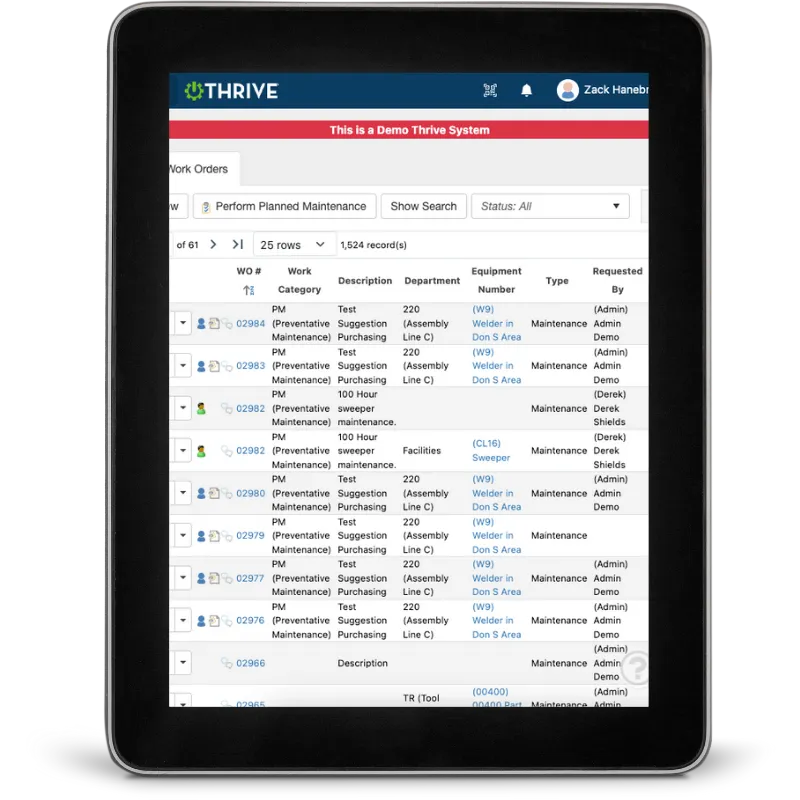
Thrive Work Order History + Asset Records
Log Every Fix – Track what was done, by who, when, and how long it took
Attach Notes + Photos – Add context, show the issue, and document the result
Link to Assets – Every job rolls up to the equipment that caused it
Filter by Date, Issue, Downtime – Find patterns fast
Justify Repairs or Replacements – Show cost history and failure frequency
Train from Real Examples – Use past jobs to teach new techs
Stop losing tribal knowledge—start making data-backed decisions.
Get Demo of Thrive
What’s Included in Work Order History
Job Logs
Capture labor, tasks, parts, and time per job
Asset History
Roll up all activity to the machine
Photo Documentation
Show what was fixed (or what broke)
Search + Filter
Find jobs by asset, tech, failure type, and more
Cost History
See how much each machine is really costing you
Trend Tracking
Spot repeat offenders and chronic issues fast
Built for Real-World Decisions

You don’t need a fancy dashboard—you need proof:
What’s been done
How often it’s failing
Whether it’s time to repair or replace
Thrive gives you the data to defend your maintenance calls and budget. No more assumptions. No more lost history.
Thrive vs Paper or Patchy Digital Records
| Feature | Thrive | Paper / Incomplete Systems |
|---|---|---|
| Work order history | ✅ Logged automatically | ❌ Spotty or missing |
| Asset records | ✅ Linked and structured | ❌ Scattered or siloed |
| Photos and notes | ✅ Attach on the spot | ❌ Rarely captured |
| Searchability | ✅ Filter by asset, issue, cost | ❌ Must dig through files |
| Decision-making | ✅ Backed by trends and history | ❌ Based on memory or guesswork |
Frequently Asked Questions
Do techs need to do extra work to log jobs?
No. Everything is captured as part of completing the work order—no double entry.
Can I see job history for a specific asset?
Yes. Every job is tied to its equipment automatically.
Can I track photos and notes per job?
Definitely. Upload photos, add comments, and keep it all stored in one place.
Is the data searchable?
100%. Filter by asset, issue, downtime, cost, date range, and more.
Companies big and small we partner with





Get Demo of Thrive
"Our IT loved working with Thrive!"
"- Beth Wilkerson, Compliance Manager, Specialty Manufacturing

"We have the real-time data for effective daily problem-solving"
- Pete Barboni, Intek Plastics
From Manual Chaos to Connected Excellence — How ASSA ABLOY Scaled Lean Manufacturing with Thrive
"We went from sticky notes and walking back and forth… to seeing everything on one screen." — Sergio, Engineering & CI Lead
Norton Modernization
"Easy integration with our systems" - Antonio Ancrum




LEAN TECHNOLOGIES
427 Main Street
Pella, IA 50219
866-LEAN-TEC (866 532-6832)
For Technical Support: [email protected]
ABOUT US | CONTACT US | VIDEOS | THRIVE RESOURCES | FAQ | CAREERS | BLOG | PRIVACY POLICY | TERMS OF USE
© Copyright 2026. Thrive by Lean Technologies. All rights reserved.

