


THRIVE MAINTENANCE
Workflow Tracking for Work Requests & Preventive Maintenance
Stop Losing Work in the System
If your workflow is hard to use, your team won’t use it. Work requests get buried. PMs get missed. No one knows what’s open, what’s late, or what actually matters today.
Planning becomes reactive instead of intentional—and visibility disappears.
Thrive simplifies maintenance workflows, work moves forward instead of getting stuck.
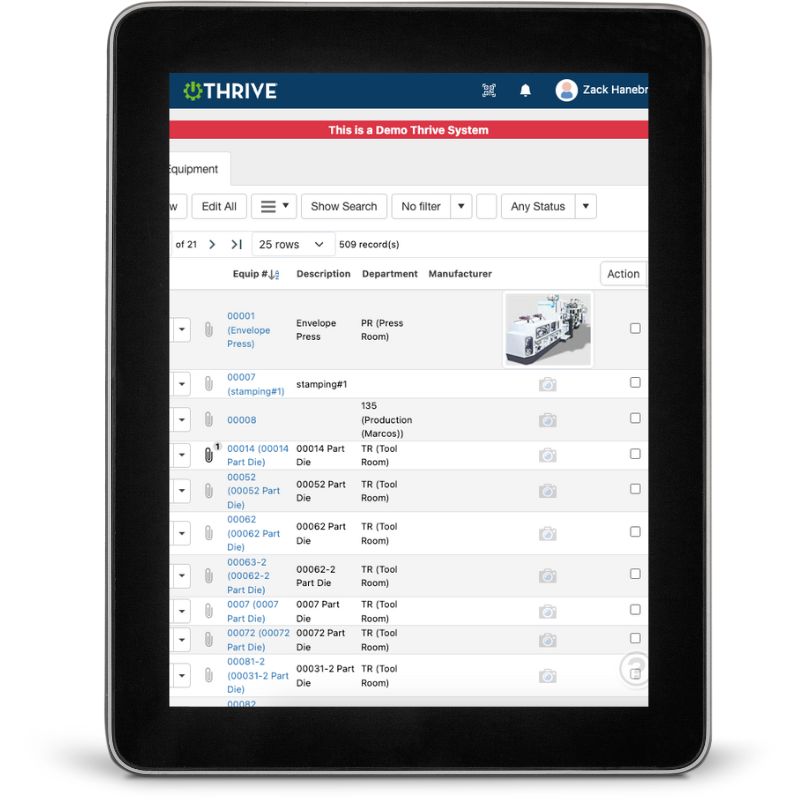
Thrive Equipment Tracking
Work Requests – Log issues instantly with buttons or QR codes
Preventive Maintenance – Schedule, assign, and track PMs with clarity
Live Status Updates – Know what’s open, in progress, or overdue
Labor Tracking – Punch in and out of jobs for real-time visibility
Mobile Access – Submit, update, and complete work from the floor
No clutter. No confusion. Just clean, usable workflows.
Get Demo of Thrive
What’s Included in Workflow Tracking
Quick Work Requests
Submit requests with one click or QR code—no login friction
PM Scheduling
Assign, track, and adjust PMs with full visibility
Labor Punch In/Out
Track time per job automatically
Real-Time Status
Instantly see what’s open, assigned, or overdue
Mobile-First Execution
Complete work from a phone or tablet
Priority Visibility
Sort work by urgency, asset, or status
Built for Busy Teams

Your team doesn’t have time to fight the system just to get work done. That’s why Thrive keeps workflows fast and simple:
Submit work requests in seconds
Scan a QR code at the machine to log issues or PMs
Punch in and out without breaking flow
See exactly what’s open and what’s next
Close work without going back to a desktop
When workflows are easy, work actually gets completed.
Thrive vs Manual or Legacy Workflow Tools
| Feature | Thrive | Manual / Legacy Systems |
|---|---|---|
| Work request entry | ✅ One-click or QR | ❌ Forms, emails, or verbal |
| PM visibility | ✅ Clear and scheduled | ❌ Missed or unclear |
| Labor tracking | ✅ Punch in/out per job | ❌ Manual or not tracked |
| Status visibility | ✅ Live and filterable | ❌ Static or outdated |
| Mobile usability | ✅ Built for the floor | ❌ Desktop-first |
Frequently Asked Questions
How do users submit work requests?
Requests can be submitted using quick-entry buttons or QR codes—no complex forms or logins required.
Can techs track labor time easily?
Yes. Techs punch in and out of jobs directly from their phone or tablet.
How do I know what work is priority?
All open work is visible in real time. Filter by status, due date, or priority to focus where it matters most.
Does this work for both PMs and reactive work?
Absolutely. Thrive supports reactive, preventive, and proactive maintenance workflows in one system.
Companies big and small we partner with





Get Demo of Thrive
"Our IT loved working with Thrive!"
"- Beth Wilkerson, Compliance Manager, Specialty Manufacturing

"We have the real-time data for effective daily problem-solving"
- Pete Barboni, Intek Plastics
From Manual Chaos to Connected Excellence — How ASSA ABLOY Scaled Lean Manufacturing with Thrive
"We went from sticky notes and walking back and forth… to seeing everything on one screen." — Sergio, Engineering & CI Lead
Norton Modernization
"Easy integration with our systems" - Antonio Ancrum




LEAN TECHNOLOGIES
427 Main Street
Pella, IA 50219
866-LEAN-TEC (866 532-6832)
For Technical Support: [email protected]
ABOUT US | CONTACT US | VIDEOS | THRIVE RESOURCES | FAQ | CAREERS | BLOG | PRIVACY POLICY | TERMS OF USE
© Copyright 2026. Thrive by Lean Technologies. All rights reserved.

