
Streamline Daily Kaizen Using Customizable Digital Lean Tools
Why Static Lean Boards Fail in Modern Manufacturing
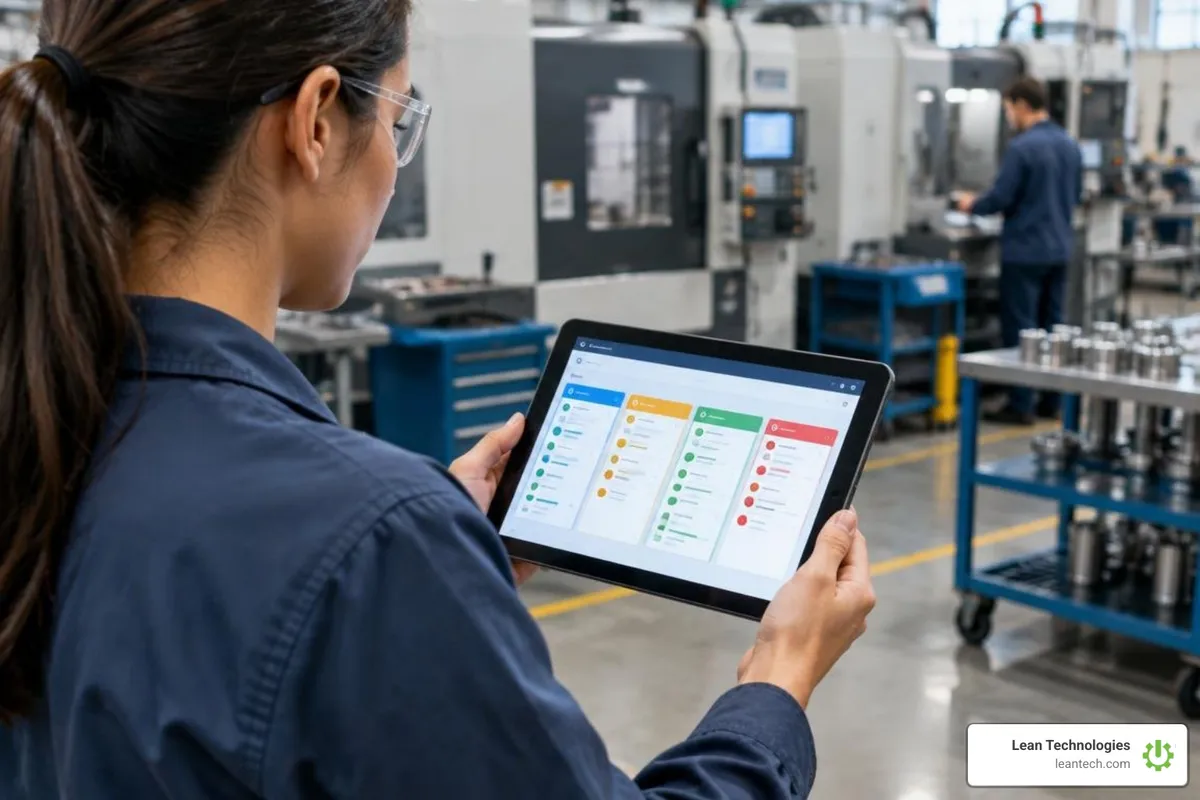
Customizable digital lean tools streamline daily Kaizen by replacing static whiteboards with mobile point-of-use logging, real-time tier escalations, and automated action tracking. Instead of waiting for end-of-shift standups, operators log stoppages, safety observations, and scrap reasons directly from tablets or phones at the machine. Supervisors see live action boards that highlight active machine stoppages, open 5 Whys analyses, and ongoing countermeasures. Every Kaizen task gets a direct owner, target completion date, and priority level, while automated notifications route high-priority items to maintenance leads or quality engineers the moment downtime exceeds established thresholds.
Traditional manufacturing teams have relied on dry-erase whiteboards, laminated standard work sheets, and sticky notes for decades. While these physical tools helped establish basic lean principles, they create operational bottlenecks in production environments. Whiteboards cannot send reminders, store searchable historical data, or notify maintenance technicians across the facility when a machine goes down.
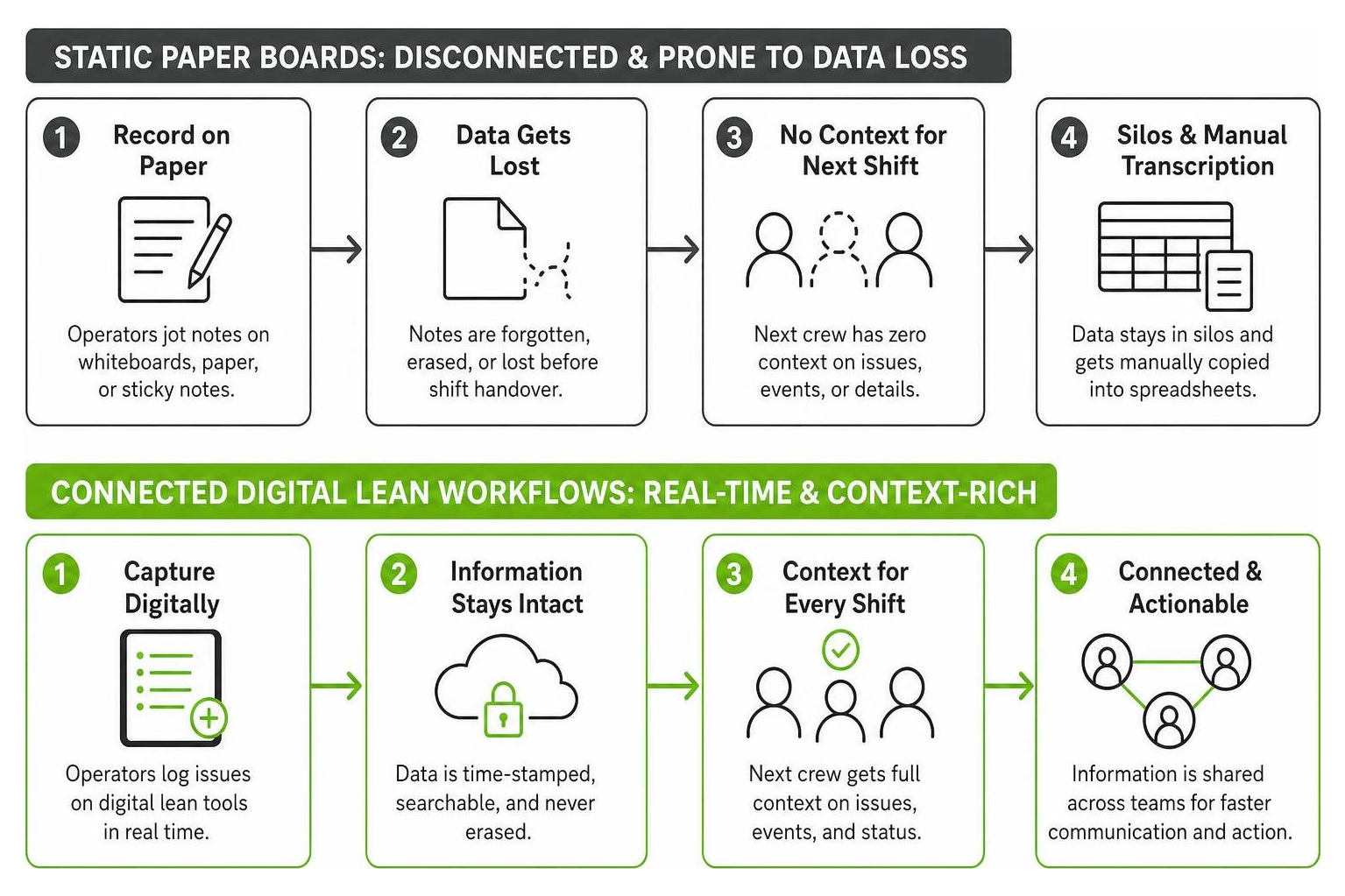
When problems arise during a shift, operators often jot down notes on scrap paper or try to remember details until the end-of-day standup. This creates severe shift handover data loss. The next crew arrives with zero context regarding intermittent machine faults, tooling wear, or minor quality deviations. Crucial operational data stays trapped in departmental silos or gets erased to make room for tomorrow’s production schedule.
Furthermore, relying on disconnected spreadsheets introduces administrative drag. Continuous improvement coordinators and plant managers spend hours manually transcribing paper logs into Excel instead of fixing problems on the floor. Understanding digital lean tools and why they matter in shop floor management highlights how closing this real-time visibility gap restores operator accountability and accelerates issue resolution.
Core Capabilities of Customizable Digital Lean Tools
Modern digital lean platforms solve the shortcomings of physical boards by combining simplicity with workflow flexibility. Rather than forcing your facility into rigid corporate software templates, customizable lean solutions let you build views that mirror your actual shop floor cells.
Modular Board Layouts: Build custom digital boards tailored to specific work cells, assembly lines, or departments without writing code.
Point-of-Use Mobile Data Capture: Operators log bottlenecks, safety observations, and scrap reasons directly from tablets or phones right at the machine.
Action Item Ownership: Assign every Kaizen task a direct owner, target completion date, and priority level to eliminate ambiguity.
Automated Escalation Pathways: Notify supervisors, maintenance leads, or quality engineers instantly when high-priority tasks sit idle or downtime exceeds established thresholds.
Rapid Framework Prototyping: Frontline leaders can sketch early-stage process hypotheses using resources like a Free Lean Canvas Maker to map value propositions and operational risks before rolling out new physical or digital processes.
These capabilities turn daily Kaizen from a paper-based chore into a structured, visible routine. Teams spend less time hunting for context and more time applying countermeasures at the source. The result is faster problem resolution, fewer repeated issues, and a clearer line of sight from frontline observations to leadership decisions.
How Customizable Digital Lean Tools Transform Daily Kaizen
Daily Kaizen thrives on steady, incremental problem-solving. When frontline teams gather for Tier 1 and Tier 2 standup meetings, they need direct access to actionable facts, not vague recollections. By implementing customizable lean production software, supervisors can pull up live digital action boards that highlight active machine stoppages, open 5 Whys analyses, and ongoing countermeasures.
Standardizing these routines ensures that daily standups remain tightly focused. Instead of spending 15 minutes debating what went wrong yesterday, teams review pre-logged issues, assess root causes, and assign corrective tasks in minutes. Frontline operators take direct ownership of their work areas because they see their logged concerns actively tracked, escalated, and resolved.
Designing Tailored Workflows with Customizable Digital Lean Tools
No two manufacturing plants run the exact same way. An injection molding facility requires completely different inspection routines and downtime categories than a precision CNC machine shop. This operational reality is why fixed, off-the-shelf software packages often fail on the floor; they force frontline workers into awkward data entry flows that add friction rather than value.
Using flexible architectures similar to modern no-code project management builders, plant managers and lean leaders can construct bespoke digital Kaizen boards in minutes. Teams can configure custom drop-down menus for scrap codes, build dedicated standard work audit checklists, and establish custom KPI cards for cell-level productivity. This adaptability allows your digital tools to evolve naturally alongside your continuous improvement initiatives.
Integrating Frontline Data with Tiered Escalation
Customizable digital tools excel at bridging communication gaps between operating tiers. When an operator flags an issue at Tier 1 that requires engineering support, the item can be escalated to the Tier 2 or Tier 3 board with a single tap.
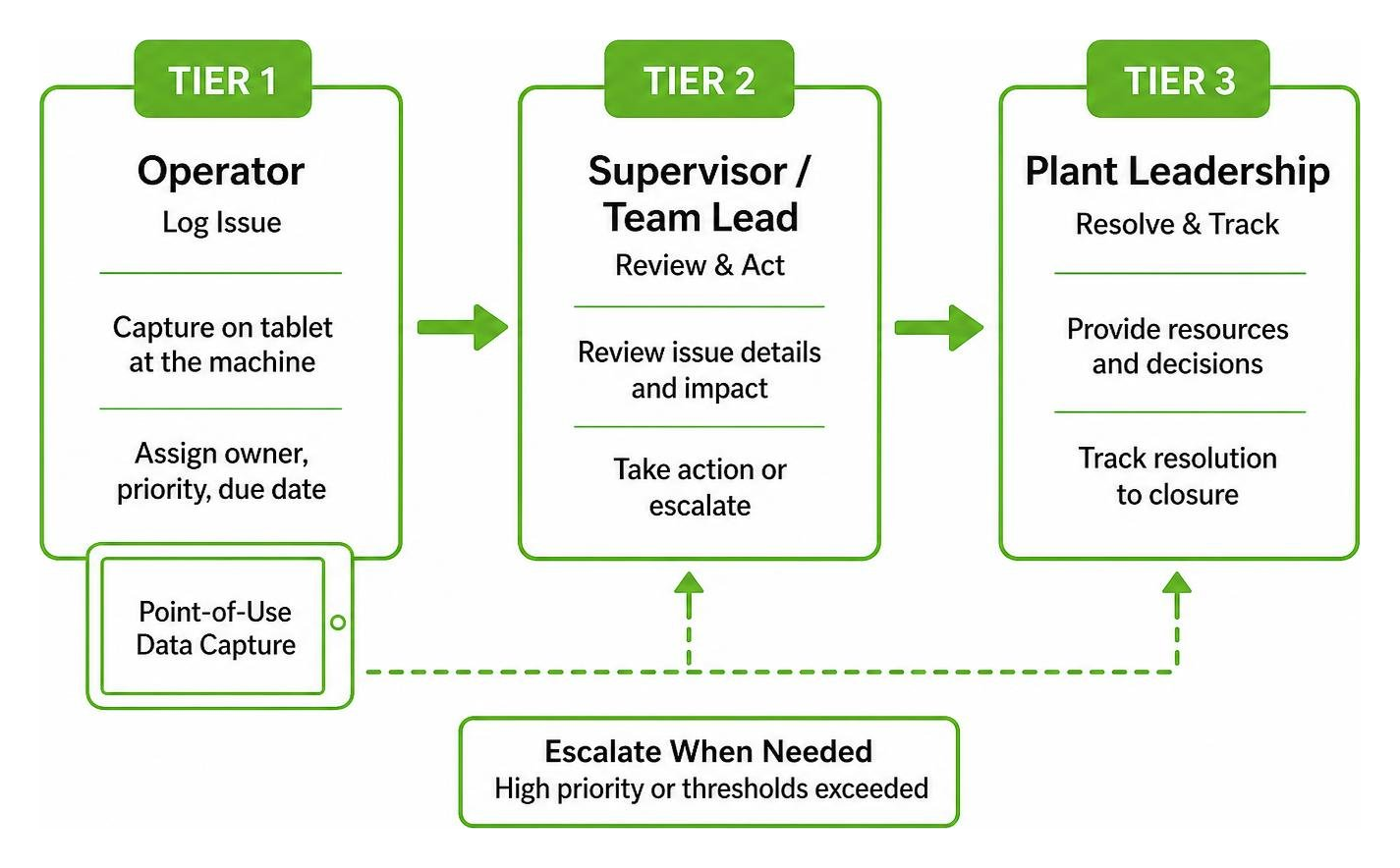
Rather than replacing critical enterprise systems, flexible digital lean tools act as an operational layer. They capture ground-level observations directly from the team and can display contextual data alongside existing ERP and MES systems. Aligning these daily habits within a structured digital lean manufacturing framework ensures complete operational alignment from the plant floor to executive leadership.
This integration matters because frontline data loses value when it stays isolated. A maintenance technician who sees a recurring intermittent fault logged across three shifts can act before the issue becomes a full line stoppage. A quality engineer who spots a scrap pattern tied to a specific tool can launch a root cause analysis before the next production run. Customizable digital lean tools make those connections visible without forcing teams to abandon the systems they already use.
Step-by-Step Guide: Implementing Customizable Digital Lean Workflows
Transitioning from static boards to digital workflows does not require massive capital investment or months of software development. Follow this structured roadmap to launch flexible Kaizen tracking across your lines:
Feature / Dimension | Static Whiteboards & Paper | Customizable Digital Lean Tools |
|---|---|---|
Data Capture | Manual handwriting at shift end | Instant point-of-use logging via tablet/mobile |
Accountability | Unassigned or forgotten sticky notes | Clear task ownership with automated notifications |
Historical Tracking | Lost when wiped clean | Searchable, permanent issue history |
Cross-Shift Visibility | Confined to physical room | Accessible across shifts, cells, and departments |
Workflow Flexibility | Limited by physical board space | Fully modular layouts, custom fields, and tags |
Step 1: Map Existing Kaizen Routines
Identify your current tier meeting cadence, communication handoffs, and escalation triggers. Document the recurring pain points that slip through the cracks during shift handovers. Talk to operators about where they currently lose time hunting for context or re-explaining issues to the next crew.
Step 2: Configure Digital Board Layouts and Custom Fields
Set up modular digital boards matching your physical work areas. Add specific dropdown fields for scrap reasons, downtime categories, and maintenance priorities to capture structured data. Keep the initial configuration simple; you can add fields later as teams identify new data needs.
Step 3: Roll Out Point-of-Use Mobile Logging for Operators
Equip cell leads and operators with tablets or shared floor terminals. Train the team to log stoppages, safety hazards, and improvement suggestions immediately at the source rather than waiting for end-of-shift reviews. A 15-minute hands-on session is usually enough for operators to log their first issue and see it appear on the live board.
Step 4: Conduct Weekly Cadence Reviews and Iterate
Review board engagement weekly with supervisors and lean coordinators. Adjust fields, add new categories, and refine escalation rules based on operator feedback using a practical digital lean starter plan. The goal is continuous improvement of the tool itself, not a one-time setup.
A phased rollout works best. Start with one line or cell, prove the workflow with the team that uses it daily, then expand to other departments. This approach builds operator confidence and gives you real feedback before scaling across the plant.
Driving Continuous Improvement with Shop Floor Dashboards
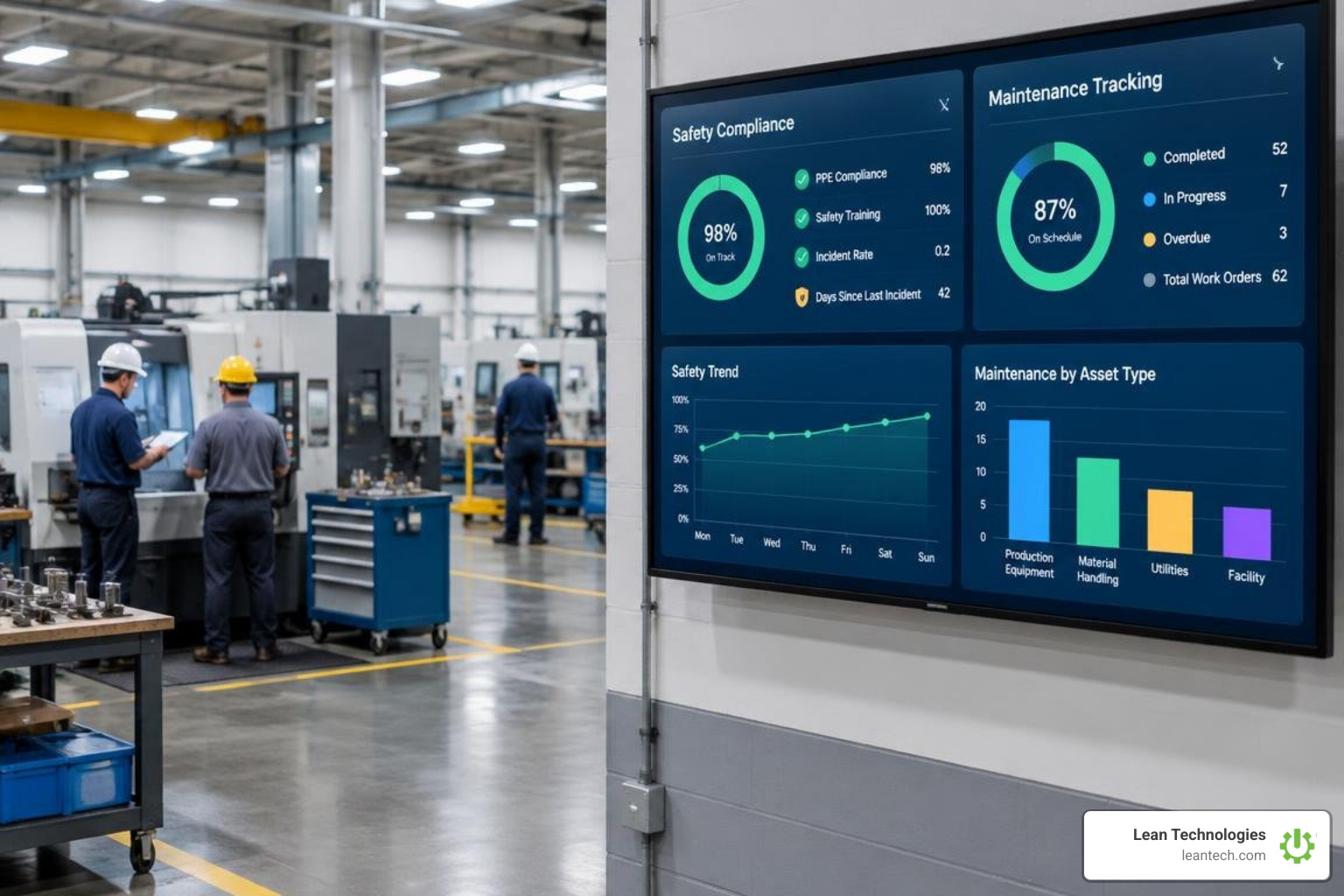
Logging issues is only half the battle; sustaining Kaizen requires visual feedback that proves problem-solving efforts yield tangible results. Modern shop floor dashboards turn daily logged events into actionable visual insights for operations managers, maintenance leads, and quality engineers.
By aggregating point-of-use data, custom dashboards allow leaders to track preventive maintenance compliance, spot recurring scrap patterns across specific shifts, and evaluate cell efficiency. Comparing metrics on a single screen helps teams pinpoint the root causes of systemic delays and direct resources where they deliver the highest operational return.
Maintenance managers can see at a glance which PM tasks are overdue and which machines have logged repeated downtime events. Quality engineers can filter scrap data by shift, cell, or defect code to isolate patterns that would otherwise hide in spreadsheets. Plant managers can compare cell-level productivity across lines and identify where countermeasures are working and where they need reinforcement.
Consulting a comprehensive guide to digital lean manufacturing can help your plant integrate visual tracking into daily standups, turning raw shop floor logs into sustained cultural excellence. When teams see their logged issues driving visible improvements, they keep logging. That feedback loop is what separates a Kaizen program that fades after launch from one that becomes part of how the plant operates every day.
Frequently Asked Questions
How do customizable digital lean tools differ from MES or ERP software?
Customizable digital lean tools are lightweight, non-intrusive applications designed specifically for frontline task management, daily Kaizen, and continuous improvement tracking. Unlike complex MES or ERP systems that manage plant-wide scheduling, financial accounting, and automated machine execution, digital lean tools focus on human workflows. They provide an accessible digital workspace for operators and supervisors to log issues, track action items, and manage shift handoffs without altering core enterprise databases.
How quickly can a plant transition from paper Kaizen boards to digital tools?
Most facilities can transition an initial production line within a few days. Because digital lean platforms use flexible, no-code layouts, supervisors can recreate their existing physical whiteboard structures digitally in minutes. Rolling out shared tablets to operators and conducting brief 15-minute training sessions allows teams to run live digital tier meetings immediately with zero production downtime.
Can customizable lean workflows adapt to different manufacturing departments?
Yes. The primary strength of modular lean tools is their versatility across operational domains. Maintenance departments can configure boards for preventive work requests, QA teams can log scrap codes and non-conformance reports, safety officers can record near-misses, and production supervisors can run 5S audits—all within the same unified visual ecosystem.
What to Do Next
Eliminating administrative waste and empowering operators to solve problems at the source is the cornerstone of sustainable operational excellence. When you replace fragile paper logs with flexible digital systems, daily Kaizen evolves from a neglected chore into an active, data-driven routine.
Implementing customizable digital lean tools gives your manufacturing team the clarity, ownership, and visibility needed to eliminate waste on the shop floor every day. Operators log issues at the machine, supervisors track action items in real time, and leadership sees the operational picture without waiting for end-of-week reports. Explore how the Thrive Continuous Improvement platform equips small to midsize manufacturers with a practical, operator-friendly toolbox to digitize lean routines and drive daily continuous improvement.