
Stop the Waste with These Top Lean Shopfloor Management Tools
The Real Cost of Running Lean on Paper and Spreadsheets
If you're evaluating customizable lean production software, here are the top tools and platforms worth knowing about in 2026:
Tool Type Best For Digital Kaizen Management Capturing, assigning, and closing improvement actions fast Leader Standard Work Software Keeping supervisors accountable to daily routines Digital 5S / Gemba Audits Mobile checklists, photo evidence, recurring audits Performance Goal Boards (SQDC) Real-time shift metrics and team huddle data Digital Kanban Boards Visual workflow tracking and WIP control Integrated Lean Platforms Multi-tool visibility across Kaizen, audits, goals, and actions
Most manufacturers running lean aren't failing because of bad strategy. They're failing because the tools don't match the work.
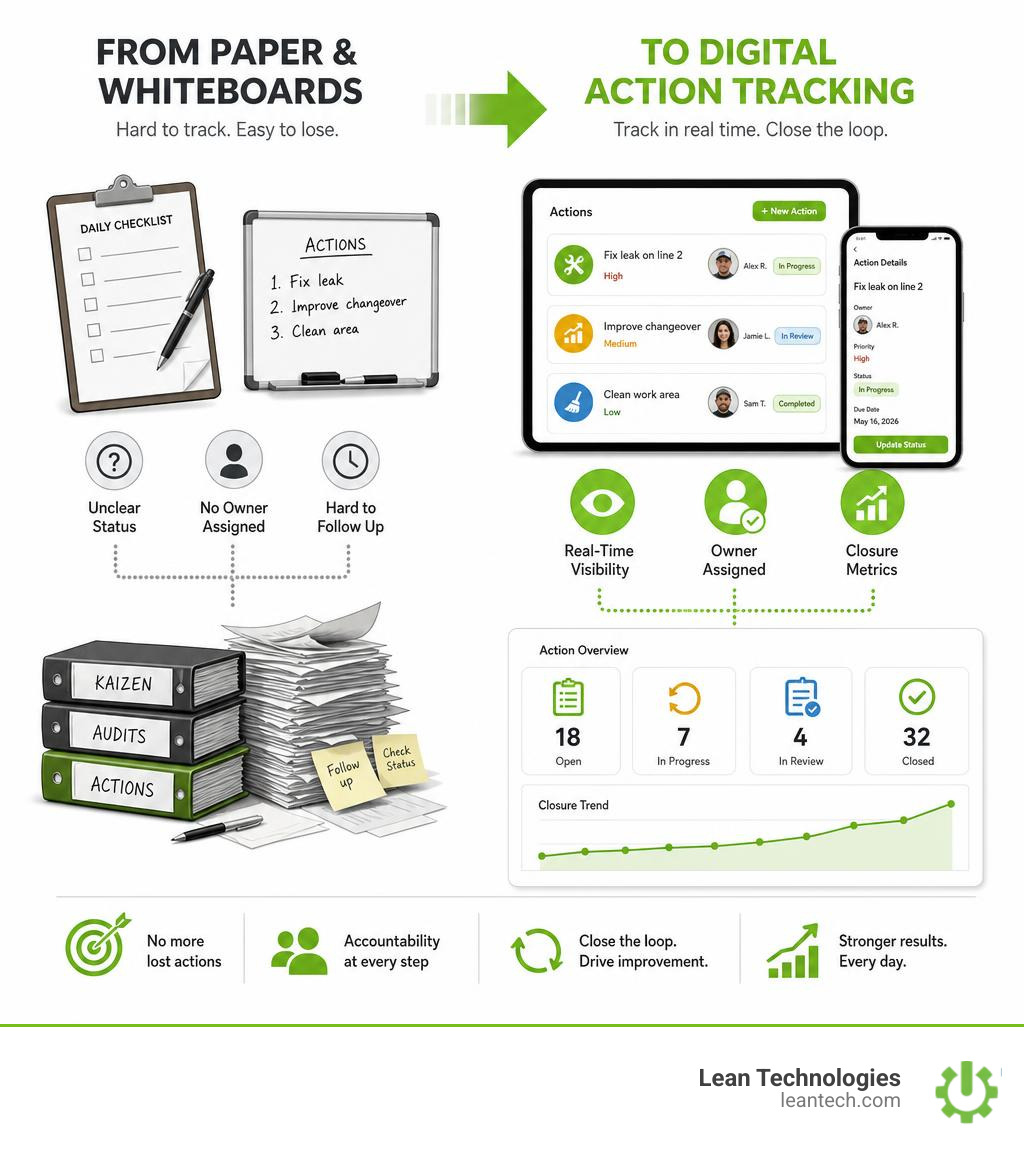
Paper Kaizen cards get lost. Whiteboard actions go unassigned. Spreadsheets sit unupdated until end of shift — or end of week. By then, the problem has already cost you.
The frustration is real. Operations managers spend hours chasing status updates that should take minutes. CI leaders can't close the loop because nobody logged the action in the first place. And when audit time comes around, the data is scattered across three binders and a shared drive nobody fully trusts.
The gap isn't lean thinking — it's lean execution. Most off-the-shelf software tries to force your processes into a pre-built template. Your team resists it. Adoption drops. You're back to the whiteboard.
That's exactly what customizable lean production software is built to fix. Instead of bending your shop floor to fit the software, the software bends to fit your shop floor — your language, your workflows, your culture.
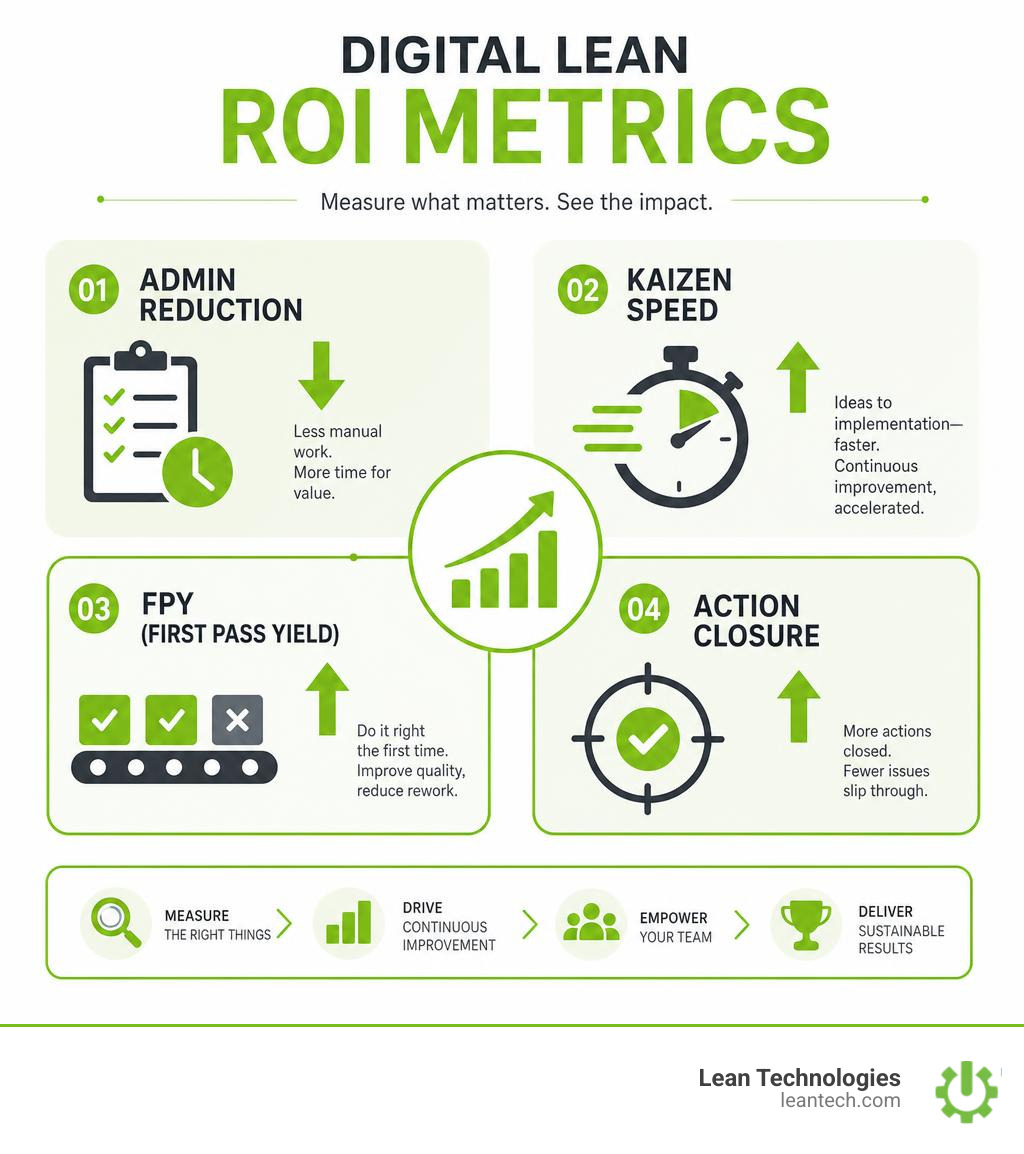
Manufacturers using digital lean tools report 40–60% reductions in lean admin time. Kaizen cycle times drop by up to 50%. First-pass yield improves by as much as 30%. These aren't theoretical gains — they're what happens when the right structure meets real operator adoption.
This guide breaks down the top lean shopfloor management tools available today, what to look for when choosing one, and how to measure whether it's actually working.
What Customizable Lean Production Software Actually Does
Customizable lean production software digitizes the daily routines that keep a lean operation moving: issue logging, Kaizen ideas, Gemba walks, 5S audits, action tracking, shift handoffs, production goals, and escalation workflows.
It is not just a prettier spreadsheet. And it should not be an ERP or MES replacement.
The best lean shopfloor software sits between strategy and execution. It gives operators, supervisors, maintenance, quality, safety, HR, and CI teams one structured place to capture problems, assign owners, track follow-up, and see whether work is actually getting done.
For manufacturers beginning that journey, Lean Technologies’ Guide to Digital Lean Manufacturing explains how digital lean helps teams move from paper-based routines to real-time shopfloor execution.
Customizable Lean Production Software vs. Off-the-Shelf Tools
Off-the-shelf tools usually start with fixed templates. That sounds helpful until the template does not match how the plant actually runs.
A custom or configurable lean platform should let teams adjust:
Workflow steps
Form fields
Approval paths
User roles and permissions
Plant-specific boards
Escalation rules
Terminology
Notifications
Metrics and dashboards
That matters because lean culture is local. One plant may call something a “countermeasure,” another may call it a “corrective action.” One team may use SQDC boards. Another may use safety, quality, delivery, cost, and people. If the software forces everyone into one rigid format, adoption usually suffers.
The goal is not unlimited customization. That becomes chaos with a login screen.
The goal is controlled flexibility: shared standards where they matter, local configuration where it helps adoption.
Why Lean Teams Outgrow Paper, Whiteboards, and Spreadsheets
Paper works when the team is small, the process is simple, and the same three people know everything. Then the plant grows.
Suddenly:
Kaizen cards sit in a tray for two weeks.
Whiteboard actions are erased before they are closed.
Downtime logs get entered at the end of the shift.
Audit findings live in binders.
Quality issues are tracked in one file and maintenance actions in another.
Supervisors spend more time chasing updates than coaching people.
That is not lean. That is admin waste wearing a hard hat.
Digital lean tools help reduce this drag. Manufacturers using digital lean systems report 40–60% less lean administration time, mainly because teams stop re-entering the same data into multiple places and start capturing information at the source.
Real-time beats real-late. If an issue gets logged when it happens, the team can act while the problem is still fresh.
How to Customize Without Creating Chaos
Customization should make the system easier to use, not harder to manage.
A smart rollout uses a clear governance model:
Standardize the core: Define common categories, statuses, naming rules, and reporting metrics.
Customize the edges: Let each team adjust boards, forms, and workflows to match local routines.
Assign workflow owners: Every digital process needs someone responsible for keeping it clean.
Use template libraries: Do not rebuild the same 5S audit, safety checklist, or Kaizen form 14 different ways.
Control changes: New fields and workflow changes should be reviewed before they spread.
Review usage weekly: Look at overdue actions, abandoned forms, and low-adoption areas.
The best setup feels simple to operators and structured to leaders. If it needs a 60-page manual to log a loose guardrail, something has gone badly wrong.
The Top Lean Shopfloor Management Tools to Look For

The best lean shopfloor management system is not one giant module. It is a connected set of tools that helps teams see problems, assign work, and close the loop.
Lean Technologies offers Thrive as an all-in-one, customizable shopfloor platform built for small to midsize manufacturers. Thrive helps teams digitize lean work processes without replacing ERP or MES systems. It organizes the human side of execution: issues, actions, goals, audits, follow-up, and continuous improvement.
Teams can explore practical lean resources through Thrive Resources.
Lean Tool Type What It Helps With Best-Fit Users Kaizen Management Ideas, improvements, ownership, due dates CI managers, supervisors, operators Digital Kanban WIP control, workflow visibility, bottlenecks Production, maintenance, project teams Leader Standard Work Daily checks, coaching, accountability Supervisors, plant managers Performance Goal Boards SQDC metrics, huddles, shift performance Operations, production, quality 5S and Gemba Audits Mobile checklists, findings, corrective actions CI, safety, quality, supervisors Workflow Tracking Cross-functional follow-up and escalation Maintenance, quality, safety, HR
Kaizen and Continuous Improvement Management
Kaizen dies when ideas disappear.
A good Kaizen tool should make it easy for anyone to submit an idea, add context, assign an owner, set a due date, and track results. It should support simple improvements as well as larger PDCA or A3-style projects.
Look for:
Mobile idea capture
Priority scoring
Owner assignment
Due dates
Approval routing
Before-and-after notes
Impact tracking
Status visibility
Overdue alerts
Digital Kaizen systems can reduce Kaizen cycle time by up to 50% because ideas no longer sit in limbo. They move through a visible workflow.
For improvement work that needs tasks, owners, and timelines, Thrive’s Project Management tools help teams manage execution instead of hoping “someone is on it.”
Digital Kanban and Visual Workflow Tracking
Kanban works because it makes flow visible. Digital Kanban keeps that visibility alive when work crosses shifts, departments, buildings, or sites.
A strong Kanban Board Tool should show:
Work in progress
Blocked items
Aging tasks
Ownership
Due dates
Handoffs
Priority
Escalations
Digital boards help production, maintenance, quality, safety, and CI teams manage work without drowning in status meetings. When a card sits too long, the system should make that obvious.
Thrive’s Workflow Tracking capabilities support that same idea across broader processes: log the work, assign the work, track the work, close the work.
Simple. Annoyingly effective.
Leader Standard Work and Daily Management
Leader standard work turns good management habits into repeatable routines.
Without it, daily management becomes personality-based. One supervisor checks safety actions every morning. Another only checks when something breaks. One shift documents issues. Another says, “We told maintenance.” Maintenance says, “No, you did not.”
A digital Leader Standard Work tool helps standardize:
Daily checks
Tier meeting preparation
Shift handoffs
Safety observations
Gemba routines
Follow-up tasks
Escalation paths
Coaching moments
It also shows what was missed. That is not about playing “gotcha.” It is about protecting the process from drift.
Performance Goal Boards and Real-Time Visibility
Performance boards are where lean becomes visible to the team.
Digital Performance Goal Boards can support SQDC metrics such as:
Safety incidents and near misses
Quality defects
Delivery performance
Cost or productivity goals
Production attainment
Action plans
Shift performance
Trend tracking
The key is not just displaying numbers. The key is connecting metrics to actions.
If first-pass yield drops, who owns the investigation? If a delivery target is missed, what countermeasure is active? If a safety issue repeats, is it assigned or just discussed every Tuesday until everyone loses the will to live?
Good goal boards make the gap visible and the follow-up accountable.
How Customizable Lean Production Software Supports Core Lean Methods

Lean methods work best when they are practiced consistently. Software cannot create culture by itself, but it can make the right routines easier to run and harder to ignore.
That includes Kaizen, 5S, Gemba walks, value stream mapping, standard work, 6S, autonomous maintenance, and short interval control.
Before digitizing, manufacturers should understand whether the culture is ready for more structured visibility. Lean Technologies’ Lean Culture Assessment can help teams identify gaps before rolling out new tools.
Customizable Lean Production Software for Kaizen, 5S, and Gemba Walks
For Kaizen, customizable lean production software helps teams capture ideas from the floor and turn them into owned actions.
For 5S and 6S, it supports:
Digital checklists
Audit scoring
Photo evidence
Recurring schedules
Corrective actions
Layered process audits
Trend visibility
For Gemba walks, it helps supervisors capture observations where the work happens. A manager can walk the line, log an issue on a tablet, attach a photo, assign it to maintenance or quality, and track the action to closure.
That is much better than writing “check conveyor noise” on a clipboard and discovering three weeks later that the conveyor decided to retire early.
Digitizing lean routines can also raise employee engagement in problem-solving by around 50%, because people see their input moving through a visible process instead of vanishing into the suggestion box of doom.
Value Stream Mapping, Waste Reduction, and Problem Solving
Value stream mapping shows where work slows down, piles up, loops back, or creates waste. Software does not replace the thinking behind value stream mapping, but it helps teams support the map with real issue data.
Digital lean tools can reveal patterns across the eight wastes:
Defects: recurring quality issues and rework
Waiting: delayed approvals, blocked tasks, downtime response
Motion: repeated movement caused by poor layout or missing tools
Over-processing: duplicate checks, extra admin, unnecessary handoffs
Inventory: WIP buildup and aging work
Transport: material movement problems
Overproduction: work started before demand is clear
Unused talent: improvement ideas not captured or acted on
The strongest platforms connect waste to action closure. It is not enough to know where the problem is. The team needs to know who owns it, when it is due, and whether the countermeasure worked.
Preserving Culture While Digitizing Lean Routines
A common fear is that software will make lean feel cold, rigid, or corporate. That can happen when technology is dropped on the plant without respecting how people already work.
Good customization protects culture by keeping:
Company language
Local team rituals
Existing huddle routines
Operator input
Supervisor coaching cadence
Visual management habits
Process ownership
The point is not to replace human-centered lean. The point is to remove the waste around it.
A digital board should support the huddle, not kill the conversation. A Gemba checklist should guide observation, not turn supervisors into tablet zombies. A Kaizen workflow should make ideas easier to act on, not require operators to fill out a mortgage application.
Integration, Adoption, and Implementation: Where Most Tools Win or Fail
Software usually fails for three reasons: it does not connect, people do not use it, or nobody owns it.
A successful implementation needs practical integration, simple user experience, and disciplined rollout. The Guide to Digital Lean Manufacturing is a useful starting point for building that roadmap.
Connecting Lean Software with ERP, MES, Maintenance, and IoT Systems
Thrive is not an ERP. It is not an MES. It does not replace the systems that handle production planning, transactions, inventory, or machine execution.
Instead, customizable lean software should connect with existing systems where it makes sense.
Common integration points include:
ERP production orders or master data
MES production records
CMMS or EAM maintenance work
Quality records
CSV imports
REST APIs
Imported machine or IoT data
Dashboards and reporting tools
Important distinction: Thrive does not collect sensor data or run predictive machine alerts. It can help organize and drive action from machine data if that data is entered by the team or imported from other systems.
That keeps the role clear: ERP and MES manage transactional and execution data. Thrive helps teams manage the improvement, accountability, and follow-through work around it.
How to Drive Adoption on the Shop Floor
Adoption is not won in the conference room. It is won at the line.
Shopfloor users need software that is fast, obvious, and useful. If logging an issue takes eight required fields and a blood sample, people will go back to sticky notes.
Look for:
Mobile, tablet, and desktop access
Simple forms
Role-based screens
Fewer clicks
Photo uploads
Clear ownership
Fast search
Notifications that matter
Visible wins in daily huddles
A strong rollout usually starts with one pilot area. Train the team, collect feedback, adjust the workflow, and show the win. Then expand.
The best adoption strategy is simple: make the digital process easier than the workaround.
Common Implementation Challenges and How to Beat Them
Most problems are predictable.
Challenge What It Looks Like How to Beat It Scope creep Every department wants every feature on day one Start with one or two high-value workflows Over-customization Too many fields, forms, statuses, and exceptions Standardize the core and limit local variation IT misalignment Manufacturing and IT disagree on ownership Define roles before launch Dirty data Old categories and duplicate lists confuse users Clean master data before rollout Weak training Users know the button, not the process Train around real shopfloor scenarios Unclear KPIs Nobody knows what success means Set baseline metrics before launch Change resistance “The whiteboard works fine” Show how digital reduces admin, not ownership Pilot fatigue The pilot never scales Create a phased rollout roadmap
The implementation model should follow a practical sequence: discovery, design, build, launch, support. That means mapping current routines, configuring workflows, testing with users, training teams, and improving based on feedback.
ROI: What Manufacturers Can Measure After Going Digital
ROI should not be vague. If the software is working, the metrics should move.
Operational Metrics to Track Before and After Launch
Before launching customizable lean tools, teams should capture baseline numbers. Otherwise, every ROI discussion becomes a debate powered by vibes.
Track:
Kaizen cycle time
Kaizen participation
Action closure rate
Overdue actions
First-pass yield
WIP
Setup time
Downtime
Response time
Audit completion
Safety incidents
Quality defects
Admin hours
Employee participation
Recurring issues
For maintenance teams, that may mean measuring response time and repeat failures. For quality teams, it may mean nonconformance closure and inspection errors. For operations, it may mean daily goal attainment and missed handoffs.
Realistic Improvement Ranges to Benchmark
Results vary by plant, process maturity, and adoption. Still, digital lean implementations commonly target measurable improvements such as:
40–60% reduction in lean admin time
Up to 50% faster Kaizen cycle time
Around 50% higher employee engagement in problem-solving
Up to 30% improvement in first-pass yield
25% reduction in setup time in documented lean software use cases
60% WIP reduction in documented lean software use cases
Up to 80% fewer inspection errors in digital inspection workflows
40% time savings on commissioning tasks in digital checklist workflows
These numbers should be used as benchmarks, not promises. The software creates structure. The team still has to use it, manage it, and improve the process behind it.
Fancy dashboard. No ownership. Same mess, better colors.
Which Manufacturers Benefit Most
Customizable lean production software is especially useful for:
Small manufacturers outgrowing spreadsheets
Midsize manufacturers standardizing daily management
Multi-site operations that need shared visibility with local flexibility
Discrete manufacturers managing flow, quality, and handoffs
Process manufacturers managing audits, safety, and compliance routines
Regulated industries with documentation needs
Quality-heavy operations
Maintenance-driven plants
CI teams running Kaizen programs
Safety teams tracking incidents and corrective actions
Operations leaders needing accountability
IT teams supporting manufacturing systems without replacing ERP or MES
The best fit is any plant where the problem is not lack of effort. It is lack of visibility, ownership, and follow-through.
Frequently Asked Questions About Customizable Lean Production Software
What features should customizable lean production software include?
It should include configurable workflows, visual boards, mobile issue capture, Kaizen tracking, 5S audits, Gemba walks, leader standard work, performance goal boards, reporting, role-based permissions, notifications, and integration options.
The most important feature is action ownership. Every issue, idea, audit finding, or gap should have a clear owner, due date, status, and closure path.
Is customizable lean software only for large manufacturers?
No. Small and midsize manufacturers often benefit the most because they usually have strong shopfloor knowledge trapped in paper, spreadsheets, and people’s heads.
A modular platform lets teams start small, often with Kaizen, goal boards, leader standard work, or workflow tracking, then expand over time. Multi-site manufacturers also benefit because they can standardize best practices while allowing each plant to configure local routines.
How long does implementation usually take?
It depends on scope. A focused pilot can often be configured and tested in weeks. Broader rollouts take longer because they involve process mapping, workflow design, user training, data cleanup, feedback loops, and phased launch planning.
A practical implementation usually includes:
Discovery and process mapping
Workflow design
Configuration
Pilot testing
User training
Launch
Weekly review and improvement
Some manufacturing software projects use 30-day prototypes or four-week facility rollouts as practical benchmarks, but timeline should be based on process complexity and readiness.
What to Do Next
Stop managing the shop floor through spreadsheets and wishful thinking.
Lean Technologies’ Thrive gives manufacturers a customizable shopfloor platform for logging issues, tracking actions, managing continuous improvement, running daily routines, and creating real-time visibility without replacing ERP or MES systems.
The fastest next step is to map one process that creates the most follow-up waste. Maybe it is Kaizen. Maybe it is Gemba actions. Maybe it is daily goals. Maybe it is maintenance requests that disappear into the “somebody should really fix that” zone.
Then digitize that process, assign ownership, and measure the result.
For a practical roadmap, start with the Guide to Digital Lean Manufacturing. To explore more ways Thrive supports lean execution, visit Thrive Resources.
The right customizable lean production software will not replace lean culture. It will help the team run it with less waste, faster follow-up, and better visibility.





