

Stop the Paper Trail with a Modern Maintenance Work Order System
Why Manufacturing Teams Are Ditching Paper Work Orders
A maintenance work order system is a digital platform that authorizes, tracks, and documents maintenance tasks in real time—replacing paper logs, clipboards, and spreadsheets with structured workflows that give supervisors and technicians instant visibility into what's broken, who's fixing it, and what it's costing.
Quick answer for teams evaluating work order management systems:
What to Look For Why It Matters Mobile access Technicians log issues at the source—no end-of-shift data entry Real-time visibility Supervisors see status updates as work happens, not hours later Asset tracking Link work orders to specific equipment for better history and planning Automated triggers Schedule preventive maintenance without manual reminders Audit trails Compliance documentation that's complete, timestamped, and searchable
Here's the reality: if your maintenance team is still writing work orders on paper, you're managing your shop floor through guesswork and lost information.
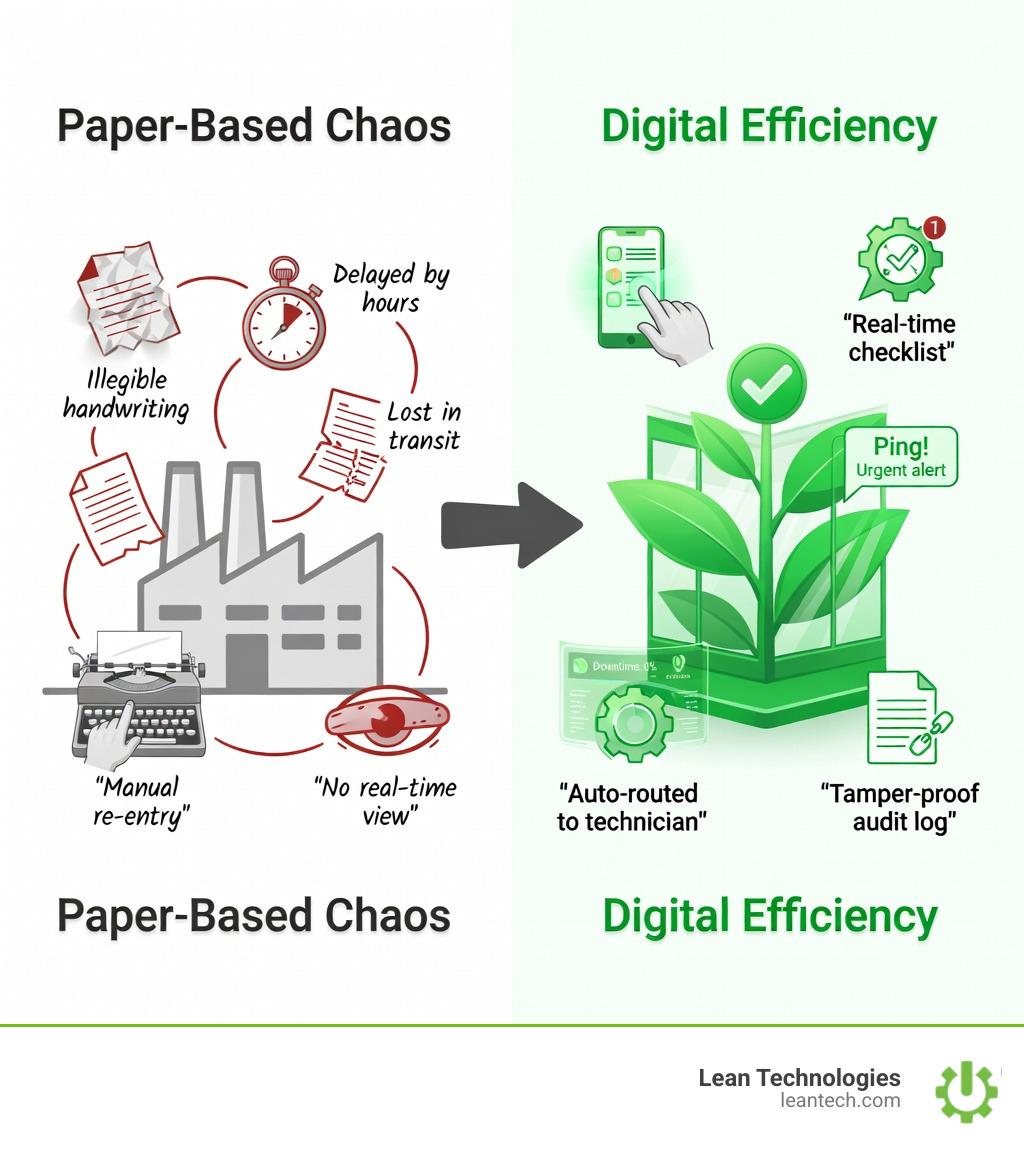
Paper logs don't tell you what's happening right now. They pile up in binders, get lost between shifts, and turn every audit into a scramble. Technicians waste time hunting down missing details. Supervisors can't see the full picture until it's too late. And when downtime hits, you're already behind.
One operations manager put it this way: "We were fighting fires every day. Now we catch problems before they stop production."
That shift—from reactive chaos to proactive control—happens when you replace paper with a system that captures data at the source, routes it to the right people, and keeps everyone accountable in real time.
Why Paper-Based Maintenance Work Orders Hold Teams Back
If you’ve ever walked onto a shop floor and seen a technician squinting at a grease-stained piece of paper, you’ve seen the problem. Paper isn't just old-fashioned; it’s a bottleneck that actively drains your profitability.
In the automotive industry, downtime can cost up to $50,000 per minute. Even for smaller plants, just an hour of unplanned downtime can easily burn through $25,000 or more. When your maintenance process relies on paper, those costs pile up because information moves at a snail's pace. This lack of efficiency often directly impacts your Overall Equipment Effectiveness (OEE), leading to hidden losses across the line.
Missed Downtime Events: If an operator notices a small vibration on a conveyor but doesn't have an easy way to log it, they might wait until the end of the shift. By then, they’ve forgotten, or the machine has already seized.
Manual Errors and Lost Paperwork: "I thought I gave that to you" is a phrase that kills productivity. Paper gets lost, coffee gets spilled on it, and handwriting is often a guessing game.
Slow Response Times: In a paper world, a "work request" has to be physically handed to a supervisor, who then has to find a technician. This "real-late" visibility means machines sit idle while people look for paperwork.
Compliance Headaches: Auditors don’t accept "I thought it was done" as a valid record. When safety inspections or environmental checks are buried in a filing cabinet, proving compliance becomes a week-long nightmare instead of a five-minute search.
What Is a Maintenance Work Order System?
At its core, a maintenance work order system is the engine that drives your maintenance department. It is a standardized digital process that details a maintenance task, assigns it to a person, and tracks it until it’s finished.
Think of it as the bridge between an idea (a work request) and action (the work order).
Work Request: This is a submission from an operator or staff member indicating that something needs attention. For example: "The motor on Line 3 is running hot."
Work Order: This is the approved, actionable document. It contains the "who, what, where, and when." It authorizes the technician to pull parts, spend time, and perform the fix.
By digitizing this with a platform like Thrive, you move from "we should fix that" to "here is the authorized plan to fix that, and here is the record that it’s done."
Key Benefits of a Digital Maintenance Work Order System
Switching to a digital maintenance work order system isn't just about being "high-tech." It’s about the bottom line.
Real-Time Visibility: Supervisors don’t have to walk the floor to know what’s being worked on. They can see a live dashboard showing every open job, who is assigned, and how long they’ve been at it.
Faster Response and Less Downtime: When an issue is logged on a tablet at the machine, the maintenance lead gets a notification instantly. We’ve seen plants increase on-time work order completion by 14% year-over-year simply by moving to mobile-first systems.
Easier Compliance and Audit Trails: Every action is timestamped. You have a digital "paper trail" that shows exactly when a safety check was performed and who signed off on it. This keeps compliance risks at bay and makes audits stress-free.
Lower Costs: By tracking parts and labor, you stop overspending. You’ll know exactly which assets are "lemons" that cost more to repair than replace.
Learn how Thrive helps teams close the loop on maintenance issues
Must-Have Features for Modern Maintenance Work Orders
If you’re evaluating a maintenance work order system, don’t just look for a digital version of a paper form. Look for these "force multipliers":
Mobile/Tablet Access: Technicians shouldn't have to walk back to an office to update a status. They need to do it on the floor, at the source.
Asset and Inventory Integration: The system should tell the tech if the spare bearing they need is actually in stock.
Customizable Templates: Not every job is the same. You need the flexibility to create specific checklists for an HVAC PM versus a hydraulic repair.
Real-Time Dashboards: You need to see your KPIs (Key Performance Indicators) like Mean Time to Repair (MTTR) or PM Compliance at a glance.
Role-Based Access: Operators should be able to request work, while only Managers should be able to approve high-cost repairs.
The Maintenance Work Order Lifecycle—From Problem to Solution
A work order isn't just a static document; it’s a journey. A modern maintenance work order system guides the task through these eight critical stages:
Identification: An operator notices an issue or a scheduled PM trigger hits.
Creation: A work request is submitted (often via a quick scan of a QR code on the machine).
Approval: A manager reviews the request, checks the budget/priority, and converts it into an official work order.
Planning: The system identifies the parts, tools, and safety procedures (like Lockout/Tagout) required.
Scheduling: The job is assigned to a specific technician based on their availability and skill set.
Execution: The technician performs the work, logging their time and parts used in real time on their mobile device.
Completion: The tech adds notes, photos of the fix, and gets a digital sign-off.
Analysis: The data is fed into a report. Was this a recurring issue? Did it take longer than estimated? This is where you turn "tribal knowledge" into shared expertise.
Types of Maintenance Work Orders and Where They Fit
Not all work is created equal. A robust maintenance work order system handles different categories to keep the plant balanced between "fixing" and "preventing."
Preventive Maintenance (PM): Scheduled, recurring tasks (like oil changes or belt inspections) designed to stop breakdowns before they happen.
Corrective Maintenance: Fixing something that is identified as failing but hasn't caused a total shutdown yet.
Emergency Repairs: The "firefighting" mode. Unplanned, urgent work that takes top priority because the line is down.
Inspections: Routine checks often driven by safety or regulatory requirements (e.g., fire extinguisher checks).
Comparison of Maintenance Work Order Types
Type Trigger Goal Priority Preventive Time or Usage (e.g., every 30 days) Extend asset life Medium Corrective Observation (e.g., "making a noise") Prevent total failure Medium-High Emergency Breakdown Restore production Critical Inspection Schedule / Compliance Ensure safety/standards High (Legal)
Industry Applications
Manufacturing: The primary goal is Overall Equipment Effectiveness (OEE). Keeping machines running and reducing unplanned stops is the difference between a profitable shift and a loss.
Facilities: Managing HVAC, lighting, and plumbing across large sites.
Food & Beverage: Strict sanitation and quality standards mean every cleaning cycle and equipment check must be documented for safety audits.
Hospitality: Ensuring guest comfort by keeping boilers, elevators, and kitchen equipment in top shape.
See how Thrive supports safety and compliance tracking
Best Practices for Digital Maintenance Work Orders
Simply buying software won't fix a broken process. To get the most out of your maintenance work order system, follow these lean principles:
1. Standardize Your Templates Don't let technicians write "fixed it" in the notes. Use standardized checklists and mandatory fields (like "Root Cause") to ensure you’re gathering clean data that you can actually use for reporting later.
2. Set Up Automated Triggers Don't rely on someone remembering to check the air filters every quarter. Let the system automatically generate the work order based on the date or machine hours.
3. Define Clear Roles Who can approve a $5,000 part? Who is responsible for closing out the work order? Clear accountability prevents jobs from sitting in "limbo" for weeks.
4. Run Post-Mortems on Major Breakdowns When a critical machine goes down for four hours, don't just fix it and move on. Use the data in your maintenance work order system to conduct a "Five Whys" analysis. Should you adjust your PM schedule? Was it a faulty part?
5. Keep Communication Tight Use built-in chat features to allow technicians to ask questions or send photos of a broken component directly to the supervisor. This eliminates the "walk-back" time to the office.
How to streamline your work request queue with Thrive
Frequently Asked Questions
What’s the difference between a work order and a work request?
A work request is a "suggestion" or notification that something is wrong, usually submitted by an operator. A work order is the formal, approved document that authorizes the maintenance team to spend time and resources fixing it.
How does mobile access speed up maintenance?
Mobile access eliminates "data lag." Instead of a tech spending the last 30 minutes of their shift entering notes from memory, they log everything at the machine. It also allows for instant notifications—when a high-priority job is assigned, the tech knows immediately.
Can digital systems really help reduce downtime and errors?
Yes. By providing real-time visibility, you catch small issues before they become catastrophic failures. Statistics show that 82% of teams using digital maintenance tools report improved safety and streamlined compliance.
What to do next
Stop managing your shop floor through spreadsheets and wishful thinking. If you can’t see what’s happening on your floor in real time, you aren't managing it—you're just reacting to it.
Let your team run lean with a maintenance work order system that provides real-time visibility and fewer workarounds. Transitioning from paper to digital doesn't have to be a multi-month ordeal; with the right tools, you can start capturing better data today.





