

Mastering Your Work Order Management System from Start to Finish
Why Your Work Order Process Is Making or Breaking Your Shop Floor
The work order process is the backbone of every maintenance operation on the shop floor. It's how problems get identified, tasks get assigned, and equipment keeps running. When it works, your team is proactive, organized, and in control. When it breaks down, you're stuck chasing fires, losing hours to unplanned downtime, and piecing together what happened after the fact.
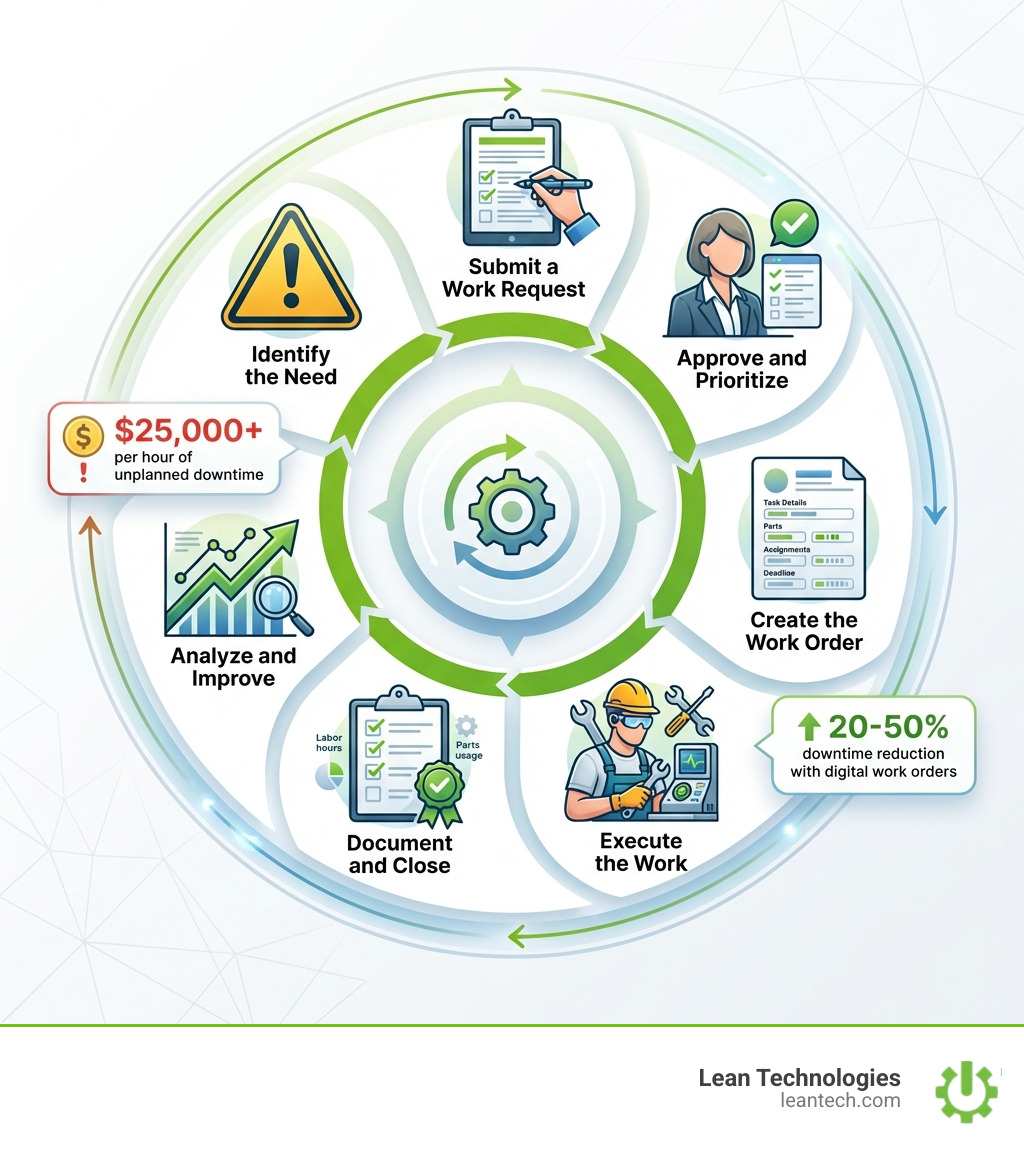
Here's the work order process at a glance:
Identify the need - A technician, operator, or sensor flags a maintenance issue
Submit a work request - The need is documented and sent for review
Approve and prioritize - A manager reviews, approves, and assigns a priority level
Create the work order - A formal document is issued with task details, parts, and assignments
Execute the work - The assigned technician completes the job following documented procedures
Document and close - Labor, parts, and outcomes are recorded and the order is closed
Analyze and improve - Data from completed orders feeds continuous improvement efforts
This isn't just a paperwork exercise. An hour of unplanned downtime can cost a manufacturing operation $25,000 or more. That's not a typo. And most of that pain traces back to one root cause: a work order process that's disorganized, incomplete, or running on paper and gut feel.
Most plants have some version of a process in place. The gap isn't awareness — it's execution. Work requests get lost in inboxes. Priority levels are inconsistent. Technicians show up to a job without the right parts or instructions. Managers can't see what's in the backlog until it's already a crisis.
The good news? A structured, digital work order process fixes most of this — and the path to get there is more straightforward than most teams expect.
Defining the Work Order Process and Its Core Components
To master the work order process, we have to start with a clear definition. A work order is more than just a "to-do" note. It is a formal document that authorizes, schedules, and tracks a specific task. It bridges the gap between identifying a problem and proving it was fixed correctly.
In a high-functioning shop floor, this process acts as the "engine" of your maintenance department. If the engine is tuned, work flows from point A to point B without friction. If it's a "rusted dud," you're burning cash on emergency repairs and wasted labor. According to McKinsey, 99% of organizations have undergone some form of maintenance transformation in the last five years to move away from these scattered, reactive habits.
The Difference Between Requests and Orders
One of the biggest points of confusion on the shop floor is the difference between a work request and a work order.
Work Request: This is the "hey, I think something is wrong" stage. It’s an initial report submitted by an operator or staff member who notices a leak, a weird noise, or a safety hazard. It isn't an authorized job yet; it’s a suggestion that needs review.
Work Order: This is the "authorized mission." Once a manager reviews the request, checks the budget, and confirms the need, they convert it into a work order. This document officially assigns a technician and commits resources to the task.
Feature Work Request Work Order Origin Operator, staff, or sensor Maintenance manager or supervisor Purpose To report a perceived need To authorize and schedule work Status Pending review Active or scheduled Resources Not yet assigned Tools, parts, and labor allocated
Effective maintenance management relies on this clear hand-off. Without it, you end up with "phantom" jobs that people start but never finish, or duplicate work because three different people reported the same broken conveyor.
Essential Information for Every Order
A work order is only as good as the data inside it. If a technician has to walk back to the office three times to ask questions, your work order process is failing. Every solid work order needs:
Asset ID & Location: Exactly which machine is it, and where is it located?
Detailed Task Description: Don't just say "fix pump." Say "Replace seal on Pump B in Line 4."
Priority Level: Is this an emergency or can it wait until next Tuesday?
Safety Notes: Lock-out/tag-out (LOTO) requirements, PPE needed, or chemical hazards.
Required Parts & Tools: Avoid the "forgot the wrench" walk of shame.
Estimated Time: Helps with scheduling the rest of the shift.

The 7-Step Lifecycle of a High-Performing Work Order
Managing a work order isn't a one-and-done event; it’s a lifecycle. When you streamline your work request queue, you ensure that every task follows a repeatable path from identification to analysis.
Step 1: Identification
The process starts when a need is spotted. This could be a reactive trigger (a machine stops), a preventive trigger (a calendar alert for an oil change), or a predictive trigger (a sensor detecting high vibration).
Step 2: Submission
The request is entered into the system. In a digital world, this happens on a tablet or mobile device right at the machine. This ensures the data is "real-time," which is always better than "real-late."
Step 3: Prioritizing the Work Order Process
This is where the magic happens. Managers must balance urgency (how fast it needs to happen) with asset criticality (how much it hurts production if the machine is down). A flickering light in the breakroom is a low priority; a failing motor on the main assembly line is an "all hands on deck" emergency. Effective maintenance planners and schedulers use a dispatch matrix to ensure the right person gets the right job at the right time.
Step 4: Creation and Assignment
The formal work order is generated. It includes all the "Essential Information" mentioned earlier and is assigned to a specific technician based on their skill set and current workload.
Step 5: Execution
The technician performs the work. If you're using a digital system, they can view digital checklists and attach photos of the repair as they go.
Step 6: Documentation and Closing the Loop
Once the wrench is put away, the job isn't done. The technician logs labor hours, parts used, and failure codes. They should also perform a quick root cause analysis to note why the failure happened. This prevents the same issue from popping up again next week.
Step 7: Analysis
At the end of the month, you look at the data. Are we doing too much reactive work? Is one specific machine a "lemon"? This step turns your maintenance team from a cost center into a continuous improvement powerhouse.
Essential Types of Work Orders for Manufacturing Excellence
Not all work orders are created equal. Depending on the goal, you’ll use different types to keep the shop floor humming.
Reactive (Corrective) Maintenance: These are the "fix it because it's broken" orders. While necessary, a high volume of these is a red flag that your preventive strategy needs work.
Preventive Maintenance (PM): These are scheduled tasks—like oiling a machine every 30 days—designed to stop failures before they happen.
Inspection Orders: These focus on checking the health of an asset. Think of it like a physical for your machinery.
Emergency Work Orders: These bypass the usual scheduling to address immediate safety risks or total production halts. Unplanned downtime can cost $25,000+ per hour, so these are handled with the highest urgency.
Optimizing Your Preventive Work Order Process
The goal of any lean operation is to move the needle from reactive to preventive. Teams that master their work order process often see a 20–50% reduction in downtime. By using standardized templates, you ensure that PMs are done the same way every time, regardless of which technician is on shift. This builds "asset longevity" and keeps your production schedule predictable.
Leveraging Predictive and Safety Orders
The future of maintenance involves predictive work orders, where AI and sensors trigger a job only when the data says a failure is imminent. This can reduce downtime by more than 50%.
Equally important are Safety Work Orders. These focus specifically on addressing hazards identified during audits or incident reports. Keeping a dedicated safety management workflow ensures that compliance isn't just a checkbox, but a lived reality on your shop floor.
Moving from Paper to Digital: Why Real-Time Data Wins
If your work order process involves a clipboard and a filing cabinet, you're fighting a losing battle. Paper systems are slow, environmentally unfriendly, and prone to human error. Data gets lost, handwriting is unreadable, and by the time a manager sees a completed report, the information is already "real-late."
The ROI of Digital Transformation
Moving to a digital system isn't just about being "high-tech." It delivers a massive return on investment (ROI), often within 6 to 12 months. Consider these benefits:
Significant Downtime Reduction: Many plants see downtime drop from 20% to under 5% within the first year of going digital.
Improved Completion Rates: Digital tracking helps teams move from 70% completion to nearly 100% without adding extra headcount.
Administrative Efficiency: Time spent on data entry and report prep can drop from 5 hours a week to just 30 minutes.
Digital systems provide accountability. You know exactly who did what, when they did it, and how long it took. This visibility is the foundation of maintenance planning and scheduling.
Best Practices for System Implementation
Transitioning doesn't have to be a nightmare. Follow these field-tested tips:
Standardize Templates: Don't let everyone invent their own way of writing a work order. Use a standardized template to keep things consistent.
Automate Triggers: Set your system to auto-generate PMs based on time or meter readings.
Train the Team: If the guys on the floor don't know how to use the app, the data will be garbage.
Track KPIs: You can't improve what you don't measure. Use the data to drive continuous improvement.
Frequently Asked Questions and Next Steps
What is the difference between a work order and a work request?
A work request is the initial report of a problem or need, usually submitted by an operator. A work order is the approved, authorized document that assigns the task to a technician and tracks its completion. Think of the request as the "ask" and the order as the "action."
How long does it take to transition from paper to digital work orders?
Most organizations can implement a basic digital system within two to eight weeks. The timeline depends on how many assets you have and how quickly your team adopts the new tools. Successful transitions often start with digitizing existing forms and then adding automation features.
What are the most important KPIs to track for work orders?
To measure your work order process performance, track:
MTTR (Mean Time to Repair): How fast are we fixing things?
PM Compliance: Are we hitting our scheduled maintenance targets?
Reactive vs. Preventive Ratio: Are we mostly fixing breaks or preventing them?
Completion Rate: What percentage of issued orders are actually getting closed?
Stop Managing Your Shop Floor Through Spreadsheets
Spreadsheets and paper are where productivity goes to die. If you’re tired of "real-late" data and disorganized workflows, it’s time for a change.
At Lean Technologies, we built Thrive to be the all-in-one, customizable shopfloor software that manufacturers actually want to use. Developed by manufacturing experts, Thrive doesn't replace your ERP—it fills the gaps where real work happens. It gives you the real-time visibility you need to streamline your work order process, boost accountability, and finally get ahead of the maintenance curve.
Let your team run lean—with real-time visibility and fewer workarounds. It’s time to move from "fixing fires" to "driving profit."