
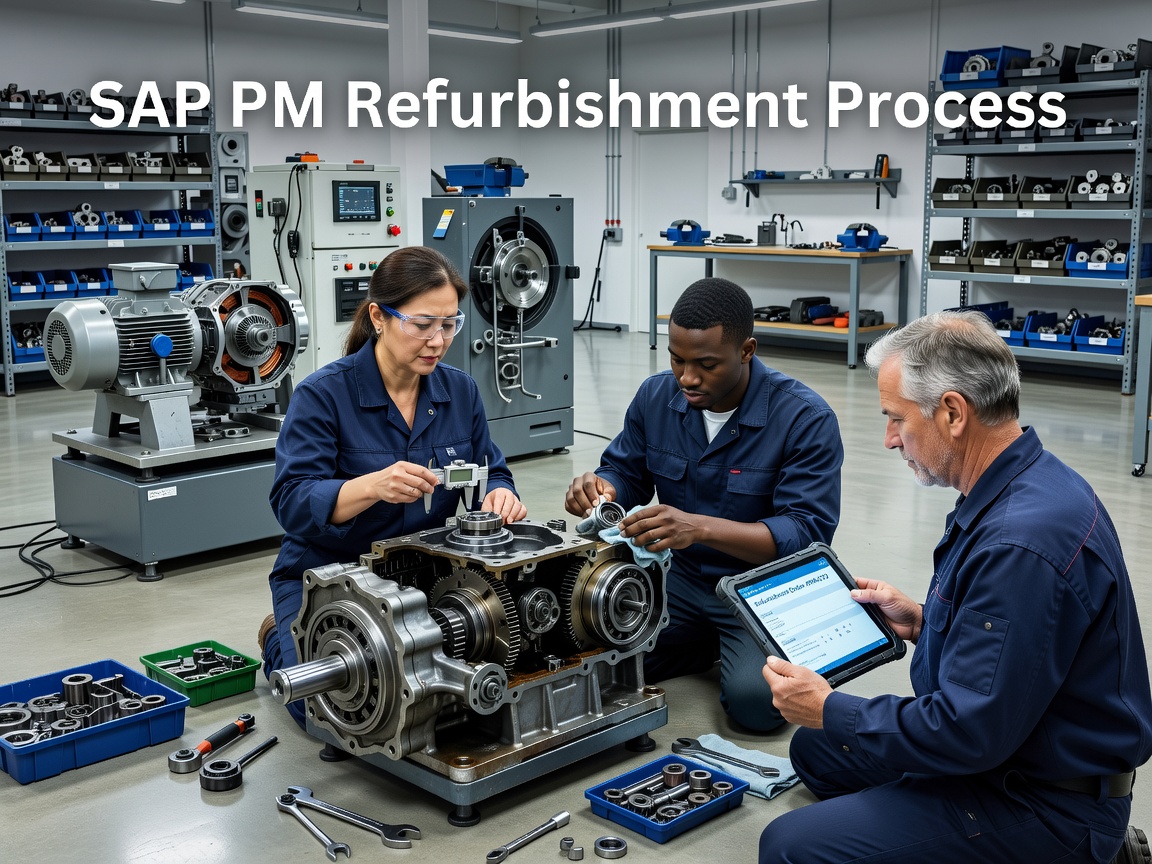
The Ultimate Guide to SAP PM Refurbishment Process
When burnt-out motors and damaged hydraulic pumps pile up on the shop floor, maintenance budgets balloon from purchasing expensive new replacements instead of repairing existing spares. Without proper inventory tracking, warehouses frequently mix up defective components with brand-new stock, causing costly operational delays. Standardizing the sap pm refurbishment process inside SAP Enterprise Asset Management (EAM) solves this by providing complete financial and inventory control over repairable parts. Understanding setup details in the SAP PM - Refurbishment Process Guide aligns maintenance and inventory teams, while structured parts management ensures warehouse stock reflects real-world asset conditions.
Core Prerequisites: Split Valuation and Serialization Profiles
The absolute cornerstone of SAP refurbishment is Split Valuation. Split valuation allows a single material master record (e.g., Material #100452, "50 HP Electric Motor") to be managed in inventory under separate valuation types with different financial values.
Standard configurations typically rely on three valuation types under a single valuation category (such as Category C - Condition-Based):
C1 / NEW: Brand new spare parts purchased directly from an OEM at full valuation price.
C2 / REFURBISHED: Repaired spare parts restored to functional condition, valued at a lower moving average price than new stock.
C3 / DAMAGED (or DEFECTIVE): Malfunctioning spare parts pulled from functional locations, assigned a minimal nominal value or zero value until repaired.
Alongside split valuation, high-value repairable assets utilize Serialization Profiles. Assigning a unique serial number to each physical material code enables true serialized tracking. This creates an explicit equipment-to-material link so that maintenance planners can track individual asset repair histories over years of operational service.
Module Integration Across SAP PM, MM, and FICO
Refurbishment in SAP is inherently cross-functional. It connects Plant Maintenance, Materials Management, and Financial Accounting/Controlling (FICO) into a closed loop:
Materials Management (MM) handles physical goods movements, warehouse locations, valuation types, and batch states. When a damaged part enters the shop, movement types manage store transfers.
Plant Maintenance (PM) plans and executes the physical work using dedicated refurbishment orders (Order Type PM04).
Financial Accounting and Controlling (FICO) captures direct maintenance costs (labor, secondary components, vendor fees) and offsets them when the completed asset is returned to warehouse inventory.
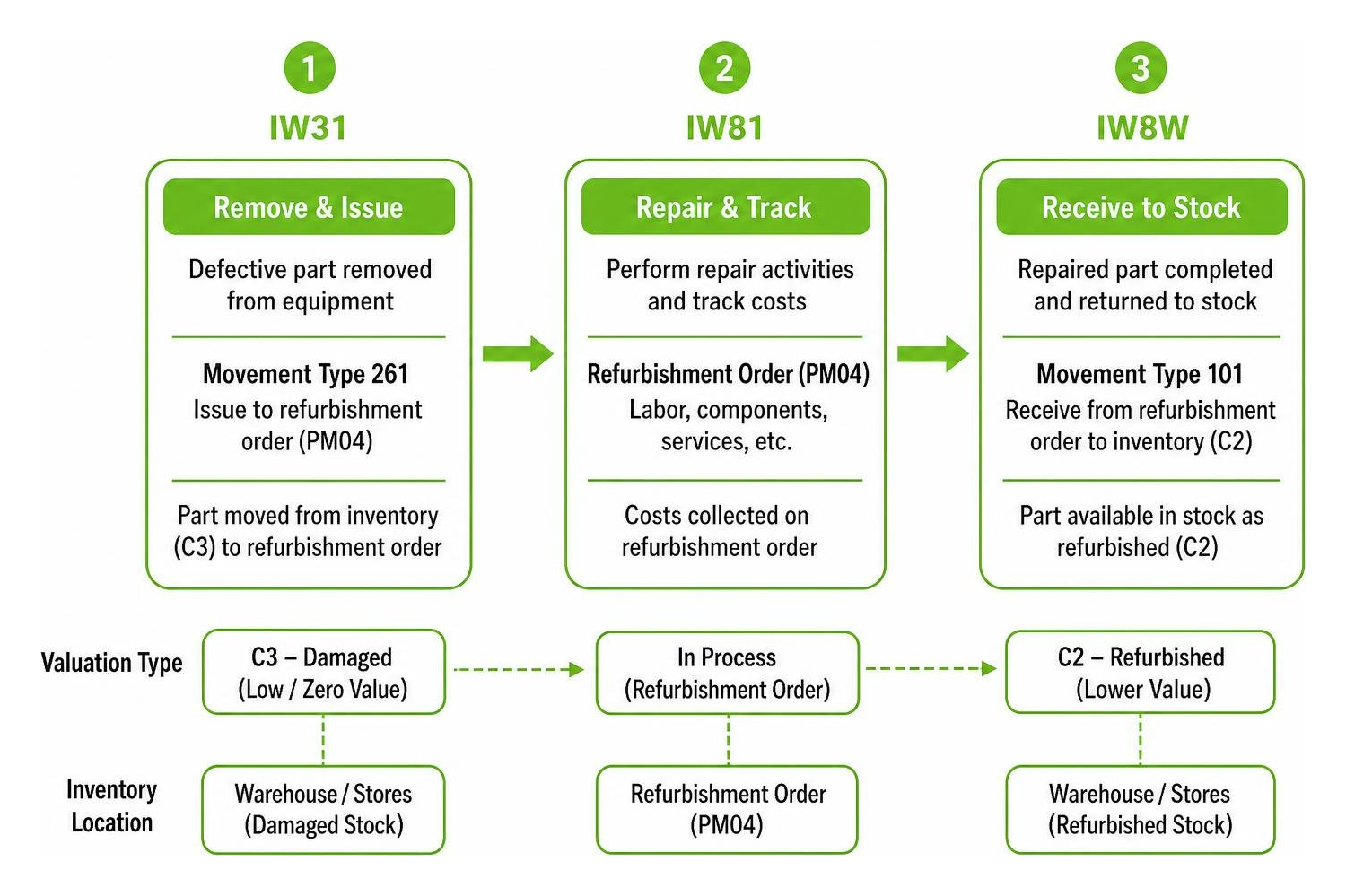
During the order lifecycle, Movement Type 261 issues the damaged component out of C3 inventory to the refurbishment order, absorbing its initial residual value. Upon repair completion, Movement Type 101 receives the refreshed asset into C2 inventory, automatically crediting the refurbishment order based on current valuation rules.
Step-by-Step Internal Refurbishment Workflow in SAP PM
When plant maintenance technicians perform repairs in-house, the internal refurbishment workflow guides the physical part from removal to warehouse re-entry.
Removing Defective Assets and Logging Stock Intake
The internal refurbishment process begins on the plant floor during breakdown or scheduled maintenance:
Technicians replace a failing or broken component on a machine using a standard corrective maintenance order created in transaction IW31.
The technician installs an operational spare from stock and returns the defective component to the warehouse using Movement Type 262 (Goods receipt for order reversing issue) or Movement Type 202, specifying valuation type C3 (DAMAGED).
The storekeeper accepts the damaged part into a designated damaged storage location. Maintaining an accurate work order history during this removal phase prevents unrecorded parts from accumulating on workbenches.
Executing the Internal SAP PM Refurbishment Process Step-by-Step
Once the defective part resides in C3 damaged inventory, the maintenance planner initiates the internal repair cycle:
Create Refurbishment Order (IW81): The planner opens T-code IW81, selecting order type PM04. In the header, the planner enters the material number, plant, originating storage location (C3 damaged), target storage location (C2 refurbished), quantity, and specific serial numbers.
Issue Damaged Material (MIGO / Goods Issue): The maintenance workshop issues the C3 damaged part from store stock against the PM04 order reservation using movement type 261.
Execute Work & Confirm Time (IW41): Technicians perform mechanical or electrical repairs, replacing internal wear components. Labor hours are posted via T-code IW41, and consumed consumable spares are charged directly to the order.
Goods Receipt of Refurbished Part (IW8W): Once fully tested, the technician or storekeeper executes a goods receipt using transaction IW8W (or MIGO). The system posts the refurbished asset into warehouse stock under valuation type C2 (REFURBISHED) using movement type 101. The refurbishment order automatically receives a financial credit corresponding to the delivery quantity multiplied by the C2 material price.
External Refurbishment (Subcontracting) vs. Internal Processing
Not all plant assets can be repaired in-house. Complex electronics, high-voltage transformers, or specialized hydraulic pumps often require vendor overhauls. SAP PM supports external refurbishment through a dedicated subcontracting process.
For long-term reliability, integrating vendor repairs into your broader planned maintenance calendar prevents unexpected backlogs at third-party repair shops. Detailed workflows can be reviewed in the standard Refurbishment Process Flowchart.
Key Differences in the External SAP PM Refurbishment Process
When executing an external refurbishment, the PM04 refurbishment order uses external control keys such as PM02 (external service) or PM03 (external operation) instead of standard internal control keys (PM01):
Subcontract Purchase Requisition: Saving a PM04 order configured with control key PM02/PM03 automatically generates a subcontracting Purchase Requisition (PR) with Item Category L (Subcontracting).
Purchase Order Creation (ME21N): Purchasing converts the PR into a Subcontract Purchase Order, linking the external vendor, pricing, and required component (the C3 damaged material).
Transfer Stock to Vendor (MIGO / Movement Type 541): The warehouse transfers the physical C3 damaged asset to special inventory status "Stock Provided to Vendor" using movement type 541 (or via ME2O/MIGO).
Goods Receipt from Vendor (MIGO / Movement Type 101 & 543): Upon return from the vendor, storekeepers process a goods receipt in MIGO. The system posts the refurbished component into C2 stock using movement type 101 while simultaneously consuming the C3 component from vendor stock via movement type 543.
Service Entry & Invoice (ML81N / MIRO): Financial teams verify external labor and freight costs via Service Entry Sheets (ML81N) and Invoice Verification (MIRO), charging external repair fees directly back to the refurbishment order.
Operational Feature Internal Refurbishment Process External Subcontracting Refurbishment Primary Order Control Key PM01 (Internal Operation) PM02 / PM03 (External Operation / Service) SAP Execution T-Codes IW81, MIGO, IW41, IW8W IW81, ME21N, ME20, MIGO, ML81N, MIRO Material Issuance Movement 261 (Goods Issue to Order) 541 (Transfer Stock to Vendor) Component Consumption Direct reservation consumption 543 (Automated consumption during GR) Primary Cost Drivers Internal technician hours & shop parts Vendor repair PO line items & freight fees Stock Receipt T-Code IW8W or MIGO MIGO (against Purchase Order)
Common Refurbishment Challenges and Implementation Pitfalls
While the standard workflow is robust, real-world implementations often hit operational snags:
Unsettled Order Variances: Failing to perform timely order settlements leaves remaining cost variances stranded on the PM04 order, distorting maintenance financial reporting.
Valuation Category Discrepancies: Posting goods receipts under the wrong valuation category (e.g., receiving a refurbished part as C1 NEW instead of C2 REFURBISHED) causes inventory valuation distortions in FICO.
Serial Number Desynchronization: Performing physical equipment swaps on the shop floor without updating serial number assignments in SAP leads to mismatched historical records between physical units and system entries.
Incomplete Master Data Governance: Attempting refurbishment without split valuation views established across all relevant storage locations causes transactional errors during goods movements.
Financial Cost Settlement and S/4HANA Best Practices
A refurbishment order acts as a temporary cost collector throughout the repair lifecycle. The order accumulates debits from labor hours, consumed sub-assemblies, and vendor invoices. It receives credits when the refurbished asset enters store stock.
At period-end closing, planners mark the order as Technically Complete (TECO). Executing transaction KO88 runs individual order settlement. The Settlement Profile configured for refurbishment orders directs any remaining cost variance (positive or negative) to a designated maintenance cost center or material price variance account.
In modern SAP S/4HANA environments, refurbishment management leverages streamlined architecture documented in SAP Process Navigator (under Best Practice scope items EAM_04 and EAM_05). Standardized Fiori applications streamline goods processing and order tracking across modern manufacturing footprints.
Enhancing Asset Operations Alongside ERP Systems
While SAP PM manages back-end logistics, inventory accounting, and purchase orders, shopfloor execution relies on real-time clarity from technicians.
Lean Technologies offers Thrive, an all-in-one, customizable shopfloor software for manufacturing. Developed by manufacturing experts, Thrive streamlines operations, boosts productivity, and improves profit through a cohesive, integrated platform.
Thrive is a digital platform built for small to midsize manufacturers to digitize lean work processes in real time without replacing ERPs or MES systems. It serves as a flexible digital toolbox for logging issues, tracking actions, and driving continuous improvement, not as an ERP or MES system.
Thrive provides real-time visibility only when processes are structured and data is entered at the source via mobile, tablet, or desktop. It organizes action from machine data entered by teams or imported from other systems, without collecting sensor data or running predictive alerts. By positioning Thrive as the fastest path to structured, accountable work processes, maintenance teams can bridge the gap between shop floor repair actions and ERP tracking.
Frequently Asked Questions about SAP PM Refurbishment Process
What is the primary difference between order type PM01 and PM04 in SAP PM?
Order type PM01 is standard for general maintenance tasks, plant repairs, and corrective maintenance work orders executed on functional locations or equipment. Order type PM04 is specifically structured for Refurbishment Orders. PM04 natively incorporates material headers, valuation type inputs (C1/C2/C3), serial number assignment lists, and inventory settlement rules required to return repaired parts to stock.
How does SAP update material valuation when receiving refurbished stock?
When posting a goods receipt for a refurbished item (e.g., via transaction IW8W or MIGO into valuation type C2), SAP calculates the stock inventory value based on the material's price control setting (Standard Price or Moving Average Price). The PM04 order is credited with the value of the delivered material (Quantity × C2 Unit Price). Any remaining cost difference between order debits and order credits is absorbed by price variance accounts or cost centers during financial settlement (KO88).
Which transaction code is used to execute goods receipt for internally refurbished parts?
The dedicated transaction code for posting goods receipt specifically against an internal SAP PM refurbishment order is IW8W. While standard MIGO (Goods Receipt against Order) can also perform this function, IW8W provides a streamlined interface designed specifically for refurbishment order processing, allowing users to enter target valuation types, quantities, and serial numbers directly.
What to Do Next
Mastering the sap pm refurbishment process provides asset-intensive manufacturers with tighter control over spare part inventories, reduced procurement expenditures, and clear visibility into repair costs. By configuring split valuation, managing serialization, and maintaining structured workflows for both internal and external repairs, organizations maximize the lifespan of critical machinery components.
To learn more about optimizing your shop floor execution, maintenance tracking, and asset workflows alongside your enterprise systems:
Explore our comprehensive guide to Maintenance Management Solutions to see how structured digital workflows enhance plant operations.
Discover how digitizing daily maintenance interactions drives shop floor accountability across manufacturing teams executing the sap pm refurbishment process.





