

The Best SAP PM Tables for Maintenance Planning
The Core SAP PM Tables Across Maintenance Workflows
The core sap pm tables include EQUI (equipment master), IFLOT (functional locations), AUFK and AFIH (maintenance orders), and QMEL (maintenance notifications). The SAP Plant Maintenance (PM) module contains over 100 database tables covering master assets, work execution, condition readings, and history. The underlying relational schema separates data into transparent tables to keep master records distinct from transactional records.
When you configure maintenance objects or design queries for operational reports, you need to navigate how technical objects connect to work orders, parts reservations, and status records.
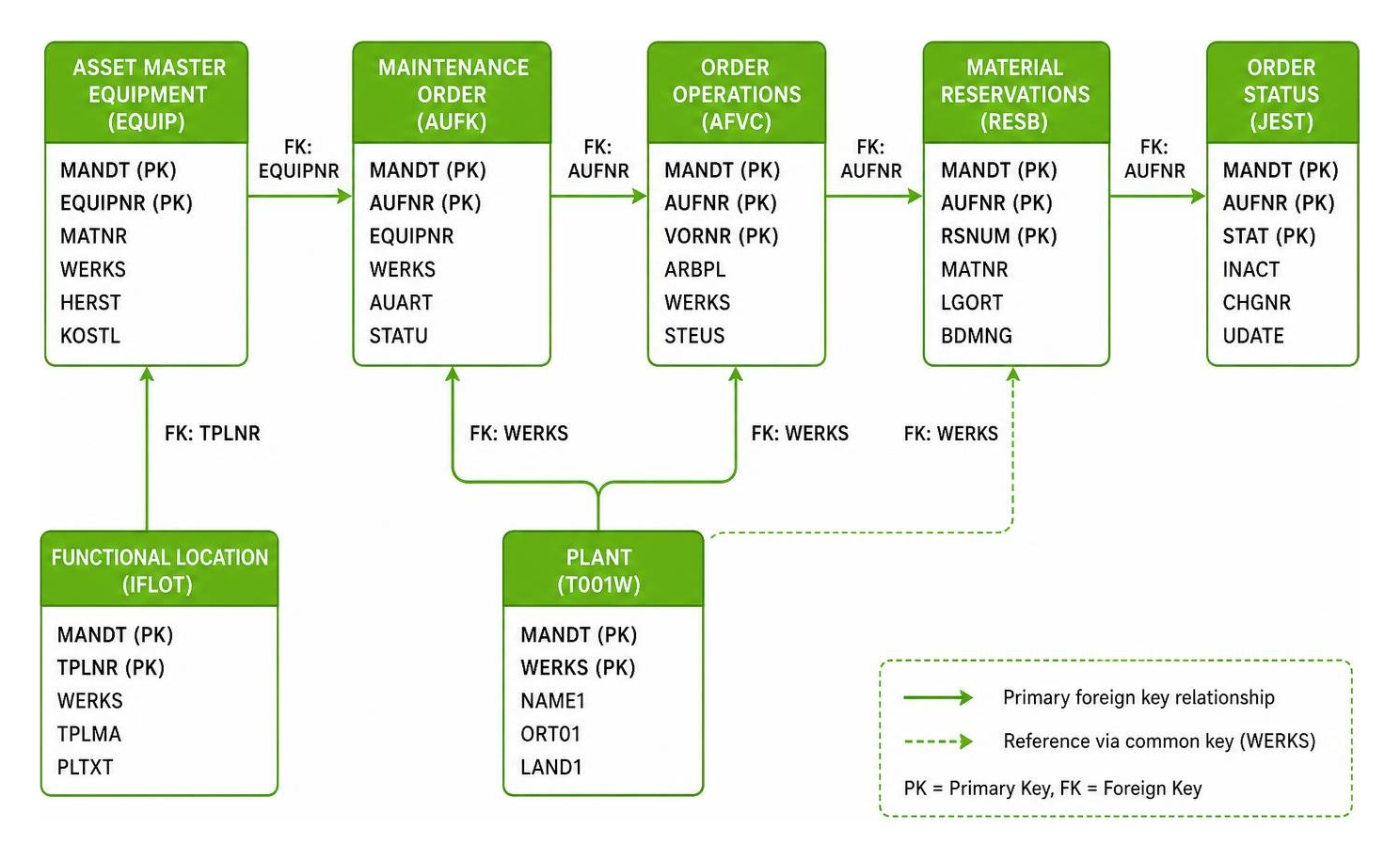
Technical Master Data SAP PM Tables for Assets and Locations
Master data forms the backbone of the sap pm module. Asset records capture what machinery you own, where it lives in the facility, its manufacturer details, and its financial assignment.
EQUI (Equipment Master Data): Central table for individual, physical assets. Key fields include
EQUNR(Equipment Number),TPLNR(Functional Location),SERIAL(Serial Number),HERST(Manufacturer), andTYPBZ(Model/Type).EQKT (Equipment Short Texts): Multilingual descriptions for equipment records, keyed by
EQUNRandSPRAS(Language Key).EQUZ (Equipment Time Segment): Tracks time-dependent equipment attributes such as cost center changes or technical category adjustments over time.
IFLOT (Functional Location Master): Represents the spatial, functional, or process-oriented hierarchy where equipment operates. Key fields include
TPLNR(Functional Location),IWERK(Maintenance Plant),BEBER(Plant Section), andINGRP(Planner Group).IFLOTX (Functional Location Short Texts): Stores language-dependent text descriptions for functional locations.
ILOA (PM Object Location and Account Assignment): Serves as a relational bridge connecting both
EQUIandIFLOTto cost centers (KOSTL), maintenance plants (SWERK), and work areas via the internal location pointerILOAN.
Feature | Equipment ( | Functional Location ( |
|---|---|---|
Object Type | Physical, movable, repairable asset | Static spatial or process position in a plant |
Key Identifier |
|
|
Maintenance History | Retained with the asset even if moved | Stays with the physical location regardless of swapped machinery |
Primary Use Case | Tracking serial numbers, rebuild history, run-hours | Structuring plant layout, lines, rooms, bays, and operational costs |
Order Execution and History SAP PM Tables
Transactional work orders manage planned interventions, emergency repairs, and the standard sap pm refurbishment process. Because SAP normalizes general order data across multiple functional modules, maintenance work orders rely on a combination of shared order tables and PM-specific extensions.
AUFK (Order Master Data): Generic header table shared across PM, PP, and CO. Contains
AUFNR(Order Number),AUART(Order Type),KTEXT(Description), andOBJNR(Object Number).AFIH (Maintenance Order Header): PM-specific extension table linked by
AUFNR. Stores asset references includingEQUNR,TPLNR,IWERK(Planning Plant),INGRP(Planner Group), andQMNUM(Originating Notification). For additional details, see the FAQ: PM/CS Tables - SAP Community.AFKO (Order Header Data for PP/PM Orders): Holds basic start/finish dates, scheduling parameters, and the routing counter
AUFPL.AFPO (Order Item): Manages line items, settlement rules, and batch assignments for refurbished spare parts.
AFVC (Order Operations): Stores individual work steps, craft disciplines, and control keys, linked to
AFKOviaAUFPLand operation numberVORNR.AFVV (Operation Quantities, Dates, and Values): Contains planned labor durations, standard work values, and scheduled timestamps for each operation.
AFRU (Order Confirmations): Stores actual technician time confirmations, completion remarks, and execution dates keyed by
RUECK(Confirmation Number) andRMZHL(Counter).RESB (Reservations and Material Requirements): Tracks reserved maintenance spare parts, required quantities, and issued stock linked to the order via
RSNUM(Reservation Number).
Maintenance Notifications, Catalogs, and Defect Codes
Maintenance notifications capture malfunction reports, breakdown logs, and work requests before work orders are generated. Plant Maintenance uses the standard SAP Quality Management notification schema:
QMEL (Quality / PM Notification Header): Central notification table holding
QMNUM(Notification Number),QMART(Notification Type, such as M1, M2, M3),AUFNR(Assigned Work Order),EQUNR,TPLNR, andOBJNR.QMIH (Maintenance Notification Excerpt): Stores breakdown flags (
MSAUS), downtime start/end timestamps, and Mean Time to Repair (MTTR) / Mean Time Between Failures (MTBF) calculation parameters.QMFE (Notification Items - Damage and Defects): Records specific damage codes, symptom descriptions, and item positions.
QMUR (Notification Causes): Stores root cause codes and catalog descriptions entered by technicians.
QMMA (Notification Activities): Records corrective steps and immediate actions taken during the breakdown.
QMSM (Notification Tasks): Tracks preventive actions and follow-up activities assigned to specific teams.
Preventive Maintenance, Task Lists, and Condition Monitoring
Standardizing preventive routines across an asset fleet requires linking task lists, maintenance schedules, and condition triggers into the standard sap pm process.
PLKO (Task List Header): Defines standard inspection routines, safety checklists, and operating instructions. Keyed by
PLNTY(Task List Type:Afor general,Efor equipment,Tfor functional location),PLNNR(Group), andPLNAL(Group Counter).PLPO (Task List Operations): Granular task steps, standard times, and safety instructions within a task list.
MPLA (Maintenance Plan Header): Manages preventive maintenance strategies, call horizons, and cycle parameters.
MPOS (Maintenance Item): Connects a maintenance plan (
WARPL) to target technical objects (EQUNR,TPLNR) and assigned task lists (PLNNR).MHIS (Maintenance Plan History): Tracks maintenance call logs, planned cycle dates, and resulting order numbers.
IMPTT (Measuring Points): Defines physical counters (e.g., run-hours, odometer) and condition points (e.g., vibration, temperature) keyed by
POINT.IMRG (Measurement Documents): Stores individual readings, entry dates, counter differences, and technician timestamps.
IBIPMPOS: A dedicated Data Dictionary structure (INTTAB) utilized for legacy batch input data migration (
RIIBIP00) of maintenance items into SAP systems.
Status Tracking, History, and Cost Settlement Tables
Every maintenance object in SAP PM (equipment, notification, order) carries an internal Object Number (OBJNR). System statuses dictate which business transactions are allowed at any given stage of the work lifecycle.
JEST (Individual Object Status): Stores active and inactive status codes for every
OBJNR. Key fields includeOBJNR,STAT(Status Code, such asI0001for Created,I0002for Released,I0045for TECO,I0046for CLSD), andINACT(Active Flag: blank if active, 'X' if inactive).TJ02T (System Status Texts): Maps technical status codes (
STAT) to human-readable abbreviations (e.g.,CRTD,REL,TECO,CLSD) based on language keySPRAS.COBRB and COBRA (Settlement Rules): Contain distribution rules and settlement parameters that allocate collected work order expenses to cost centers (
KOSTL) or WBS elements.
Failing to apply Technical Completion (TECO) within 48 hours blocks timely cost settlement and skews maintenance work order backlogs. Applying Business Closed (CLSD) finalizes historical reporting, locks financial postings, and releases unconsumed spare part reservations back to available stock.
Cross-Module Integration: Connecting PM to MM, QM, and PP
Plant Maintenance does not operate in isolation. It relies on Materials Management (MM) for spare parts, Quality Management (QM) for calibration inspection lots, and Production Planning (PP) for shared resource capacity. See the Plant Maintenance Tables (PM/CS/QM) - SAP Community overview for deeper structural diagrams.
MARA and MARC (Material Master Data): General and plant-level definitions for spare parts (
ERSA), assemblies, and consumables.EBKN and EBAN (Purchase Requisitions): Track external service purchase requisitions generated directly from maintenance order operations.
MSEG and MATDOC (Material Documents): Track physical goods movements and spare parts issues (Movement Type 261) against maintenance work orders.
QALS (Inspection Lot Record): Connects calibration maintenance orders to QM inspection lots for formal sign-off.
CRHD (Work Center Header): Defines maintenance crafts and work centers (
ARBPL), linking labor capacities across PM and PP execution.
How to Find and Query SAP PM Tables in Your System
When customizing reports or troubleshooting custom enhancements, several standard SAP GUI utilities help you identify exact database tables:
F1 / F9 Technical Information: Highlight any field on an SAP screen (such as transaction
IW32orIE03), press F1, click the Technical Information icon (or press F9), and review the underlying Data Element and Domain. Double-click the domain and execute a Where-Used List for database tables (this resolves the parent table in roughly 90% of non-generic domains).Transaction SE11 / SE84: Use the ABAP Dictionary to search tables filtered by Application Component PM (Plant Maintenance) or PM-EQM (Equipment and Technical Objects).
Transaction ST05 (SQL Performance Trace): Activate an SQL trace, run a maintenance transaction (e.g., release an order in
IW32), deactivate the trace, and display the log to see every table read and updated in real time.Transaction DB15 (Archiving Objects): Enter standard PM archiving objects such as
PM_ORDER,PM_EQUI, orPM_QMELto display a grouped list of all underlying transparent database tables.
Best Practices for Querying and Reporting on Maintenance Data
Extracting clean metrics like Mean Time to Repair (MTTR), Mean Time Between Failures (MTBF), and schedule compliance requires precise join logic:
Filter Active Statuses: When querying
JEST, always filter byINACT = ''(blank) to ensure you only evaluate active statuses, and join againstTJ02Tto isolate validTECOorCLSDstates.Language Key Consistency: Always include
SPRAS = sy-langu(or the target language key) when joining description tables (EQKT,IFLOTX,TJ02T) to avoid Cartesian products that duplicate row counts.Index Optimization: When querying high-volume transactional tables like
AFRU(Confirmations) orIMRG(Measurement Documents), filter by indexed fields such asAUFNR,EQUNR, or posting dates (ERSDA) to avoid expensive full-table scans.Eliminate Paper Bottlenecks at the Source: Advanced database tables are only as reliable as the inputs provided by technicians on the floor. When mechanics rely on paper workarounds, shift handoffs get missed and downtime logs are entered days late.
For small to midsize plants seeking to streamline daily execution, Thrive acts as the fastest path to structured, accountable work processes. Teams can view their open operational tasks directly on mobile devices, log equipment issues instantly, and ensure work data is clean before it ever reaches historical ERP records.
Frequently Asked Questions About SAP PM Tables
What is the difference between EQUI and IFLOT tables in SAP PM?
EQUI stores master data for discrete, physical assets that can be installed, dismantled, repaired, or moved (e.g., an electric motor or gearbox). IFLOT stores functional locations, which represent static spatial or operational structures in a facility (e.g., Line 1, Furnace Bay 3). When an asset is moved, its maintenance history moves with the EQUI record, while historical operating costs for that plant position remain attached to IFLOT.
Which tables store maintenance order status changes like TECO and CLSD?
Order status changes are stored in table JEST, which tracks status codes per object number (OBJNR). The human-readable text descriptions for system statuses (such as I0045 for TECO and I0046 for CLSD) are maintained in table TJ02T.
How do I link maintenance orders (AFIH) to equipment (EQUI) and notifications (QMEL)?
Join the generic order master table AUFK to AFIH using AUFNR. The AFIH table contains the direct reference fields EQUNR (to join with EQUI-EQUNR), TPLNR (to join with IFLOT-TPLNR), and QMNUM (to join with QMEL-QMNUM).
What to Do Next
Mastering sap pm tables helps maintenance planners, data engineers, and plant leaders build dependable reports, manage equipment backlogs, and track true asset costs.
However, ERP databases only reflect the information your team actually records. Paper workarounds, late shift logs, and unclosed continuous improvement loops lead to incomplete maintenance records.
Thrive is a digital platform built for small to midsize manufacturers to digitize lean work processes in real time without replacing ERPs or MES systems. Positioned as a flexible digital toolbox for logging issues, tracking actions, and driving continuous improvement, Thrive provides real-time visibility only when processes are structured and data is entered at the source via mobile, tablet, or desktop. It does not collect sensor data or run predictive alerts; instead, it organizes action from machine data entered by teams or imported from other systems.
Explore how to streamline your shopfloor workflows and improve execution with modern maintenance management tools that keep your frontline connected and accountable.





