
Demystifying Functional Locations and Equipment in SAP Plant Maintenance
Core Architecture of SAP PM Technical Objects
SAP PM technical objects are the master data entities—primarily functional locations and equipment masters—used to structure, track, and maintain physical and logical plant assets. Functional locations represent the places where maintenance happens, while equipment masters represent the individual, serialized assets that can be installed, moved, or repaired. To manage plant assets reliably, the SAP PM module organizes these physical assets and logical plant structures into a cohesive framework. At the center of this framework are two foundational organizational units: the maintenance plant and the planning plant.
A maintenance plant represents the physical location where assets operate and where maintenance work takes place (for instance, a specific manufacturing facility, packaging hall, or water treatment site). A maintenance planning plant, by contrast, is where maintenance tasks, labor capacities, and spare parts are scheduled and coordinated. Depending on your organization's operating model, you can set up:
Centralized planning: One central planning plant manages work orders, resources, and spare parts for several physical maintenance plants.
Decentralized planning: Each maintenance plant acts as its own planning plant, handling scheduling locally.
Partially centralized planning: Major overhauls and capital turnarounds are planned centrally, while daily reactive maintenance is handled on-site.
Every physical asset or system modeled in SAP PM belongs to these organizational structures through specific master data entities. Technical asset modeling relies heavily on assigning appropriate object types (such as PUMP, MOTR, or CRAN) to group similar assets across plants for unified analysis.
Dimension | Functional Location (IFLOT) | Equipment Master (EQUI) |
|---|---|---|
Core Concept | Logical or spatial place where maintenance occurs | Individual, physical asset that can be maintained independently |
Mobility | Fixed in place within the plant hierarchy | Mobile; can be installed, moved, repaired, or dismantled |
Primary Identifier | Alphanumeric string defined by a structure indicator | Unique internal or external equipment number |
Cost Tracking | Tracks operating costs tied to a physical area/line | Tracks lifecycle maintenance costs tied to a specific serialized asset |
History Retention | Retains operational history of the location across all installed machines | Retains cumulative maintenance history regardless of where it is installed |
BOM Association | Functional Location BOM (used for complete process units) | Equipment BOM or Material BOM (used for serialized machines) |
Functional Locations vs. Equipment: Understanding the Distinction
Understanding the boundary between a functional location and a piece of equipment is essential for practical asset management. A functional location represents a placeholder in your plant layout—like PACKAGING-LINE-01-DRIVE-ZONE. An equipment master, on the other hand, represents a specific physical machine—such as a 75 kW ABB motor with serial number SN-98234-A.
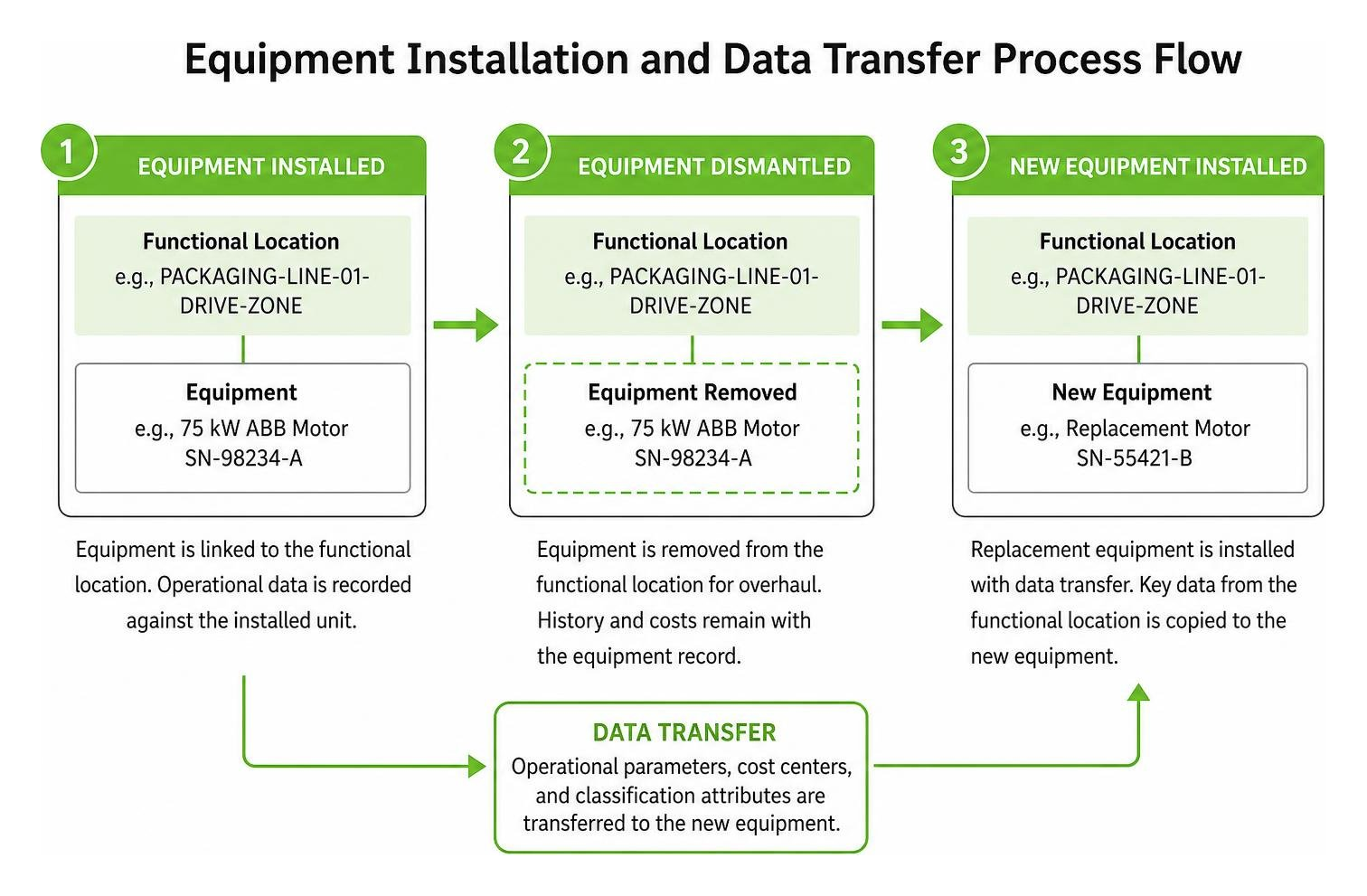
When an asset needs overhaul, technicians execute a dismantle process in SAP. The equipment record is removed from the functional location, preserving all past work history, running hours, and repair costs on that physical motor. A replacement motor is then linked to the position via the install with data transfer function. This action immediately copies operational parameters, cost centers, and classification attributes from the functional location down to the newly installed unit.
Using an organized equipment tracking system ensures you never lose historical tracking data when rotating repairable spares across production lines.
Bills of Materials (BOM), Assemblies, and Measuring Points
Maintaining plant assets requires structured linkages to spare parts and operational condition data:
Maintenance BOMs: A functional location BOM covers complete process systems, an equipment BOM tracks parts for a specific machine, and a material BOM links spare parts to a standardized material master (useful when dozens of identical pumps share the same seal kit).
PM Assemblies: Non-serialized structural elements (like an impellor assembly or gearbox casing) that allow you to locate faults on work orders without creating full equipment master records.
Measuring Points and Counters: Anchors for recording operating parameters such as vibration levels, motor operating hours, pressure differentials, and temperature readings. These readings feed preventive maintenance complete guide strategies, triggering scheduled services automatically when usage limits are reached.
Structuring, Classification, and Data Transfer
To build a searchable asset hierarchy, SAP PM uses structure indicators and edit masks. When you define a structure indicator, you establish character lengths, separators, and hierarchy levels for your functional location keys. Official SAP resources on configuring technical objects outline how edit masks standardize site coding across multiple enterprise locations.
Structuring SAP PM Technical Objects: Hierarchies and Spatial Layouts
SAP PM allows three primary structuring strategies:
Spatial Structuring: Organized by geographic site, building, floor, and bay (e.g.,
PLANT01-BLD02-FL01-BAY04).Technical Structuring: Organized by process flows, systems, and sub-systems (e.g.,
WATER-PURIFICATION-RO_SYS-STAGE01).Functional Structuring: Organized by operational purpose or production line sequence.
Organizations can also deploy reference functional locations as templates to rapidly replicate identical production lines, as well as define superior equipment and sub-equipment relationships to represent multi-stage machines (like a conveyor with distinct drive, tensioning, and belt sub-units).
Classification Systems, Characteristics, and Dynamic Data Transfer
The SAP classification system groups equipment and functional locations using standard class types (such as class type 002 for Equipment and 003 for Functional Locations). Within each class, you assign custom characteristics—such as operating voltage, flow rate, nominal pressure, or pipe diameter.
You can also assign an ABC indicator to flag asset criticality (e.g., A = High Business Impact / Safety Critical, C = Non-critical).
SAP PM supports two distinct data transfer mechanisms:
Hierarchical Data Transfer: Automatically pushes organizational data (like cost centers, work centers, and maintenance planners) from higher-level functional locations down to child equipment.
Horizontal Data Transfer: Copies technical attributes from a reference template or similar piece of equipment during master data creation.
Technicians can check the data origin tracking screen at any time to verify whether an asset attribute originated from its parent location or was manually overwritten. For system developers and database administrators, master data relationships can be analyzed directly across underlying SAP PM tables such as IFLOT, EQUI, and EQUZ.
Driving Maintenance Planning, Execution, and Cross-Module Integration
Technical objects act as the central reference points for every maintenance transaction across the shop floor. When a technician logs an issue, the equipment or functional location number is attached directly to the maintenance notification.
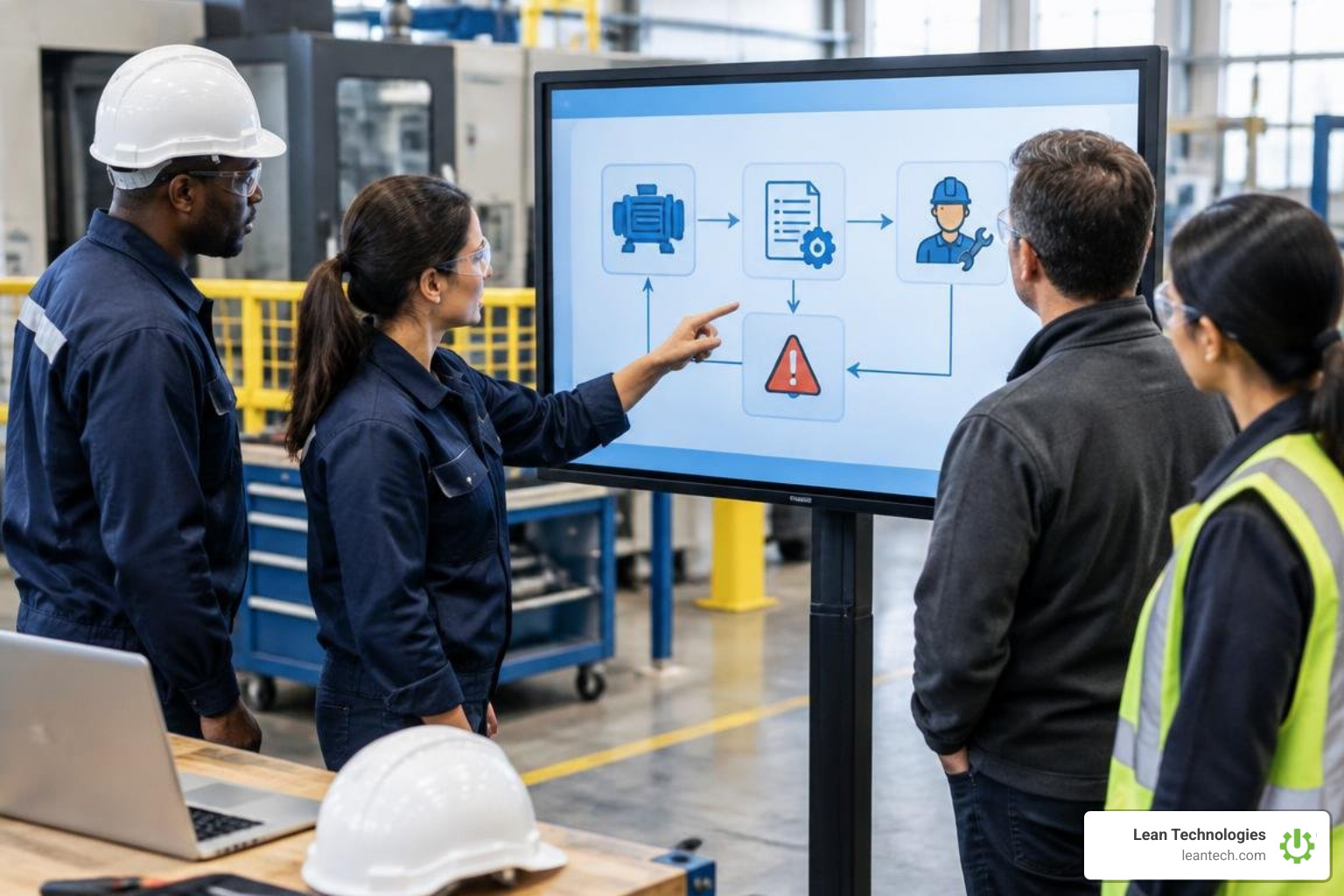
In modern enterprise architectures, developers interact with S/4HANA using standard OData interfaces mapped to records such as the SAP data dictionary table TECHNICALOBJEC_D.
Linking Technical Objects to Work Orders and Preventive Maintenance
When planners convert a notification into a formal maintenance order, the technical object serves as the operational anchor:
Cost Collector Assignment: The order pulls settlement rules directly from the technical object's assigned cost center or WBS element.
Task List Assignment: Standardized maintenance procedures (task lists) are linked directly to equipment categories or functional locations.
Order History: Every closed order updates the technical object's history file, allowing planners to review all past labor, spare parts usage, and downtime records via your maintenance work order system.
Cross-Module Integration: MM, PP, and QM Touchpoints
SAP PM technical objects integrate directly with core SAP business modules:
Materials Management (MM): Maintenance BOMs allow planners to reserve warehouse spare parts directly on a work order or trigger automatic purchase requisitions (PRs) for non-stock materials.
Production Planning (PP): Functional locations link directly to production work centers. When maintenance requires machine downtime, the system flags line capacity limits in PP, preventing scheduling conflicts between operations and maintenance crews.
Quality Management (QM): Equipment master records link directly to test equipment management (calibration orders), ensuring measuring devices are recalibrated against defined intervals before production release.
Lifecycle Management, Cost Control, and Implementation Best Practices
Managing assets effectively across their operational lifespan requires structured oversight from initial commissioning to final retirement.
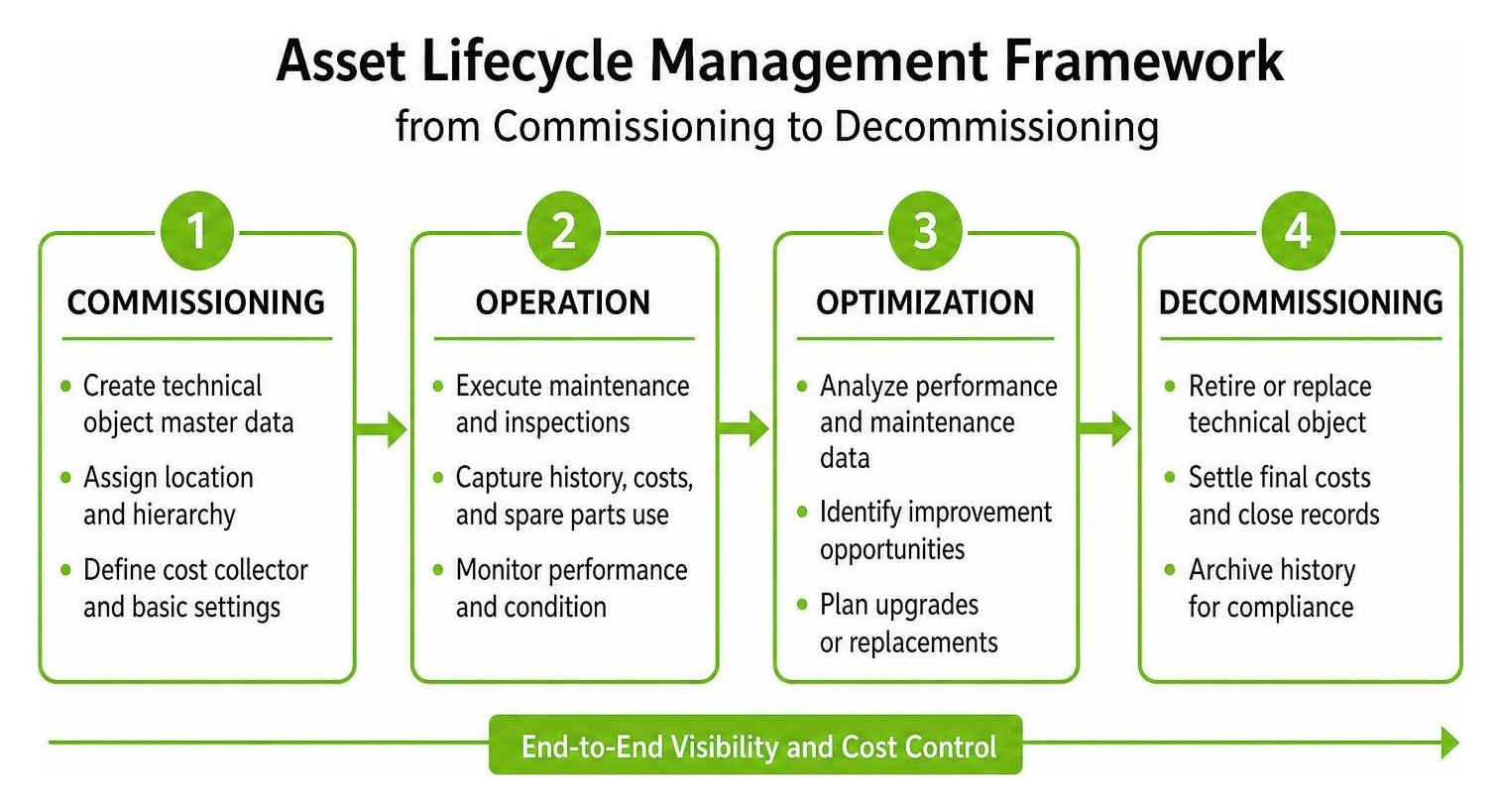
By capturing every repair expense against technical objects, organizations can calculate the true Total Cost of Ownership (TCO) and make informed capital expenditure decisions as outlined in modern asset lifecycle management strategies.
Master Data Governance for SAP PM Technical Objects
To keep technical object records clean and reliable across enterprise sites:
Use Internal Numbering for Equipment: SAP recommends using internal system numbering for equipment master records while using clear, structured descriptions. This avoids key duplication and optimizes database search speeds.
Standardize Functional Location Masking: Enforce consistent edit masks across all production sites so maintenance crews can easily identify plant areas.
Control Technical Object Types: Keep your technical object type catalog concise (e.g., standardizing on
PUMP,VALV,MOTR). Avoid creating overly specific types that duplicate standard classification characteristics.Establish Clear Role-Based Access: Restrict master data creation and status changes (such as decommissioning flags) to designated master data stewards.
Overcoming Common Master Data Pitfalls and Tracking Asset Costs
Without strict governance, maintenance databases often suffer from common operational pitfalls:
Data Drift and Incomplete Installations: Technicians often swap physical spares without completing the dismantle and install steps in SAP, corrupting maintenance histories and cost allocations.
Duplicate Equipment Records: Manual, unstructured data entry leads to duplicate records for the same machine, splitting cost histories and obscuring failure frequencies.
Incorrect Settlement Rules: Inaccurate cost center links cause maintenance expenses to settle to the wrong departmental budgets.
Unreliable Reliability Metrics: Incomplete breakdown start and end timestamps prevent accurate calculation of Mean Time Between Failures (MTBF) and Mean Time to Repair (MTTR).
Bridging the Shop Floor and Enterprise Asset Management
While SAP PM serves as a powerful enterprise system of record for accounting, procurement, and asset hierarchies, frontline teams often struggle with heavy transaction screens and complex desktop interfaces during daily operations. In busy plant environments, operators and line supervisors need fast, intuitive ways to capture equipment abnormalities, track handover actions, and log root causes right at the machine.
This is where lightweight digital tools bridge the gap between daily lean routines and enterprise ERP platforms. Lean Technologies provides Thrive, an all-in-one digital toolbox purpose-built for small to midsize manufacturers.
Thrive is not an ERP or MES system and does not replace your core SAP landscape. Instead, it digitizes shop floor lean work processes, giving operators and supervisors an accessible mobile and tablet interface to log machine abnormalities, coordinate centerlines, manage 5S audits, and drive continuous improvement actions without relying on paper clipboards or disconnected spreadsheets. Rather than running automated sensor collection or predictive algorithms, Thrive captures and organizes critical operational context directly from the people running the lines, giving maintenance and production leaders clear visibility into shop floor execution.
By combining disciplined master data in SAP PM with streamlined frontline logging through Lean Technologies maintenance solutions, manufacturing plants can eliminate paper workarounds and maintain accurate asset histories across their entire operation.
Frequently Asked Questions About SAP PM Technical Objects
What is the primary difference between a functional location and equipment in SAP PM?
A functional location represents an operational place or system position where a maintenance task is carried out (e.g., LINE-01-FILLER-STATION), whereas an equipment record represents a physical, serialized asset (e.g., a specific drive motor) that can be installed, moved between locations, or sent out for refurbishment.
How do technical object types differ from equipment categories?
An equipment category is a fundamental SAP system control key that determines numbering ranges, screen layouts, and field selection rules during master data entry. An object type is a descriptive classification attribute (such as PUMP or CONVEYOR) used primarily to group and filter similar assets for maintenance reporting.
Can an equipment record exist without being assigned to a functional location?
Yes. Standalone equipment records can exist independently in the system. This commonly applies to mobile fleet vehicles, rotating spare parts stored in maintenance workshops, or repaired assets circulating through a refurbishment loop prior to line reinstallation.
What to do next
Audit Your Plant Hierarchy: Review your existing functional location edit masks and ensure equipment master records reflect current shop floor machine layouts.
Standardize Equipment Types: Review your technical object types and replace custom, duplicate entries with standardized classification characteristics.
Engage Frontline Operators: Equip maintenance teams and operators with accessible digital interfaces that make logging machine issues and maintenance handovers fast and accurate.
Align Cross-Functional Teams: Establish clear master data ownership between maintenance planners, production managers, and IT teams to ensure long-term data integrity across your enterprise systems.





