
Modern Production Counting Tools to Keep Operators in Sync
Track Piece Counts While the Shift Is Still Running
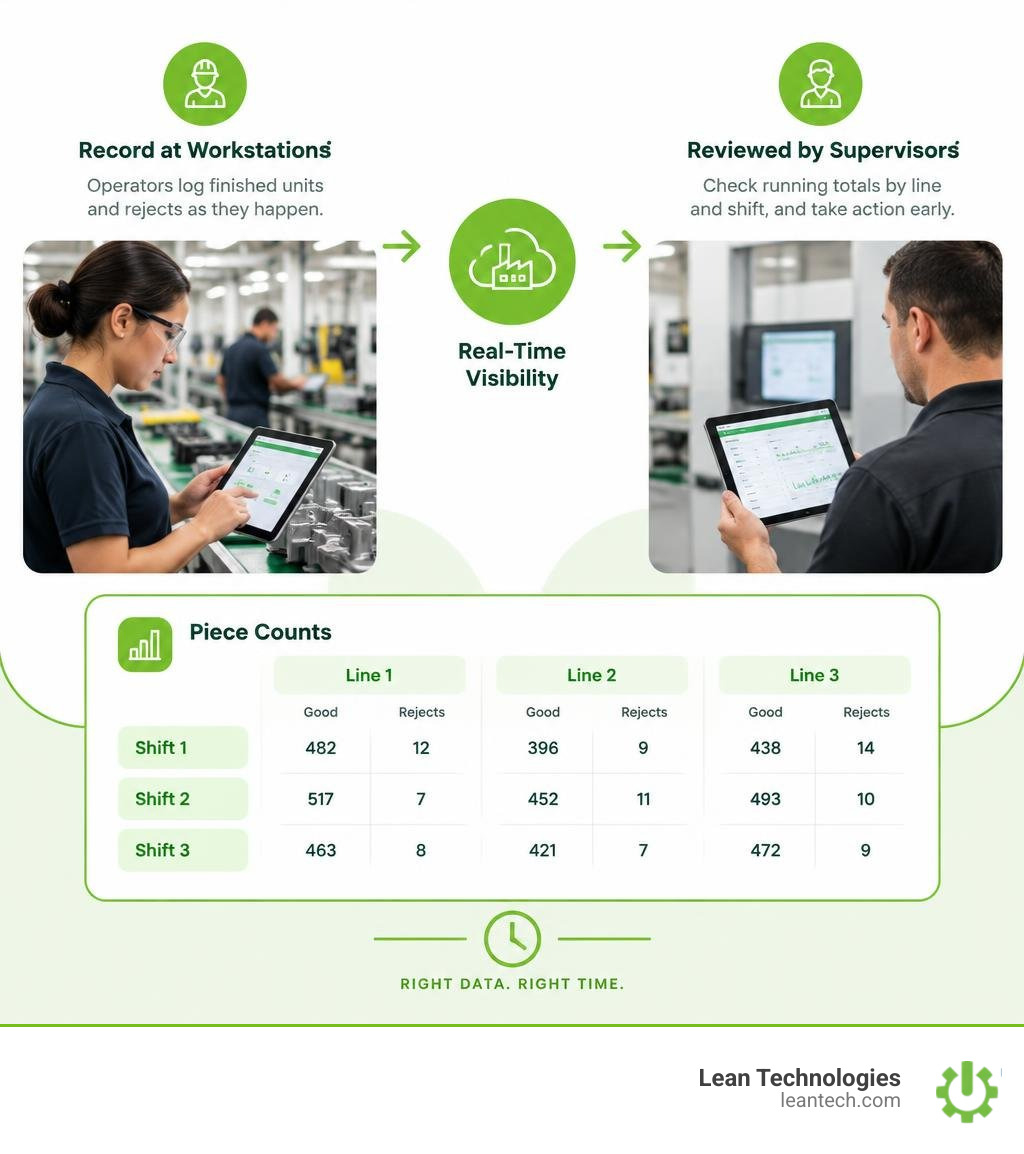
Still waiting for paper tally sheets to find out whether a line hit its target? To track factory piece counts in real time, set up production counter software at each counting point, have operators record finished units and rejects as they happen, and check the running totals by line and shift. Clear labels and a consistent shift handover help keep those counts useful.
The goal is to give supervisors a count they can act on before the shift ends. Thrive helps small and midsize manufacturers put that information to work: operators and supervisors can log issues, track actions, and improve lean processes. It is not an ERP or MES, and it does not replace either. Thrive organizes data entered by the team or imported from other systems, with real-time visibility when people enter information at the workstation instead of logging it later on paper.
What Is Production Counter Software and How Does It Work?
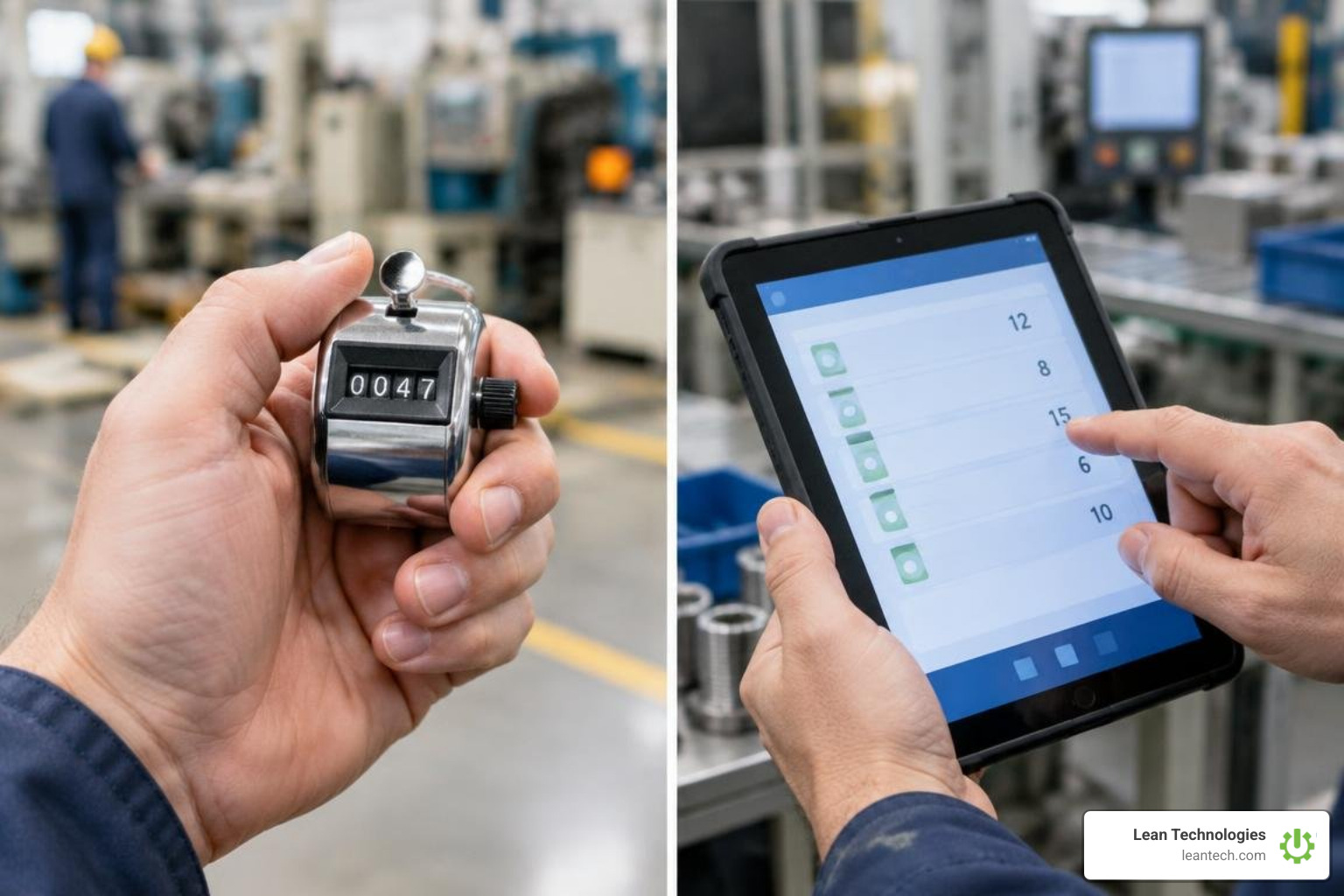
A production counter is any tool used on the factory floor to record the quantity of parts, assemblies, or finished goods produced during an operational period. For decades, plants relied on mechanical thumb clickers, physical stroke counters on stamping presses, or whiteboard tick marks to keep track of output.
While mechanical counters register basic numbers, they keep that data locked at the physical workstation. Supervisors must walk the floor to read values, and nobody knows an hourly run rate has plummeted until someone manually transcribes numbers onto a whiteboard or paper clipboard.
Modern production counter software replaces these disconnected devices with responsive digital interfaces that run on tablets, smartphones, industrial touchscreens, or browser windows. Instead of a single mechanical wheel turning with each stroke, a digital counting app lets an operator tap a screen or interface directly with digital inputs to log good parts, categorize defects, and record operational pauses.
When deployed across your facility, digital counting tools serve as the front line for your factory data collection system. When an operator records a count, the software immediately updates running shift totals, calculates target-versus-actual deltas, and structures the data so plant leadership can see line performance as it happens.
Core Capabilities of Production Counter Software
Digital counting tools bridge the gap between simple manual tallies and complex automation. Key capabilities include:
Multi-Grid Piece Counting: Operators can run multiple active tallies on a single screen to distinguish between different product variants, batch numbers, or assembly stages.
Segmented Scrap and Rework Logging: Instead of just recording total parts, operators log rejected parts alongside specific reason codes (such as dimensional defects, surface blemishes, or burrs).
Target Progress Tracking: Visual indicators highlight whether the current run rate is ahead of or behind takt time, giving operators immediate feedback on shift quotas.
Undo and Correction Controls: Unlike a mechanical clicker that requires resetting the whole unit when an operator misclicks, digital counters allow immediate tap corrections to protect tally integrity.
Offline Data Persistence: Industrial environments often have spotty Wi-Fi. Browser-based digital counters use local device storage to ensure counting never stops even if the network drops.
Production Counter Software vs Heavyweight MES Deployments
When manufacturing leaders realize paper tally sheets are failing them, their first thought is often a full-scale Manufacturing Execution System (MES). However, full MES platforms can cost anywhere from $50,000 to over $500,000, take months or years to implement, and demand extensive PLC integration and dedicated IT overhead.
For manual assembly cells, secondary packaging lines, kitting stations, and visual inspection areas, heavyweight systems are often over-engineered. Understanding how plant managers track production by shift without an MES shows that lightweight digital counting tools provide the targeted visibility teams need without the complexity of an enterprise overhaul.
Feature / Capability | Mechanical Clickers & Paper Sheets | Production Counter Software / Apps | Heavyweight Enterprise MES |
|---|---|---|---|
Initial Setup Cost | Minimal ($10–$30 per clicker) | Extremely low / Accessible software | Very High ($50k–$500k+) |
Time to Deploy | Immediate | Minutes to days | 6 to 18 months |
Data Visibility | Post-shift or next day | Real-time at workstation | Real-time across enterprise |
Defect Categorization | Handwritten notes (high error rate) | Multi-counter categorical logging | Automated via PLC / Vision / Scanners |
Hardware Requirements | Physical clicker, paper, clipboards | Standard tablets, phones, PCs | Industrial PCs, PLCs, servers |
Maintenance & Overhead | Manual data entry labor | Minimal (browser or app updates) | Dedicated IT and systems engineers |
Ideal Operational Fit | Very low-volume manual operations | Manual lines, inspection, kitting, fabrication | Fully automated, high-speed lines |
For operations looking for rapid digital adoption, lightweight tools provide immediate shop floor value without infrastructure overhauls.
Key Metrics You Can Track with Digital Production Counting
Tracking piece counts digitally does far more than answer "how many did we make?" It turns simple taps into actionable operational metrics that drive continuous improvement.
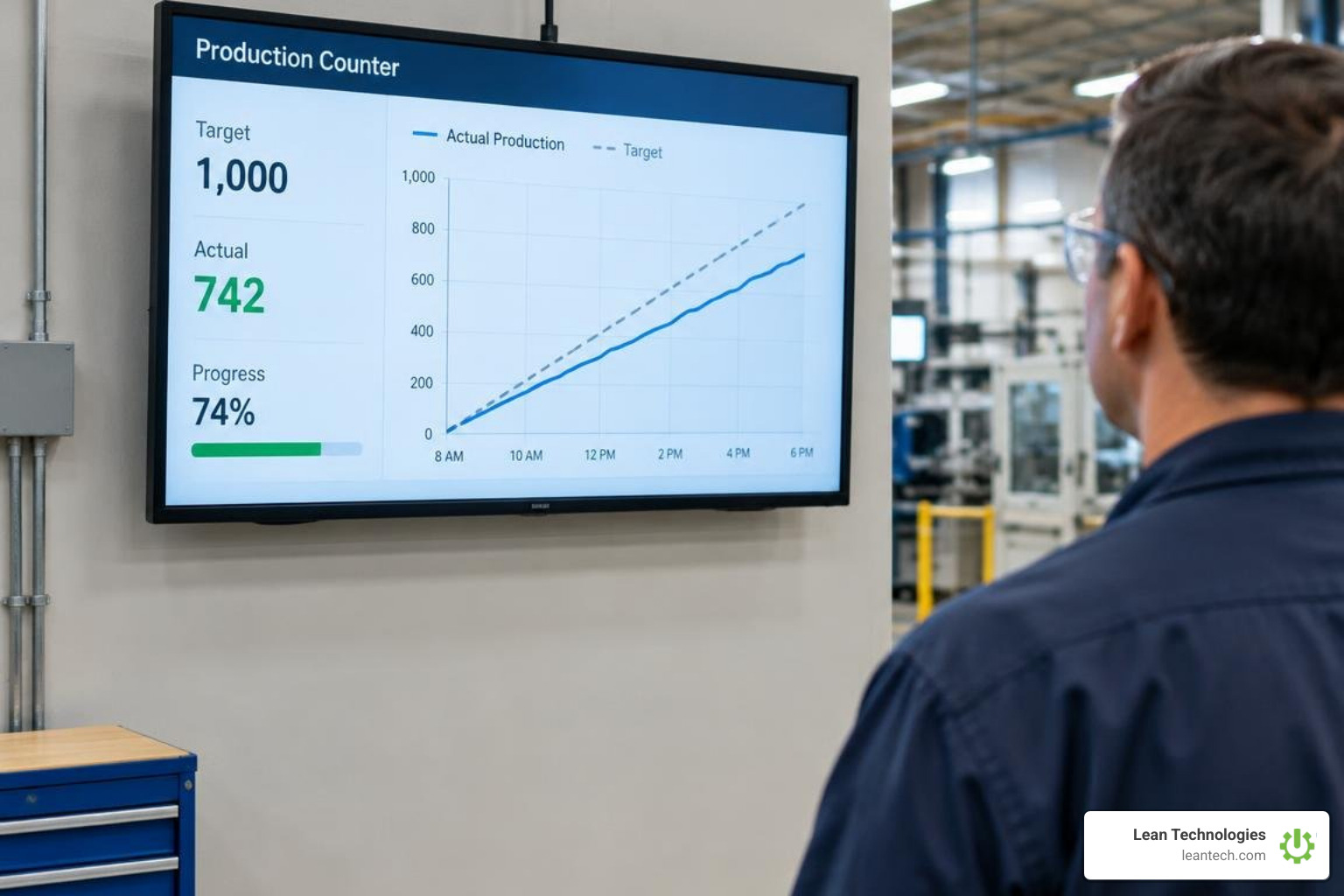
When operators log production and quality events at the workstation, your operations team gains access to reliable shop floor analytics:
Hourly Run Rate: The number of parts produced per hour compared against your planned production rate, exposing mid-shift slowdowns before they cause late shipments.
First-Pass Yield (FPY): The percentage of units coming off the line that meet quality standards without requiring rework, calculated as good units divided by total units entered.
Scrap and Defect Rates: The exact ratio of scrap pieces to total manufactured parts, giving quality engineers clear data for continuous improvement initiatives.
Overall Equipment Effectiveness (OEE) Inputs: Accurate counts of total pieces, scrap parts, and operating time provide the baseline data highlighted in OEE manufacturing software to calculate availability, performance, and quality scores.
By establishing structured defect and scrap tracking directly at the counting station, operators categorize rejected parts in real time. This immediate categorization prevents defective batches from moving downstream into final packaging.
Monitoring Production Rate and First-Pass Yield
Tracking cycle times and production rates against your planned takt time keeps human-paced operations balanced. When operators tap to record completed parts, team leads can immediately see if a station is falling behind pace.
Following practical production efficiency software methods, supervisors can calculate:
Production Pace: Actual pieces produced divided by elapsed shift hours.
Takt Time Adherence: Comparing actual cycle time per piece against the customer demand rate.
Yield Percentage: (Total Good Units Produced / Total Units Started) × 100.
This immediate visibility allows supervisors to reallocate personnel, clear upstream part shortages, or adjust feed rates while the shift is actively running, rather than reviewing a missed target the following morning.
Capturing Shift Downtime and Pareto Defect Types
Digital counting interfaces make it simple to track non-productive events alongside finished goods. By dedicating specific counters to operational delays, operators log downtime events as they occur:
Machine fault or mechanical jam
Material starvation or waiting for parts
Tooling changeover and setup
Operator break or shift change
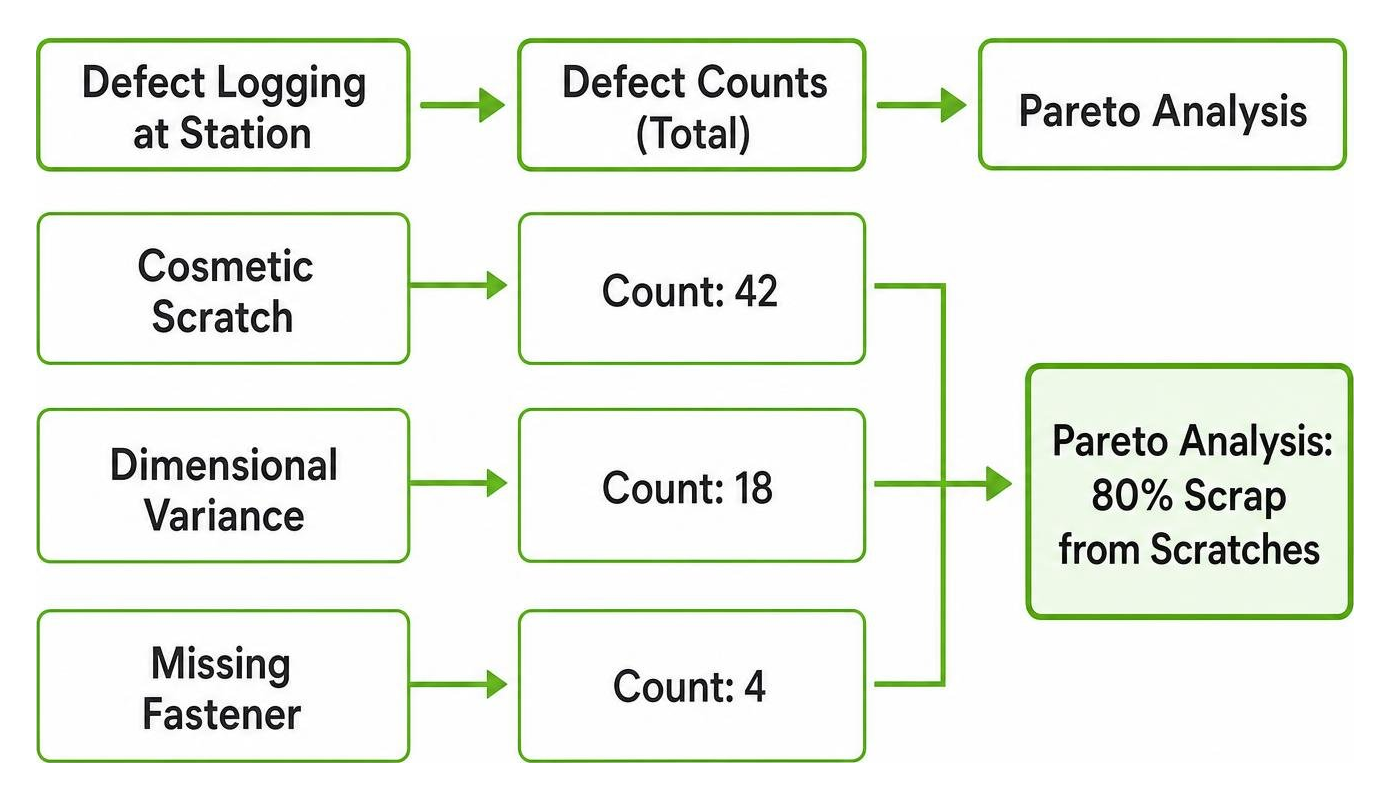
When quality engineers analyze these categorized counts, they can run a Pareto analysis to identify which 20% of defect types cause 80% of scrap volume. This data guides root cause problem solving and keeps continuous improvement teams focused on high-impact fixes.
Step-by-Step Guide to Implementing Digital Piece Counting on the Shop Floor
Transitioning your team from paper tally sheets or mechanical clickers to a digital counting workflow is straightforward. Follow these three steps to build a reliable counting process.
Step 1: Mapping Counting Points Across Lines and Inspection Stations
Start by identifying the critical control points where physical counts provide the most operational value. Rather than putting a counter at every single hand-off, focus on:
Line Infeed: Where raw parts or subassemblies enter the cell, establishing your total started volume.
Bottleneck Workstations: The pacing operation that dictates total line throughput.
In-Process Quality Inspection Stations: Where parts undergo visual, dimensional, or functional testing.
Kitting and Packing Stations: Where finished items are boxed, labeled, and prepared for palletization.
Positioning counting tools at these strategic locations gives plant managers end-to-end visibility through real-time production monitoring without overwhelming operators with unnecessary data entry steps.
Step 2: Configuring Multi-Shift Counters and Offline Local Storage
Industrial shop floors present practical challenges: dropped Wi-Fi connections, physical vibrations, and multi-shift handovers. Set up your digital counters to handle these environments:
Enable Offline Local Storage: Ensure your counter interface saves tap events to the browser or device memory locally. If network connectivity drops, counts remain accurate and intact.
Set Shift-Based Labeling: Label individual counters with clear identifiers including Shift Number, Line ID, Part SKU, and Counter Type (e.g., Line 2 - Shift 1 - SKU A400 - Good Parts).
Mount Hardware Ergonomically: Place tablets or touch interfaces within easy reach of the operator’s natural hand path, ideally mounted to workstation frames using adjustable VESA arms.
Standardizing this setup establishes reliable manufacturing shop floor data collection practices across every operational work center.
Step 3: Establishing Standard Operator Handover and Data Export Protocols
A digital count is only as good as the operating discipline behind it. Standardize the shift-ending procedure:
Reconcile Physical vs. Digital Counts: At shift end, the operator verifies digital piece counts against completed totes, pallets, or bins.
Document Operational Notes: Operators log any notable equipment downtime reasons or material flaws directly alongside the final counts.
Export and Reset: Export the count log via CSV or digital shift summary, then reset the active counter grid for the incoming shift crew.
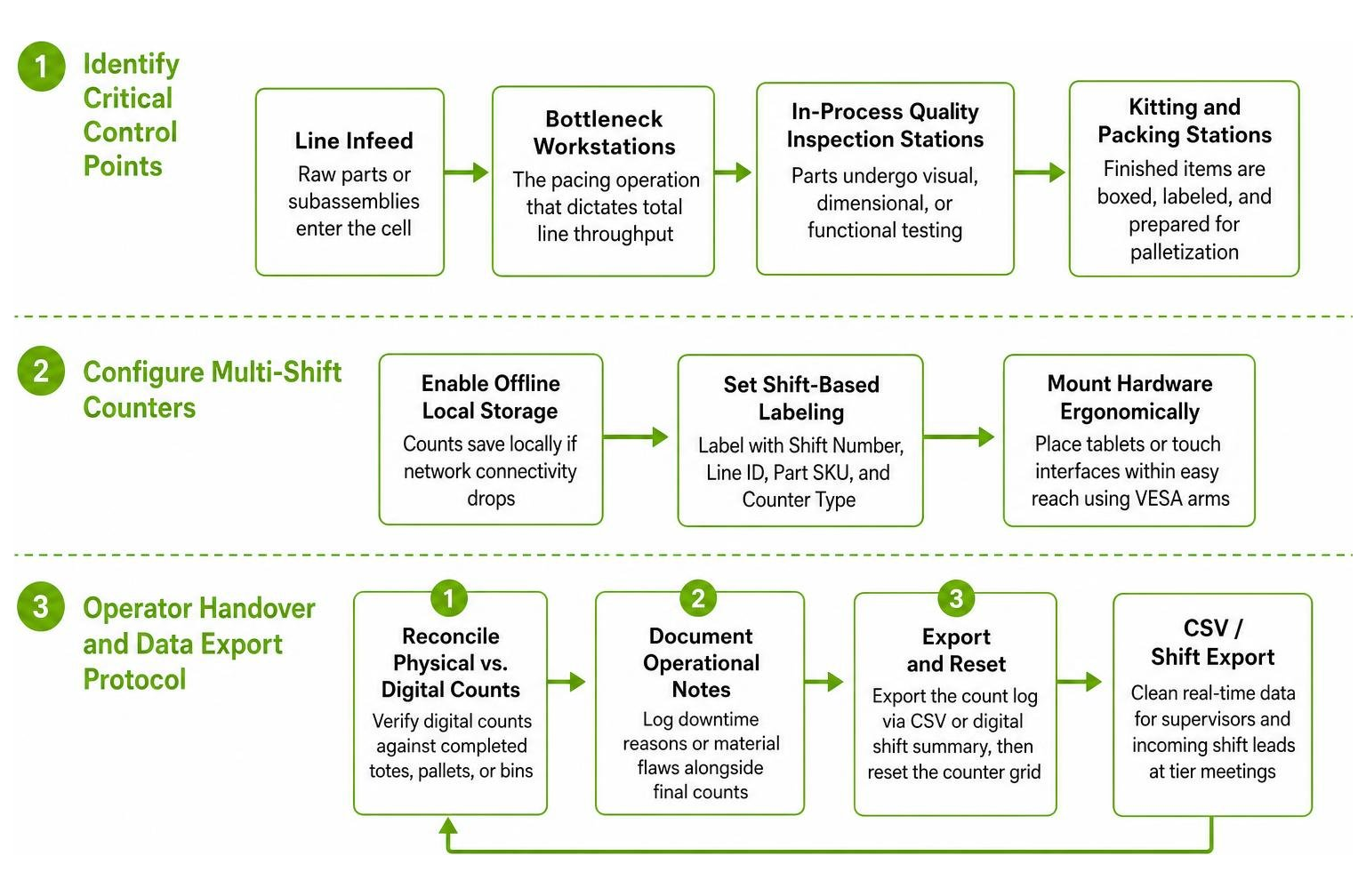
This structured routine provides clean lean shopfloor real-time data for supervisors and incoming shift leads during morning tier meetings.
Frequently Asked Questions About Shop Floor Piece Counting
Can multiple operators count simultaneously on the same production line?
Yes. On balanced manual assembly lines or high-volume cells with multiple operators, each team member can run an independent counter on their own mobile device or mounted tablet. Operators track their specific subassembly counts or inspection stations separately. At the end of the shift, supervisors aggregate these individual station counts into the overall cell summary to evaluate station balancing and individual cycle times.
Does production counter software work offline in restricted factory environments?
Many digital tally counter applications and browser-based tools are designed with an offline-first architecture. They utilize the browser's local storage (LocalStorage or IndexedDB) to write every tap directly to the device’s solid-state memory. If your plant has restricted Wi-Fi, industrial RF interference, or strict network firewalls, operators can continue counting with zero latency or risk of data loss.
How do operators export end-of-shift counts for management reporting?
Operators typically export counts by generating a timestamped digital summary, downloading a structured CSV file, or capturing a formatted shift screenshot of the counter grid. These files are attached to shift handover logs or imported directly into reporting spreadsheets, eliminating manual transcription errors and saving valuable shift-change time.
What to Do Next
Accurate piece counting is foundational to lean manufacturing, but recording the numbers is only the first step. When operators spot a trend—such as an increase in cosmetic scratches or an hourly output dip—they need a clear system to flag that issue, assign an owner, and resolve the root cause.
Thrive is an all-in-one, customizable shopfloor platform designed by manufacturing experts to streamline operations, boost productivity, and improve profitability. Thrive serves as a flexible digital toolbox for small to midsize manufacturers that digitizes lean work processes to help operators and supervisors log issues, track actions, and drive continuous improvement.
Thrive is not an ERP or MES system, and it does not replace your existing ERP or MES. Instead, Thrive organizes and drives action from machine and production data when entered by your team or imported from other systems. It gives your leadership real-time visibility when data is captured at the source on mobile devices, tablets, or desktop stations, rather than logged later on clipboards or spreadsheets.
To learn more about connecting your shop floor workflows, explore our guide to digital lean manufacturing or request a demo with our team today.





