

The Best Program Management Software to Keep Your Sanity Intact
Managing Multiple Projects Without Losing Your Mind
Program management software is the category of tools that helps organizations plan, track, and align multiple related projects under a single strategic umbrella — instead of managing each one in isolation.
If you're trying to find the right tool fast, here are the main categories of software to consider:
Platform Category Best For Key Focus Agile-Focused Tools Technical and software teams Sprint planning and dependency mapping Collaborative Work Managers Cross-functional teams Task assignment and visual timelines Enterprise PMO Systems Large organizations Portfolio prioritization and budget tracking Spreadsheet-Style Databases Reporting-heavy teams Grid-based tracking and custom formulas
Now, here's the real problem.
Most operations managers aren't running one project. They're running five to fifteen at once — a new line startup, a quality initiative, a safety audit, a CI program, and a capital equipment install. All at the same time. All sharing the same people and budget.
And most teams are still tracking all of it in spreadsheets and email chains.
That's not a workflow. That's a liability.
Research shows that organizations with mature program management are far more successful than those without it. The gap isn't small. The difference shows up in on-time delivery, resource efficiency, and how quickly teams can respond when something goes sideways.
The problem isn't that people don't care. It's that they don't have the right visibility. When your data lives in five different places and gets updated once a week — or once a week is optimistic, maybe once a month — you're always reacting to problems that already happened. By the time the spreadsheet catches up, the damage is done.
Program management software changes that equation. It connects your projects, your people, your timelines, and your strategic goals into one place — so you can see what's happening right now, not what happened last Tuesday.
For manufacturing operations teams specifically, this isn't just a productivity play. It's the difference between running a plant and chasing a plant.
What is Program Management Software and Why Do You Need It?
To understand why dedicated program management software is essential, you have to look at how work actually flows through an organization.
When operations leaders run multiple initiatives, they aren't just looking at individual tasks. They are looking at the bigger picture: How do these initiatives impact our bottom line? Are we over-allocating our best engineers? Is a delay on Line 1 going to cascade and derail the entire product launch?
At its core, program management is about coordinating related projects so they deliver a larger business outcome, not just a stack of disconnected task lists.
If you try to answer these questions using basic tools or standard spreadsheets, you run into a wall. Spreadsheets don't show real-time resource constraints. They don't flag dependencies automatically. And they certainly don't align daily shopfloor actions with high-level corporate goals.
Dedicated program management software acts as a central nervous system for your initiatives. It ensures that every project under a program works in tandem to drive strategic alignment, maximize resource optimization, and maintain overall portfolio health.
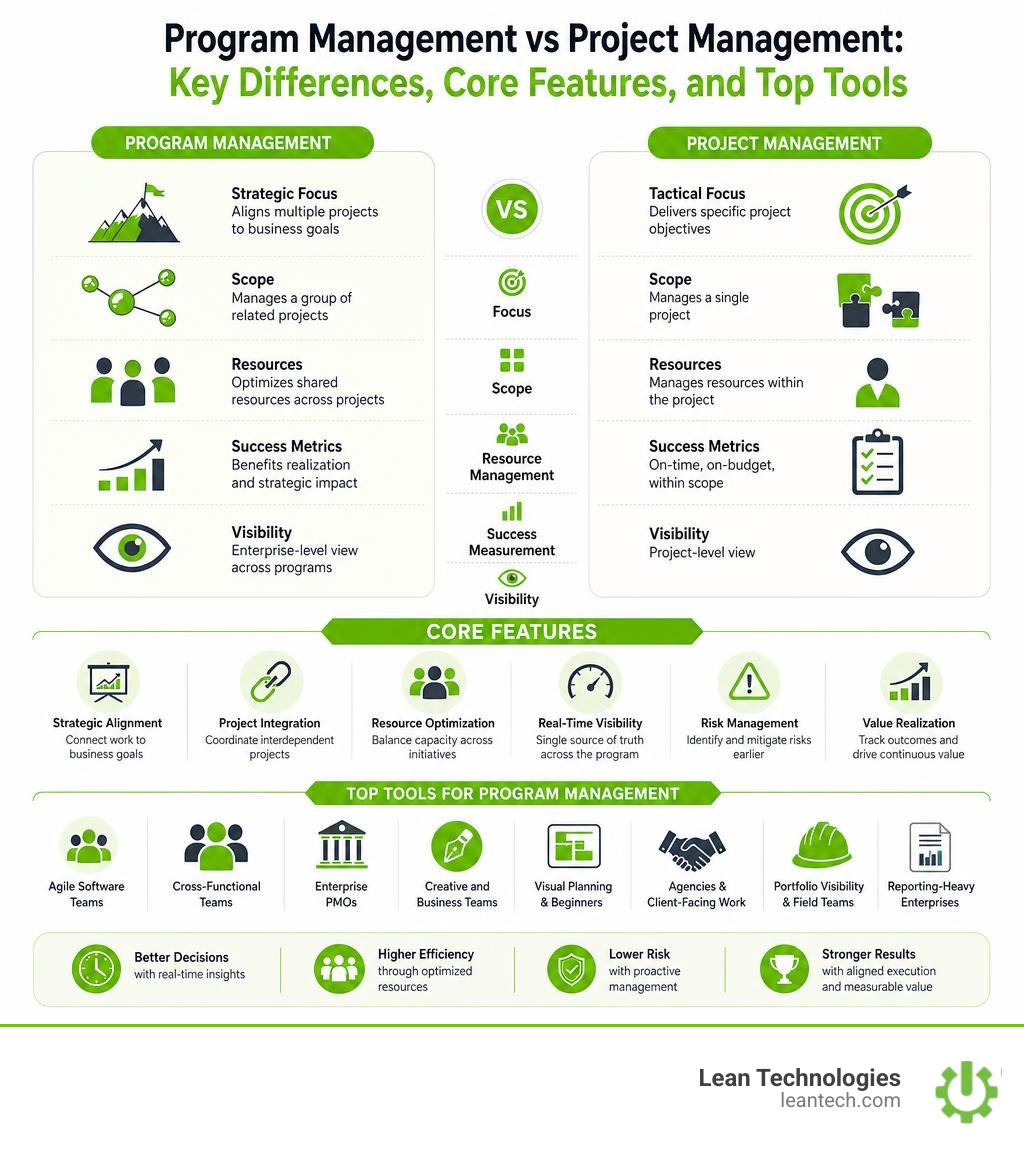
Key Differences: Project vs. Program Management Software
It is common to confuse project management with program management, but they serve entirely different purposes.
Project Management Software is tactical. It is designed to track a single, defined initiative from start to finish. It focuses on task lists, individual timelines, and specific deliverables. If you are tracking the installation of a single conveyor belt, you are using project management.
Program Management Software is strategic. It connects and manages multiple related projects (often 5 to 20+) simultaneously. It focuses on cross-project dependencies, high-level resource constraints, and portfolio visibility. If you are managing the transition of an entire plant to a digital lean model-which involves machine moves, operator training, software implementation, and safety audits-you are managing a program.
Think of a project manager as a train conductor making sure one specific train arrives on time. A program manager is the station master, coordinating all incoming and outgoing trains to prevent collisions, optimize track usage, and ensure the entire network runs efficiently.
To keep your daily tasks aligned across these larger programs, using a dedicated Project Tracking tool ensures nothing slips through the cracks.
How Program Management Software Prevents Strategic Drift
Plans drift. It is a quiet, constant problem that accelerates when reality on the ground changes faster than your monthly or quarterly planning cycles. In fact, industry data shows that $250 million is lost annually to strategic drift, and 1 in 3 enterprise projects fail because execution drifts away from strategic goals.
When you run programs without a single source of truth, teams work in silos. The engineering team might pivot to solve an immediate machine issue, unaware that their shift in focus delays a critical compliance audit scheduled by the safety team.
Program management software stops strategic drift in its tracks. It connects daily execution directly to your high-level strategic goals. When a timeline slips or a resource is reassigned on the shopfloor, the software immediately reflects the impact on the broader program. This allows continuous improvement (CI) leaders and operations managers to make real-time adjustments before the program veers off course.
By integrating robust Change Management frameworks and real-time Workflow Tracking, organizations can pivot quickly when bottlenecks arise, ensuring that every hour spent on the floor directly supports corporate objectives.
Core Capabilities of High-Performing Platforms
Not all platforms are created equal. If you are evaluating program management software, you cannot rely on simple task managers that call themselves "portfolio solutions." You need a platform built to handle complexity, balance resources, and provide deep visibility.
High-performing platforms must offer a centralized roadmap, track cross-project dependencies, and deliver the real-time data needed to make data-driven decisions.

Resource Allocation and Workload Balancing
The biggest bottleneck in any program is almost always people. If your key maintenance technician is scheduled to support three different project startups next Tuesday, your timeline is already broken—you just don't know it yet.
Effective program management tools include advanced capacity planning features. These tools allow managers to see real-time availability across the entire team, preventing burnout and eliminating wasted capacity. Ideally, your software should help you maintain a healthy 75% to 85% resource utilization rate.
Visualizing this work is critical. Using a digital Kanban Board Tool allows teams to see workloads dynamically. If one team member is over-burdened, managers can drag and drop tasks to redistribute the workload instantly, keeping the entire program balanced.
Risk Management and Cross-Project Dependencies
In a complex program, projects do not live in a vacuum. They are highly interdependent. If the electrical team does not finish wiring the new production line, the software integration team cannot test the PLC code.
Dedicated program management tools allow you to map these relationships explicitly using Gantt charts and critical path scheduling. If a task on the critical path is delayed, the system automatically shifts all dependent timelines and flags the risk to the program manager.
This level of risk mitigation requires structured follow-up. Using proactive Follow-up Tools on Action Items ensures that when a dependency is threatened, the responsible team member is notified immediately to resolve the blocker. This keeps your broader Project Management efforts on track and under budget.
Unified Workflows and System Integrations
Your program management software should not be another isolated island of data. To be truly effective, it must integrate seamlessly with the tools your teams already use every day—including financial systems, time-tracking tools, and ERPs.
Modern platforms offer robust API connectivity to synchronize data across your business. For instance, when an engineer logs hours against a specific task on the shopfloor, those hours should automatically sync to your program's budget tracker. This level of integration eliminates manual reporting and ensures that your high-level portfolio views are always backed by accurate, real-time data.
To see how leading platforms structure these connected portfolios, bridging the gap between daily execution and strategic planning is key. For managing the actual execution of these initiatives, structuring them as clear Projects within your integrated workflow is essential.
How Different Types of Program Management Tools Compare
To help you choose the right platform for your organization, let's look at how the leading categories of program management software solutions stack up in terms of features, capabilities, and usability.
1. Agile-Focused Enterprise Platforms
Best For: Technical teams and large-scale enterprise planning.
Key Features: Unmatched dependency mapping, robust agile reporting (sprints, epics, story points), and extensive third-party integrations.
The Catch: The interface is highly complex and has a steep learning curve. Additionally, the cost can grow substantially when you add the necessary plugins to make it work for non-technical teams.
2. Collaborative Work Management Tools
Best For: Cross-functional team collaboration and human-agent workflows.
Key Features: Clean, intuitive interface, customizable portfolios, and visual connection of goals to daily tasks. These platforms often release monthly updates, including AI-powered project summaries and capacity planning improvements.
The Catch: Pricing structures can feel deceptive, often requiring purchasing user seats in large blocks, which is not always disclosed upfront.
3. Traditional Enterprise PMO Systems
Best For: Enterprise PMOs requiring rigorous portfolio prioritization.
Key Features: Scenario planning, AI-assisted project initialization, budget and cost management, and multi-methodology delivery (Agile, Waterfall, Phase-Gate).
The Catch: It is a heavy, formal system that may be overkill for smaller, fast-moving teams.
4. Hybrid Field and Office Tools
Best For: Hybrid teams that need to balance office planning with field execution.
Key Features: Real-time workload charts, portfolio roadmaps, secure collaboration, and mobile apps that allow frontline workers to update tasks on the go.
The Catch: While highly flexible, they often lack some of the deep software-engineering-specific features found in pure agile platforms.
5. Visual Board-Based Platforms
Best For: Visual learners and teams looking for an easy-to-use starting point.
Key Features: Exceptionally customizable visual boards, drag-and-drop automations, and pre-built templates.
The Catch: Advanced program management features, like multi-board portfolio dashboards, are often locked behind higher-priced tiers.
6. Creative and Production Management Tools
Best For: Creative production and marketing programs with complex proofing needs.
Key Features: Robust proofing features for external reviewers, flexible effort tracking, and frequent release updates.
The Catch: The interface is complex and can feel cluttered. Notifications can quickly become overwhelming if not configured carefully.
7. Client-Facing Professional Services Platforms
Best For: Professional services and agencies managing client-facing programs.
Key Features: Excellent portfolio-level health indicators, built-in time tracking, and client billing features.
The Catch: They are highly optimized for client work; if you only manage internal programs, many of the billing and client-facing features will feel like unnecessary clutter.
8. Spreadsheet-Style Databases
Best For: Organizations transitioning from Excel that still want a spreadsheet-style interface.
Key Features: Powerful formula functions, real-time portfolio dashboards, and monthly product enhancements.
The Catch: If your team struggles with spreadsheet adoption, a grid-heavy interface will not solve that cultural hurdle.
For a broader perspective on how these and other tools compare in real-world testing, exploring independent reviews of project management software can help you understand how simpler Kanban systems compare to enterprise platforms. If you are looking for a highly simplified, no-clutter tool for smaller teams, a basic task tracker is also worth considering.
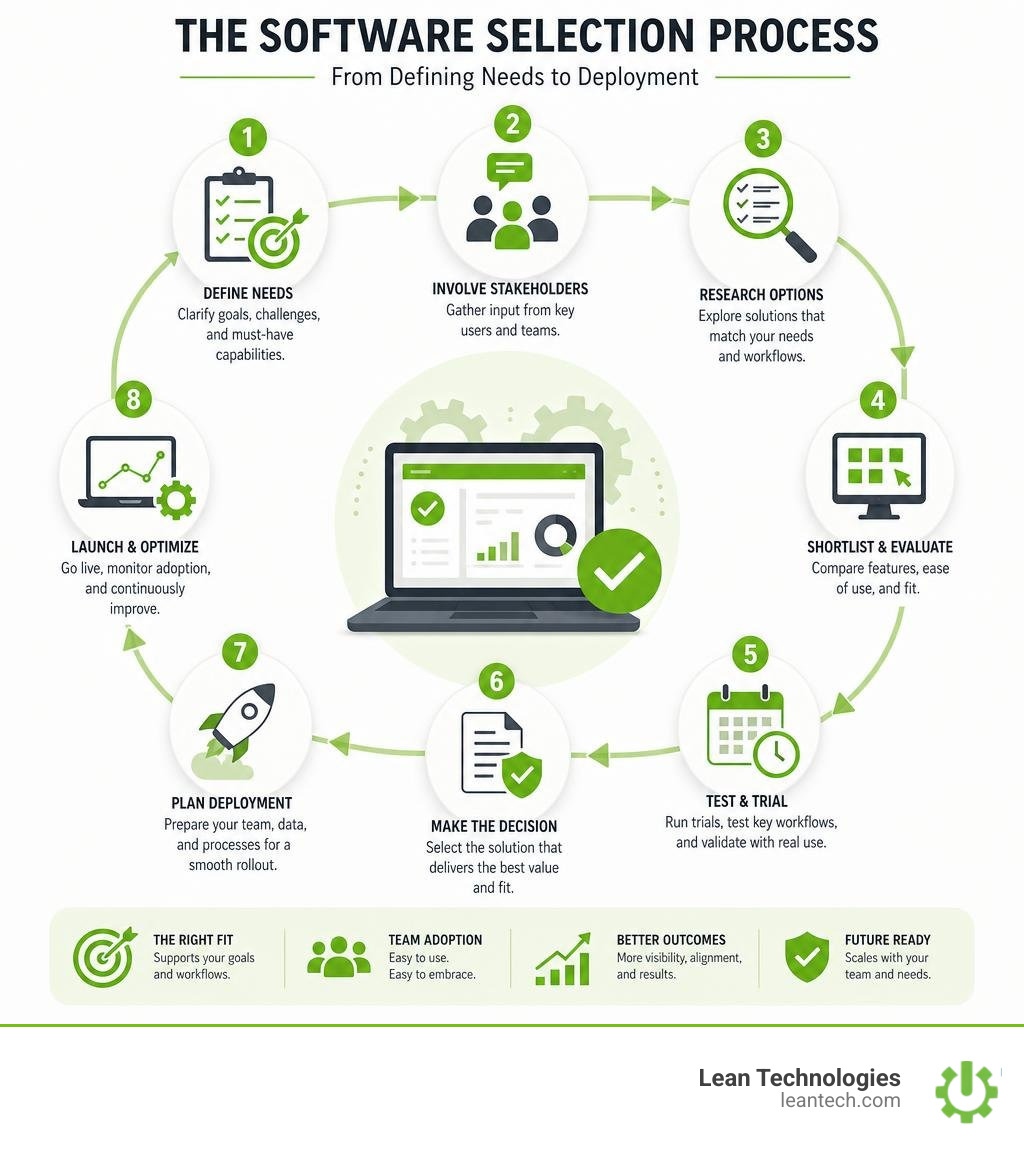
How to Evaluate and Select the Right Platform
Selecting the right program management software is not about finding the tool with the most features. It is about finding the tool that your team will actually use.
If you buy a highly complex enterprise platform but your supervisors find it too difficult to navigate, they will quietly go back to tracking their work in Excel. You will have paid for a premium software license while still suffering from zero real-time visibility.
Defining Your Team's Operational Needs
Before you start signing up for free trials, sit down and define your team's actual workflows.
How many projects are you managing simultaneously?
Do your teams work at desks, or are they on their feet on the shopfloor or in the field?
What is the technical expertise of your average user?
If your team is primarily on the floor, mobile usability is not a nice-to-have; it is a critical requirement. You need a platform that allows operators and supervisors to log issues and update task statuses in real time using tablets or mobile devices.
Furthermore, the tool must support your leadership workflows. Implementing Leader Standard Work and maintaining physical or digital Performance Goal Boards ensures that the data in your software directly reflects the daily goals of your team.
Avoiding Common Implementation Pitfalls
The biggest failure point in any software rollout is adoption. To ensure a successful implementation, keep these three guidelines in mind:
Prioritize Data Hygiene: If your team does not trust the data in the system, they will not use it. Establish clear rules for who updates tasks and how often. Clean out old, unused workflows and automations quarterly to keep the system clean.
Account for Training Costs: Do not assume your team will figure out the software on their own. Budget time and resources for hands-on training sessions, and select "software champions" in each department to help their peers.
Test with Real Work: When trialing a new platform, do not just play around with dummy data. Input an actual, active program with real dependencies and shared resources. Run it in parallel with your old system for two weeks to see where the friction points are.
Frequently Asked Questions about Program Management
What is the difference between project and program management?
Project management focuses on the tactical execution of a single, defined initiative with a specific start and end date. Program management focuses on the strategic coordination of multiple related projects to achieve broader business objectives, optimize resource allocation, and manage cross-project dependencies.
Why should we move away from spreadsheets for program tracking?
Spreadsheets lack real-time data synchronization, do not support automated dependency tracking, and quickly suffer from version control issues. When managing multiple interconnected initiatives, spreadsheets require hours of manual updating and offer zero proactive visibility into resource bottlenecks or timeline risks.
How does program management software integrate with existing ERP systems?
Most modern program management platforms offer open APIs or pre-built connectors to integrate with ERPs. This allows the software to pull critical production or financial data from the ERP to update project budgets, track resource costs, and align shopfloor execution with high-level business goals without duplicate data entry.
What to Do Next
If you are managing a busy manufacturing shopfloor, you already know that high-level planning tools only solve half the problem. You can have the most beautiful Gantt chart in the world, but if your operators cannot easily log issues, track actions, and drive continuous improvement in real time, your program will still fail.
That is where Thrive by Lean Technologies comes in.
Thrive is an all-in-one, customizable shopfloor software developed by manufacturing experts specifically to streamline operations, boost productivity, and improve profit. Thrive is not an ERP or a heavy MES. Instead, it is a flexible, real-time digital toolbox designed to help operators and supervisors digitize lean work processes right at the source.
Whether you are tracking downtime, managing safety audits, or closing the loop on continuous improvement initiatives, Thrive delivers the real-time visibility you need to keep your programs on track—without the headache of paper-based workarounds or outdated spreadsheets.
Stop managing your shop floor through spreadsheets and wishful thinking. Let your team run lean, work with real-time visibility, and keep your sanity entirely intact.





