

Master SAP Plant Maintenance Planning and Scheduling for Real Plant Efficiency
Turn Maintenance Backlogs Into Workable SAP Schedules
A pump needs service, but the part is missing and production has no time set aside. SAP plant maintenance planning and scheduling helps you catch those gaps before work reaches the floor. Start by recording the issue or setting up a preventive plan. Then define the job, check parts and labor, agree on a maintenance window, and dispatch the work.
The goal is not just to put a date on an order. It is to give technicians a job they can complete safely, with the right materials and enough time. This guide shows how SAP PM plans, maintenance orders, planning buckets, and scheduling tools fit together so you can reduce last-minute changes and keep work moving.
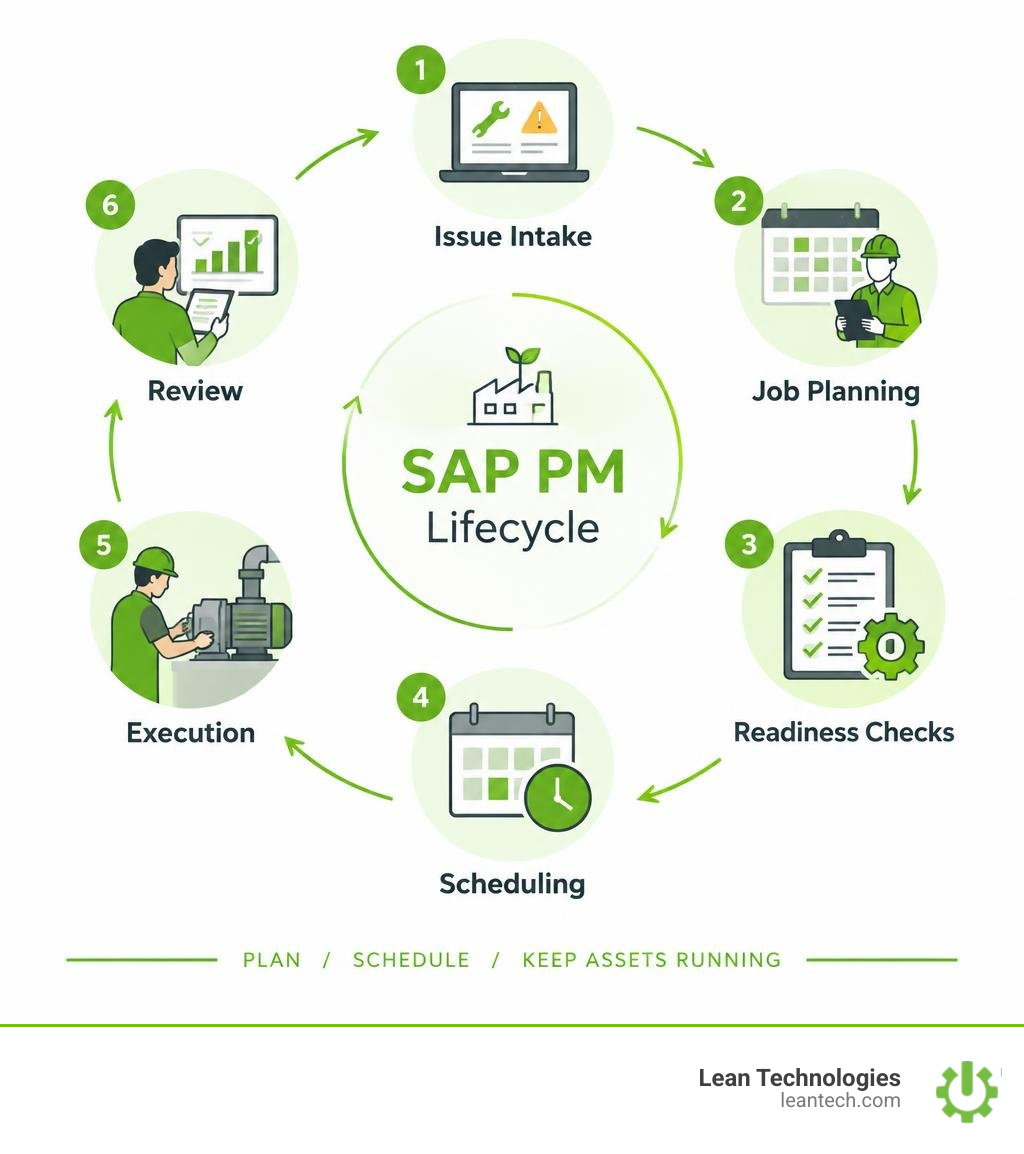
Unplanned downtime can quickly drain plant profitability. Research indicates that 98% of organizations experience financial losses exceeding $100,000 for a single hour of downtime, with over 80% seeing losses rise past $300,000. Managing the cost of downtime demands a structured enterprise asset management strategy where every task, tool, and technician aligns with plant operating goals.
Core Foundations of SAP Plant Maintenance Planning and Scheduling
Mastering maintenance workflows begins with understanding how enterprise software organizes physical assets and work management rules. As detailed in our plant maintenance guide, your system setup dictates how seamlessly work orders travel from creation to final financial settlement.
The structural foundation relies on key enterprise layers:
Maintenance Plant: The physical facility where machines and technical systems operate.
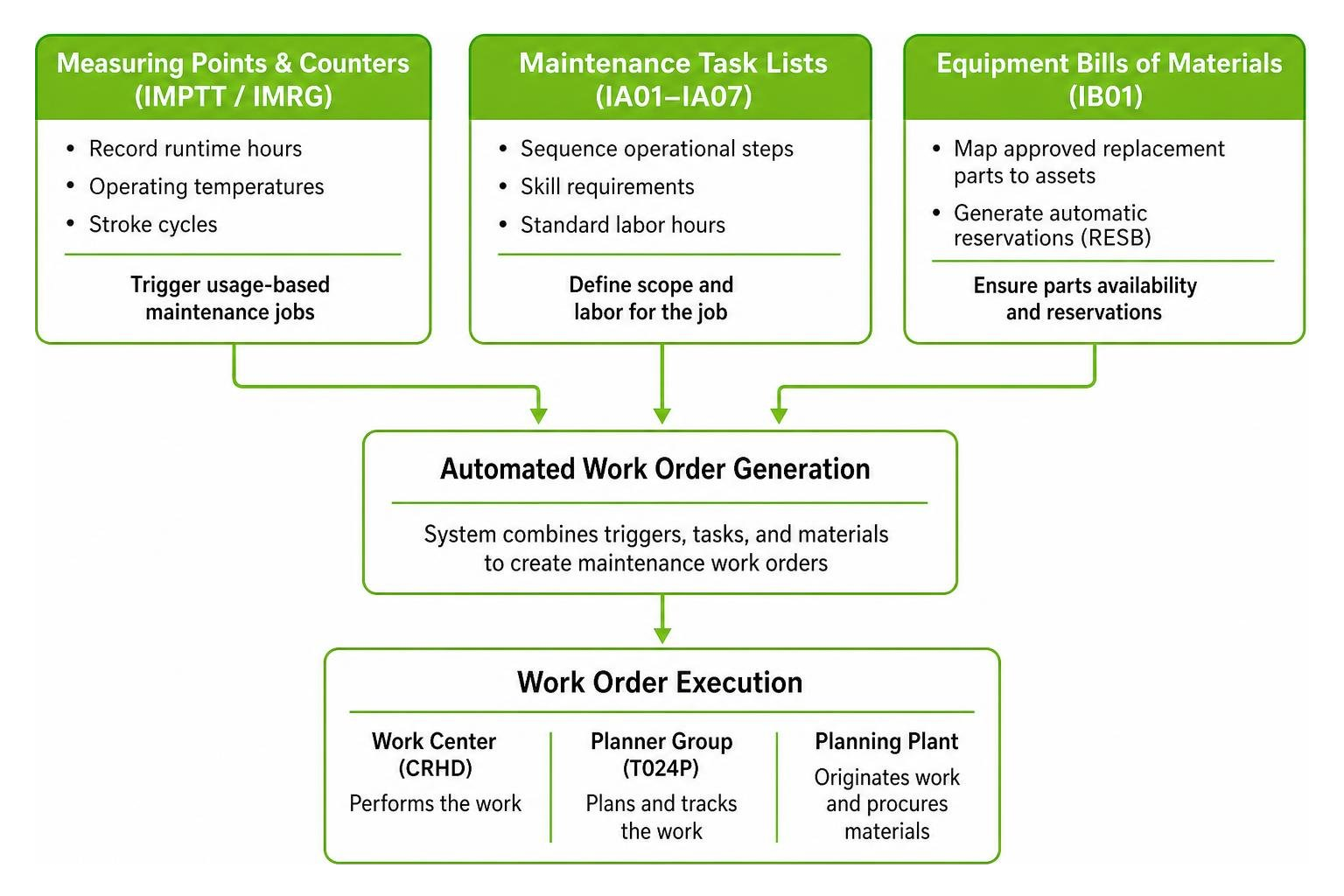
Planning Plant: The plant where maintenance requirements are planned, materials are procured, and work packages originate.
Work Center (CRHD table): The specific technician crew, trade discipline, or physical machine group executing the labor.
Planner Group (T024P table): The sub-department or team responsible for planning specific types of assets or maintenance disciplines.
Understanding the underlying SAP PM master data architecture ensures that labor, material costs, and operating downtime route accurately to the appropriate general ledger accounts.
Technical Objects: Structuring Functional Locations and Equipment
SAP Plant Maintenance divides physical production environments into two core asset objects: functional locations and equipment masters. Exploring SAP PM technical objects helps clarify how these entities interact.
A functional location (stored in the IFLOT table) defines a specific spatial, functional, or process position within the plant, such as LINE_01-EXTRUDER-DRIVE. It represents where a task occurs.
An equipment master (stored in the EQUI table) represents an individual, physical machine with a unique serial number, such as PUMP-SN4401.
The system uses the equipment installation segment table (EQUZ) to preserve complete equipment lifecycle histories. When an asset moves from Line 1 to Line 3 for rebuilding, its entire maintenance cost and breakdown history remains intact without disrupting functional location reporting.
Master Data Synergy: Task Lists, Maintenance BOMs, and Measuring Points
Preventive upkeep relies on clean, interlinked master data to eliminate manual work:
Maintenance Task Lists (
IA01–IA07): Sequence operational steps, skill requirements, and standard labor hours for recurring jobs.Equipment Bills of Materials (
IB01): Map approved replacement parts directly to assets, generating automatic reservations (RESB) when maintenance orders generate.Measuring Points and Counters (
IMPTT/IMRG): Record runtime hours, operating temperatures, or stroke cycles to trigger usage-based maintenance jobs automatically.
The Strategic Role and Daily Responsibilities of the Maintenance Planner
Maintenance planners serve as the operational bridge between production requirements and technical reliability. A planner does not spend the day firefighting immediate breakdowns; their job is to look days and weeks ahead.
Key planner responsibilities include:
Backlog Grooming: Reviewing newly submitted work requests and filtering out duplicates.
Work Scope Preparation: Defining tasks, determining required craft disciplines, and estimating labor hours.
Resource & Parts Coordination: Verifying spare parts availability in inventory and ordering non-stock items.
Operations Alignment: Coordinating with plant leaders on production scheduling optimization to lock in maintenance windows.
Safety Integration: Establishing Work Clearance Management (WCM) protocols and generating required safety permits before releasing orders.
The 5 Types of Maintenance Plans in SAP PM
To maintain asset health systematically, planners configure automated routines. Our planned preventative maintenance guide outlines the importance of matching the correct maintenance strategy to each machine's operating profile.
Maintenance Plan Type | Primary Trigger | Best Shop Floor Use Case | Key Transactions |
|---|---|---|---|
Single Cycle Plan | Fixed time or counter | Standalone assets with straightforward recurring needs (e.g., annual safety inspection) |
|
Strategy-Based Plan | Tiered time or usage cycles | Complex machines requiring tiered task sequences (e.g., 250-hour lube, 1000-hour overhaul) |
|
Multiple Counter Plan | Mixed logical triggers ( | Mobile equipment or machines where wear depends on runtime hours and calendar time |
|
Service Procurement Plan | Scheduled service milestones | Managed maintenance tasks executed by external specialty contractors |
|
Outline Agreement Plan | Service contracts / Call-offs | Long-term service agreements integrated with Sales & Distribution (SD) or Customer Service (CS) |
|
Single Cycle Plans and Strategy-Based Maintenance Plans
A Single Cycle Plan (IP41) is the most straightforward maintenance trigger in SAP PM. It links one maintenance cycle (such as 30 days or 500 operating hours) to a single task list. When the cycle expires or counter threshold is reached, SAP generates a maintenance order or notification.
Strategy-Based Maintenance Plans (IP42) introduce tiered maintenance packages linked to a central maintenance strategy (IP11). Consider an industrial air compressor:
Package 1 (Monthly): Inspect belts and check oil levels.
Package 2 (Quarterly): Replace air filters and grease bearings.
Package 3 (Annual): Full valve rebuild and electrical diagnostic.
SAP automatically schedules these packages in sequence, ensuring that smaller monthly checks suppress or merge into comprehensive annual overhauls without redundant work orders.
Multiple Counter Plans for Complex Usage Parameters
Certain assets do not follow simple calendar intervals. A transport vehicle or critical turbine experiences wear based on multiple independent variables.
A Multiple Counter Plan (IP43) links several counters using logical operators:
OR Operation: A service order triggers after 10,000 miles or 12 months, whichever comes first.
AND Operation: A component replacement triggers only when an asset reaches 2,000 operating hours and 50,000 total production strokes.
Service Procurement and Outline Agreement Maintenance Plans
When maintenance work involves external contractors, specialized plan types automate purchasing workflows:
Subcontracting Operations: Planners assign external control keys (such as
PM02) to work order operations, prompting SAP to generate purchase requisitions (BANFN) automatically.Outline Agreements: Maintenance plans reference framework contracts, automatically calling off service line items and routing actual invoice settlements through internal cost accounting structures upon technician sign-off.
End-to-End Workflow: From Notification to Order Settlement
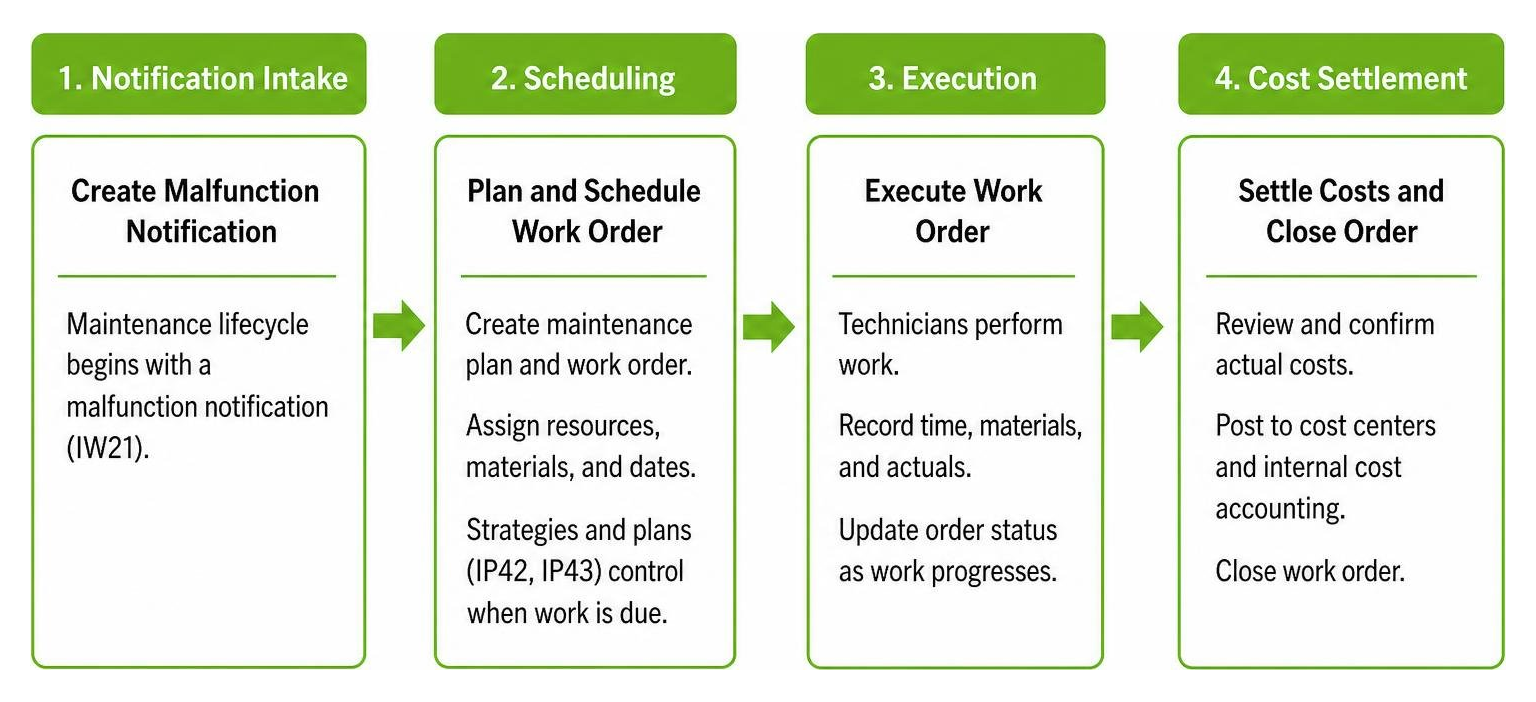
Transforming a breakdown or planned routine into completed work requires a disciplined process flow. Following a standardized SAP PM workflow prevents lost work requests and maintains strict financial tracking.
When an emergency occurs, teams follow our planned corrective maintenance guide to stabilize equipment while keeping order statuses accurate.
Notification Intake and Maintenance Work Order Creation
The maintenance lifecycle begins with a malfunction notification (IW21):
Notification Types:
M1(Equipment Breakdown),M2(Malfunction Observation), andM3(General Maintenance Request).Failure Mode Coding: Operators and technicians log damage, cause, and object part codes, building the foundational data required for root cause analysis.
Once validated, the planner converts the notification into a formal maintenance order (IW31) within our maintenance work order system. The order outlines specific labor operations, tools, and bills of materials. Implementing digital work order tracking ensures that open tasks do not get lost in shift handoffs.
Critical Scheduling Parameters: Call Horizon, Lead Time, and Shift Factors
Preventive maintenance schedules rely on accurate mathematical parameters configured during plan creation:
Call Horizon: Expressed as a percentage (e.g., 80%), this parameter determines when SAP generates a maintenance order relative to its target execution date. On a 100-day cycle with an 80% call horizon, SAP creates the order on day 80, giving planners 20 days of advance notice to stage parts and line up labor.
Scheduling Lead Time: Defines the advance window required to stage long-lead components before order start.
Shift Factor: Determines how early or late task completions adjust the next scheduled date. If a 30-day task completes 5 days late, a 100% shift factor moves the next due date out by 5 days, whereas a 0% shift factor keeps the original calendar cadence fixed.
Deadline Monitoring (
IP30): A scheduled background job that scans all active maintenance plans and calls due orders automatically.
Executing SAP Plant Maintenance Planning and Scheduling in S/4HANA Fiori
Modern S/4HANA systems introduce a structured Phase Model for managing orders. The process of preparing and scheduling maintenance in S/4HANA divides the order lifecycle into distinct stages:
In-Preparation: The order is planned, but materials and labor are not yet locked in.
Readiness Verification: Planners run automated parts availability checks (ATP check) and confirm internal crew capacity.
Dispatch & Execution: Work is released. Technicians consume materials via goods issue movement type 261.
Technical Completion & Settlement: The order is marked technically complete (TECO), and transaction
KO88settles actual labor and material costs to the designated cost center or asset account.
Managing Backlogs and Dispatching with SAP Fiori and Resource Scheduling
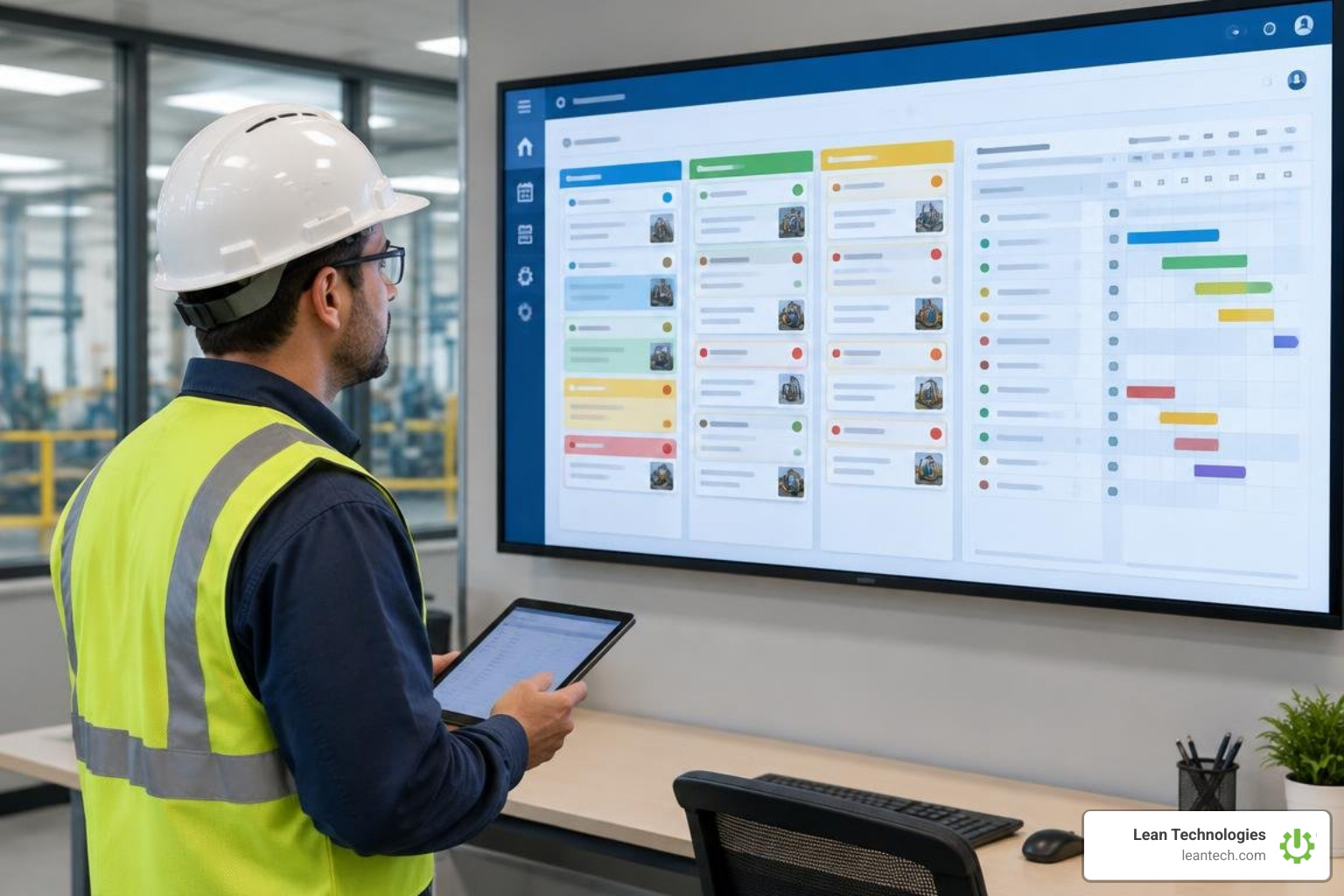
Legacy transactions often left planners jumping between multiple screens. SAP Fiori streamlines sap plant maintenance planning and scheduling by providing dedicated apps that organize work visually.
Key Fiori tools include:
Maintenance Backlog Overview (F5105): Displays cards showing non-dispatched orders, missing parts, and rework trends across work centers.
Manage Maintenance Backlog (F4073): Allows planners to filter open orders using colored readiness icons that highlight missing stock or expired permits.
Structuring Work with Operational and Event-Based Planning Buckets
The Manage Maintenance Planning Buckets app (F3888) groups maintenance orders into logical time frames based on specific scope attributes (such as plant, work center, or planner group):
Operational Buckets: Recurrent containers generated automatically for regular maintenance intervals (daily, weekly, or monthly cycles).
Event-Based Buckets: Once-off containers configured for major events, such as annual plant shutdowns, major overhauls, or line changeovers.
Planners can assign up to 30 scope attributes per bucket without degrading system performance, providing clear visibility over scheduled backlogs.
Optimizing SAP Plant Maintenance Planning and Scheduling Without and With Resource Scheduling (RSH)
How work moves from backlog to execution depends on your licensing and system configuration:
Scheduling Without Resource Scheduling (Standard): Planners dispatch work orders at the entire order level. All operations within the order share the same start and end schedule dates.
Scheduling With Resource Scheduling (RSH Add-on): Planners use graphical Gantt charts to dispatch individual operations and sub-operations. This allows dynamic workload leveling across work centers, balancing technician capacity down to specific hours.
Modernizing Maintenance: Mobile Execution, AI, and Future Plant Trends

Traditional maintenance setups often struggle with slow data entry: work gets printed on paper, technicians jot down notes with greasy pens, and completion hours sit on a desk for days before someone types them into SAP. Modernizing these workflows bridges the gap between field execution and system planning.
Adopting a digital work order system speeds up reporting, eliminates lost paperwork, and gives management real-time visibility into machine health.
Transitioning from Reactive Breakdowns to Predictive Maintenance
Relying entirely on reactive repairs leads to costly downtime and disrupted schedules. Shifting toward structured predictive maintenance planning helps teams identify equipment issues early.
The global predictive maintenance market is expanding rapidly—projected to grow from $10.6 billion in 2024 to $47.8 billion by 2029, reflecting a compound annual growth rate of 35.1%. Using condition readings and historical trends helps plants optimize asset lifecycles, align with ISO 55000 standards, and track core reliability metrics:
Mean Time Between Failures (MTBF): Measures average operational runtime between unexpected breakdowns.
Mean Time to Repair (MTTR): Tracks the average time required to troubleshoot, repair, and recommission an asset.
Empowering Floor Teams with Mobile Maintenance and AI Automation
Equipping technicians with mobile devices transforms shop floor execution. Instead of waiting to access a terminal, operators can confirm hours (IW41), log parts consumption, and upload inspection photos directly at the machine.
Meanwhile, emerging artificial intelligence tools are helping streamline planning tasks. AI assistants can scan notification descriptions, recommend relevant failure codes, and propose standard labor hours. This supports new planners and reduces administrative overhead.
In summary
Executing disciplined sap plant maintenance planning and scheduling transforms erratic shop floor operations into predictable, high-performing manufacturing environments. When master data is structured, maintenance plans run automatically, and backlog scheduling remains visible, plant teams reduce equipment failures and keep operations running safely.
While SAP provides the comprehensive enterprise foundation for asset records, maintenance planning, and financial accounting, frontline success ultimately depends on daily shop floor engagement. Bridging the gap between high-level ERP schedules and daily team execution is essential for lasting continuous improvement.
For small to midsize manufacturers seeking to streamline shopfloor coordination, Lean Technologies provides Thrive—a flexible digital toolbox built by manufacturing experts. Thrive digitizes lean work processes, enabling operators and supervisors to log issues, track actions, and drive continuous improvement directly from tablets, mobile devices, or workstations.
Thrive is not an ERP or MES system and does not replace your core software. Instead, it complements your environment by organizing and driving action from shop floor data entered by your team or imported from existing systems. By capturing operator observations at the source rather than relying on paper workarounds, teams gain the clear visibility needed to strengthen overall shop floor maintenance management.
Frequently Asked Questions about SAP Plant Maintenance Planning and Scheduling
What is the primary difference between a functional location and equipment in SAP PM?
A functional location (IFLOT) defines where a maintenance activity occurs within a plant hierarchy (such as LINE_01-EXTRUDER), whereas an equipment master (EQUI) represents an individual, physical machine with a serial number (such as MOTOR-SN99102). Equipment can be installed, dismantled, and moved between different functional locations while maintaining its complete maintenance history via equipment time segments (EQUZ).
How does call horizon percentage impact maintenance order generation?
The call horizon determines when SAP generates a maintenance call object relative to its cycle duration. For example, on a 100-day preventive maintenance cycle with an 80% call horizon, SAP triggers the maintenance order at day 80. This gives planners a 20-day lead time to stage materials, verify tool availability, and schedule technician labor before the target start date.
What is required to enable operation-level dispatching in SAP S/4HANA?
Standard SAP S/4HANA schedules maintenance orders at the header level. To split, level, and dispatch individual operations or sub-operations to specific work centers and time slots, plants require the SAP Resource Scheduling (RSH) add-on license, which enables the graphical Maintenance Scheduling Board and Work Center Utilization Fiori apps.





